
Introduction:
Here I am creating a simple web service and using it in a windows application. Using a web service in a window form application is similar to using a WCF service. At first we create a web service and write the following code.
using
System;
using
System.Collections.Generic;
using
System.Linq;
using System.Web;
using
System.Web.Services;
namespace
mywebservice1
{
///
<summary>
/// Summary
description for Service1
///
</summary>
[WebService(Namespace =
"http://tempuri.org/")]
[WebServiceBinding(ConformsTo =
WsiProfiles.BasicProfile1_1)]
[System.ComponentModel.ToolboxItem(false)]
// To allow this Web Service to be called from
script, using ASP.NET AJAX, uncomment the following line.
//
[System.Web.Script.Services.ScriptService]
public class
Service1 : System.Web.Services.WebService
{
[WebMethod]
public string
HelloMessage()
{
return
"Hello, Web Service";
}
}
}
Run this service.
Output:
Create a windows application and follow the given steps.
- Right click on Solution Explorer. Look at the below figure.

- Click Add Service Reference. A new window will open.

- Copy the URL of your running web service application and paste it in address (given in above figure) and click the Go button. After doing this, it will show service description. Look at the below figure.

- Click the ok button.
- Create a button on the design page and write the following code.
using
System;
using
System.Collections.Generic;
using
System.ComponentModel;
using
System.Data;
using
System.Drawing;
using
System.Linq;
using
System.Text;
using
System.Windows.Forms;
namespace
consumingws
{
public partial
class Form1 :
Form
{
public Form1()
{
InitializeComponent();
}
private void
btnok_Click(object sender,
EventArgs e)
{
ServiceReference1.Service1SoapClient
ob = new ServiceReference1.Service1SoapClient();
MessageBox.Show(ob.HelloMessage());
}
}
}
Run the application.
output:
Click the ok button.
Output: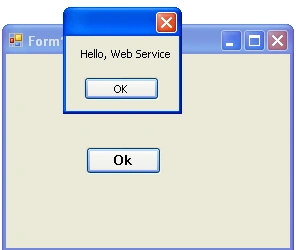
Join the conversation! Your thoughts help the community grow.