
How to consume ASP.NET Core Web API using HttpClient.
SolutionWe’ll create a library to wrap the functionality of HttpClient. I’ll use builder pattern for this purpose. Add a class with methods for storing the parts of HttpClient.
- public class HttpRequestBuilder
- {
- private HttpMethod method = null;
- private string requestUri = "";
- private HttpContent content = null;
- private string bearerToken = "";
- private string acceptHeader = "application/json";
- private TimeSpan timeout = new TimeSpan(0, 0, 15);
- public HttpRequestBuilder()
- {
- }
- public HttpRequestBuilder AddMethod(HttpMethod method)
- {
- this.method = method;
- return this;
- }
- public HttpRequestBuilder AddRequestUri(string requestUri)
- {
- this.requestUri = requestUri;
- return this;
- }
- public HttpRequestBuilder AddContent(HttpContent content)
- {
- this.content = content;
- return this;
- }
- public HttpRequestBuilder AddBearerToken(string bearerToken)
- {
- this.bearerToken = bearerToken;
- return this;
- }
- public HttpRequestBuilder AddAcceptHeader(string acceptHeader)
- {
- this.acceptHeader = acceptHeader;
- return this;
- }
- public HttpRequestBuilder AddTimeout(TimeSpan timeout)
- {
- this.timeout = timeout;
- return this;
- }
- rest of code
Add a method to send a request using HttpClient and get the response.
- public async Task<HttpResponseMessage> SendAsync()
- {
- // Check required arguments
- EnsureArguments();
- // Setup request
- var request = new HttpRequestMessage
- {
- Method = this.method,
- RequestUri = new Uri(this.requestUri)
- };
- if (this.content != null)
- request.Content = this.content;
- if (!string.IsNullOrEmpty(this.bearerToken))
- request.Headers.Authorization =
- new AuthenticationHeaderValue("Bearer", this.bearerToken);
- request.Headers.Accept.Clear();
- if (!string.IsNullOrEmpty(this.acceptHeader))
- request.Headers.Accept.Add(
- new MediaTypeWithQualityHeaderValue(this.acceptHeader));
- // Setup client
- var client = new System.Net.Http.HttpClient();
- client.Timeout = this.timeout;
- return await client.SendAsync(request);
- }
We’ll also add a factory class to build requests for GET, POST, PUT, PATCH, and DELETE.
- public static class HttpRequestFactory
- {
- public static async Task<HttpResponseMessage> Get(string requestUri)
- {
- var builder = new HttpRequestBuilder()
- .AddMethod(HttpMethod.Get)
- .AddRequestUri(requestUri);
- return await builder.SendAsync();
- }
- public static async Task<HttpResponseMessage> Post(
- string requestUri, object value)
- {
- var builder = new HttpRequestBuilder()
- .AddMethod(HttpMethod.Post)
- .AddRequestUri(requestUri)
- .AddContent(new JsonContent(value)) ;
- return await builder.SendAsync();
- }
- public static async Task<HttpResponseMessage> Put(
- string requestUri, object value)
- {
- var builder = new HttpRequestBuilder()
- .AddMethod(HttpMethod.Put)
- .AddRequestUri(requestUri)
- .AddContent(new JsonContent(value));
- return await builder.SendAsync();
- }
- public static async Task<HttpResponseMessage> Patch(
- string requestUri, object value)
- {
- var builder = new HttpRequestBuilder()
- .AddMethod(new HttpMethod("PATCH"))
- .AddRequestUri(requestUri)
- .AddContent(new PatchContent(value));
- return await builder.SendAsync();
- }
- public static async Task<HttpResponseMessage> Delete(string requestUri)
- {
- var builder = new HttpRequestBuilder()
- .AddMethod(HttpMethod.Delete)
- .AddRequestUri(requestUri);
- return await builder.SendAsync();
- }
- }
JsonContent, PatchContent, and FileContent are custom classes to simplify the sending of data.
- public class JsonContent : StringContent
- {
- public JsonContent(object value)
- : base (JsonConvert.SerializeObject(value), Encoding.UTF8, "application/json")
- {
- }
- public JsonContent(object value, string mediaType)
- : base(JsonConvert.SerializeObject(value), Encoding.UTF8, mediaType)
- {
- }
- }
- public class PatchContent : StringContent
- {
- public PatchContent(object value)
- : base (JsonConvert.SerializeObject(value), Encoding.UTF8,
- "application/json-patch+json")
- {
- }
- }
- public class FileContent : MultipartFormDataContent
- {
- public FileContent(string filePath, string apiParamName)
- {
- var filestream = File.Open(filePath, FileMode.Open);
- var filename = Path.GetFileName(filePath);
- Add(new StreamContent(filestream), apiParamName, filename);
- }
- }
Finally, a few extension methods to help working with HttpResponseMessage class.
- public static class HttpResponseExtensions
- {
- public static T ContentAsType<T>(this HttpResponseMessage response)
- {
- var data = response.Content.ReadAsStringAsync().Result;
- return string.IsNullOrEmpty(data) ?
- default(T) :
- JsonConvert.DeserializeObject<T>(data);
- }
- public static string ContentAsJson(this HttpResponseMessage response)
- {
- var data = response.Content.ReadAsStringAsync().Result;
- return JsonConvert.SerializeObject(data);
- }
- public static string ContentAsString(this HttpResponseMessage response)
- {
- return response.Content.ReadAsStringAsync().Result;
- }
- }
We can use the code above like -
- private static async Task GetList()
- {
- var requestUri = $"{baseUri}";
- var response = await HttpRequestFactory.Get(requestUri);
- Console.WriteLine($"Status: {response.StatusCode}");
- var outputModel = response.ContentAsType<List<MovieOutputModel>>();
- outputModel.ForEach(item =>
- Console.WriteLine("{0} - {1}", item.Id, item.Title));
- }
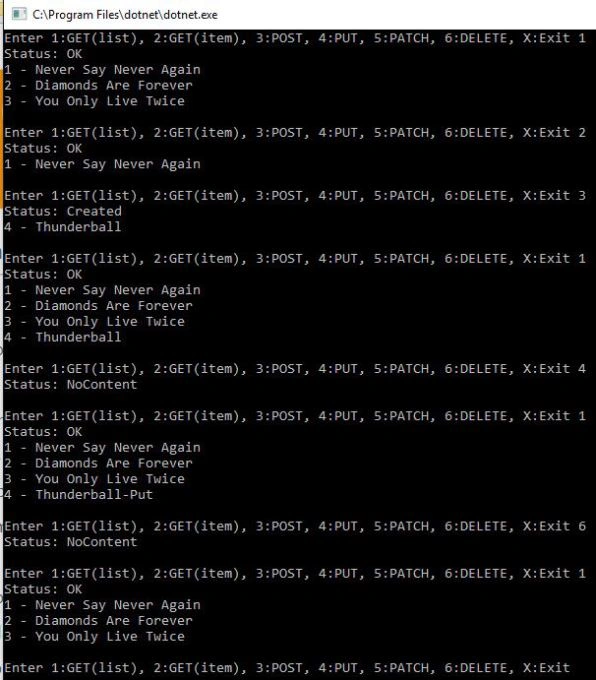
Here is how the sample client looks like.
Note
The sample code has examples of another type of requests too. It uses CRUD API created in a previous post. Download its project and run the API before running this console sample.
Nishanth KumarPosted Aug 13, 2019, 11:58 PM
Excellent, can you please share the post example also and some one help on how to read my urls from applicationsettings.json file
Heino PlaatjiesPosted May 23, 2018, 4:39 AM
Hi, can you share an example to Post and get to api using HttpClient using Windows Forms Applications
Arvind SinghPosted Dec 27, 2017, 12:02 AM
Good one.............