

Introduction
Nowadays, Web API is the main part of each solution we build. We see cloud apps are everywhere and they are a wonderful solution if compared with a normal Windows application and a local SQL Server database. Now, users can access their data anywhere they are, from any device. Web API is the main concept of the cloud applications so clients such as Windows, Android, iOS or web application are just consuming those APIs to access online resources, or creating a new one.
In this article, I'm going to show you how to consume any web API and make GET, POST requests very easily from within your C# client applications (UWP, WPF, WinForms, Xamarin, Unity.....etc.) using AKSoftware.Webapi library from NuGet Packages instead of using an instance of HttpClient class.
I will make a simple .NET Core console application to consume a Products API that I have built already to get a list of products via a GET request and add a new product via a POST request.
Here is the GET request's result that the API returns.

So, let's get started and see how to access that product and add a new one using AKSoftware.WebApi:
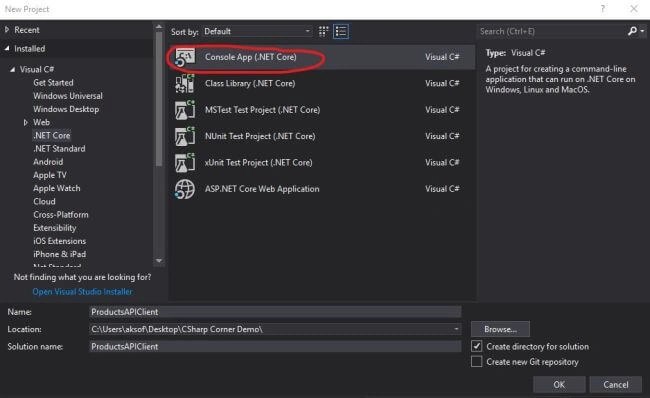
First of all, create a new console application as follows.
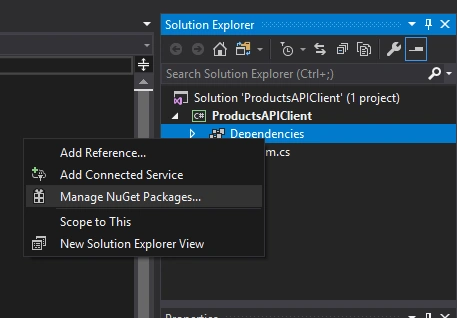
Then, after creating the project, go to "Manage NuGet Packages" to install the required library.
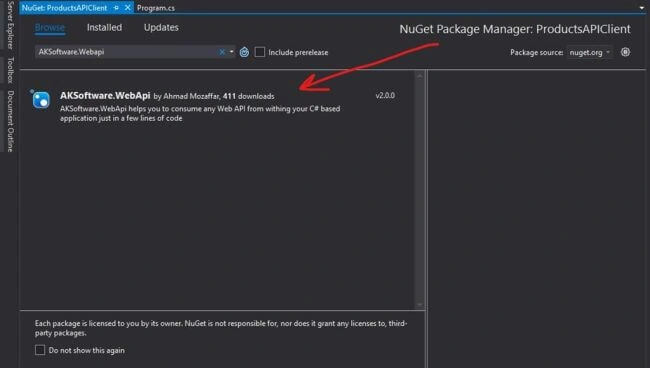
Now, things are ready and it's the time of coding. Using AKSoftware.WebApi will reduce a huge amount of code in making requests and getting the responses from and to the API as well as serializing and deserializing objects from C# objects into JSON objects and vice versa.
In the beginning, we should create the models we need. In our example, we need a Product class that has the same properties that the JSON result has in addition to another class. We will call it ProductsResponse because the result of the GET request that we have doesn't return a collection of Products directly. It returns an object that has two properties - one called Count that holds the number of products that the GET returned and the second property is called Products which is an array of Products. So we will create these two classes as below.
- public class Product
- {
- public int ID { get; set; }
- public string Name { get; set; }
- public string Description { get; set; }
- public decimal Price { get; set; }
- public DateTime ProductionDate { get; set; }
- }
- public class ProductResponse
- {
- public int Count { get; set; }
- public Product[] Products { get; set; }
- }
Now, we are ready to access the results. So, go to the program.cs file and add the following namespaces.
- using System.Threading.Tasks;
- using AKSoftware.WebApi.Client;
- // Create a function that prints all the products
- async static Task getProductsAsync()
- {
- // Create a new instance of from the service client that will get the products from the API
- ServiceClient client = new ServiceClient();
- // Send a get request to the API using GetAsync<> method and specify the type that you will receive
- var response = await client.GetAsync<ProductResponse>("https://localhost:44388/api/products");
- // Iterate over the products in the response and print each ID Name and Price
- foreach (var item in response.Products)
- {
- Console.WriteLine($"-{item.ID} | {item.Name} | {item.Price}");
- }
- }
Now, we will create a post method to make a POST request to our API in order to add a new product.
- // Create a method to make a post request to add a new product
- async static Task postProductAsync()
- {
- // Create a new instance of from the service client that will get the products from the API
- ServiceClient client = new ServiceClient();
- // Create a new instance from the product class
- Product product = new Product
- {
- ID = 100097,
- Name = "New Product",
- Description = "The Description of the product",
- Price = 85.88m,
- ProductionDate = new DateTime(2019, 3, 19)
- };
- // Send the a POST request to the API with our new product
- var addedProduct = await client.PostAsync<Product>("https://localhost:44388/api/products", product);
- // Check if the producted is added
- if (addedProduct != null)
- Console.WriteLine("Product has been added");
- else
- Console.WriteLine("Error inserting the product");
- }
After creating the get and post methods, we still need to call those methods from the main method.
- static void Main(string[] args)
- {
- // Call the get method
- getProductsAsync();
- // call the post method
- postProductAsync();
- // Just in order to finishing the application before we press any key
- Console.ReadKey();
- }
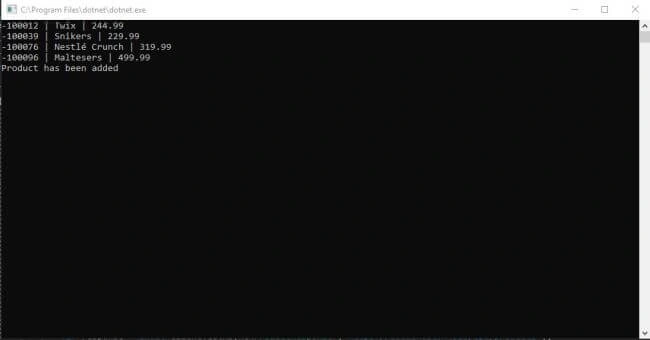
So, we have got all the products just in a simple function call and we can manipulate them the way we want like calculating the total price or any other processing depending on our project requirements, as well as we have added a new product the same way.
Conclusion
AKSoftware.WebApi is very easy to use and it reduces a great number of code lines in order to achieve the communication between your C# client and the Web API that you are dealing with, in addition to what we have mentioned above you can use the same library to make PUT and DELETE request and even calling a protected resources in the API via access token using GetProtected<>, PostProtected<>, PutProtected<> and DeleteProtected<>.
Hope you found it a useful article and got the benefits you want, thanks for reading.
Cicero FoscariniPosted May 20, 2022, 4:30 AM
Hi! Thank you for your article. I cannot find the code for the Api you are consuming. Do you have it? It makes the life easier when we are learning and wanting to test. Thank you.
احمد نخلةPosted May 14, 2019, 2:57 AM
???????? ?? ???? ????? ????? ???? ?????
Mangesh GPosted May 6, 2019, 1:14 AM
What significance this will provide over traditional httpclient we have right now....