

Introduction
A constructor is a unique class method that is automatically called upon the creation of a class instance. A constructor, like a method, has a set of instructions that are carried out when an object is created. It's employed to set initial values for data members belonging to the same class.
Crucial Reminders Regarding Constructors
- A class's constructor must share the same name as the class in which it is contained.
- An abstract, final, and synchronized constructor is not possible.
- There can only be one static constructor created per class.
- Not even void is a return type for a constructor.
- It is not possible for a static constructor to be parameterized.
- Constructors in a class can be of any number.
- To control a constructor's access, or which other class is able to invoke it, access modifiers can be used in the constructor declaration.
Types of Constructors
- Default Constructor
- Parameterized Constructor
- Copy Constructor
- Private Constructor
- Static Constructor
- Primary Constructor
Default Constructor
A default constructor is one that takes no parameters. Every instance of the class that has a default constructor has its initial values set to the same ones. Within a class, the default constructor initializes all object and string fields to null and all numeric values to zero.
public class JaiminClass
{
    public JaiminClass()
    {
        Console.WriteLine("Default constructor called.");
    }
}
var jaiminClass = new JaiminClass();

Parameterized Constructor
A parameterized constructor is one that takes in at least one parameter. Every instance of the class may have a separate initialization value set by it.
public class JaiminClass
{
    public string Name { get; set; }
    public int Rank { get; set; }

    public JaiminClass(string name, int rank)
    {
        Console.WriteLine("Parameterized constructor called.");
        Name = name;
        Rank = rank;
    }
}

var jaiminClass = new JaiminClass("Jaimin Shethiya", 203);
Console.WriteLine("{0} - {1}", nameof(jaiminClass.Name), jaiminClass.Name);
Console.WriteLine("{0} - {1}", nameof(jaiminClass.Rank), jaiminClass.Rank);

Copy Constructor
By copying variables from one object to another, this constructor builds an object. Initializing a new instance to the values of an existing instance is its primary purpose.
public class JaiminClass
{
    private  string Name { get; set; }
    private int Rank { get; set; }

    public JaiminClass(JaiminClass jaiminClass)
    {
        Console.WriteLine("Copy constructor called.");
        Name = jaiminClass.Name;
        Rank = jaiminClass.Rank;
    }

    public JaiminClass(string name, int rank)
    {
        Console.WriteLine("Parameterized constructor called.");
        Console.WriteLine();
        Name = name;
        Rank = rank;
    }

    public string Details
    {
        get
        {
            var sb = new StringBuilder();
            sb.AppendFormat("{0} - {1}", nameof(Name), Name);
            sb.AppendLine();
            sb.AppendFormat("{0} - {1}", nameof(Rank), Rank);

            return sb.ToString();
        }
    }
}

// create the new object.
var jaiminClass = new JaiminClass("Jaimin Shethiya", 203);

// here is jaimin class information copied into the obj jaimin class.
var objJaiminClass = new JaiminClass(jaiminClass);
Console.WriteLine(objJaiminClass.Details);

Private Constructor
A constructor is referred to as a private constructor if it is created using a private specifier. Both the creation of an instance of this class and the ability for other classes to inherit from it are prohibited.
Things To Bear in Mind.
- It is the application of the pattern for singleton classes.
- When there are just static members, use the private constructor.
- It is impossible to create instances of the class when the private constructor is used.
public class JaiminClass
{
    public static  int Rank { get; set; }

    public static int Counter()
    {
        Console.WriteLine("Counter method called.");
        Console.WriteLine("{0} - {1}", nameof(Rank), Rank);
        return ++Rank;
    }

    private JaiminClass()
    {
        Console.WriteLine("Private constructor called.");
    }
}

JaiminClass.Rank = 100;
JaiminClass.Counter();

Console.WriteLine();
Console.WriteLine("{0} - {1}", nameof(JaiminClass.Rank), JaiminClass.Rank);

// Will throw the error. We cann't create object of this class
// JaiminClass jaiminClass = new JaiminClass();
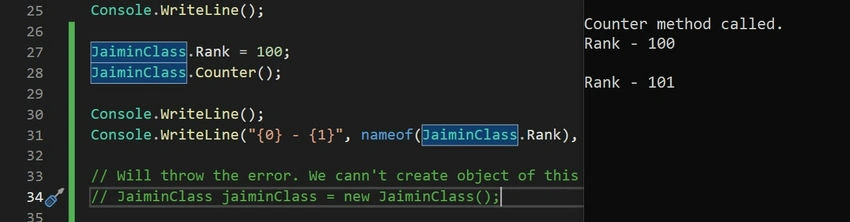
The C# language has a unique instance constructor called Private Constructor. Private constructors are essentially used in classes with just static elements. A private keyword is always used to declare the private constructor.
Static Constructor
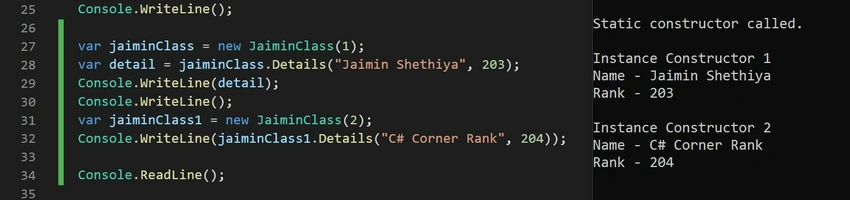
The static constructor is called when the class creates its initial reference to a static member, and it only has to be called once. Static constructors are intended to be used just once to initialize static fields or class data.
Things to Bear in Mind.
- Direct calls are not possible.
- The user is powerless while it is running.
- It doesn't require any arguments or access modifiers.
- To initialize the class prior to the creation of the first instance, it is called automatically.
public class JaiminClass
{
    public string Name { get; set; }
    public int Rank { get; set; }

    static JaiminClass()
    {
        Console.WriteLine("Static constructor called.");
        Console.WriteLine();
    }

    public JaiminClass(int id)
    {
        Console.WriteLine("Instance Constructor {0}", id);
    }

    public string Details(string name, int rank)
    {
        Name = name;
        Rank = rank;

        var sb = new StringBuilder();
        sb.AppendFormat("{0} - {1}", nameof(Name), Name);
        sb.AppendLine();
        sb.AppendFormat("{0} - {1}", nameof(Rank), Rank);

        return sb.ToString();
    }
}

var jaiminClass = new JaiminClass(1);
var detail = jaiminClass.Details("Jaimin Shethiya", 203);
Console.WriteLine(detail);
Console.WriteLine();

var jaiminClass1 = new JaiminClass(2);
Console.WriteLine(jaiminClass1.Details("C# Corner Rank", 204));
Primary Constructor
In C#, declaring and initializing properties directly within the class declaration is possible with a Primary Constructor. It provides a more declarative and clear syntax, making the process of defining and assigning values to attributes easier.
Advantages of Primary Constructors
- Succinctness: Primary constructors reduce boilerplate code and improve readability by offering a concise syntax.
- Scoping: Primary constructors allow flexibility in their usage since, in contrast to traditional constructors, their parameters are in scope for the duration of the class or structure.
- Default Values: Developers will find object creation easier and more easily with default parameter values.
public class JaiminClass(string name, int rank)
{
    public string Name { get; } = name;

    public int Rank { get; } = rank;


    public string Details()
    {
        var sb = new StringBuilder();
        sb.AppendFormat("{0} - {1}", nameof(Name), Name);
        sb.AppendLine();
        sb.AppendFormat("{0} - {1}", nameof(Rank), Rank);

        return sb.ToString();

    }
}

var jaiminClass = new JaiminClass("Jaimin Shethiya", 203);
var detail = jaiminClass.Details();
Console.WriteLine(detail);

This feature is not available below the version of the C# 12.
We learned the new technique and evolved together.
Happy coding!
Join the conversation! Your thoughts help the community grow.