

Introduction

- Arduino IDE
- Python 2.7.8 or Python 2.7.11 or 3.2
Install the python Software
Download the link given below the line or copy the link.
Click the software and a new Window will open.
 In this Window, click the run option to install the software.
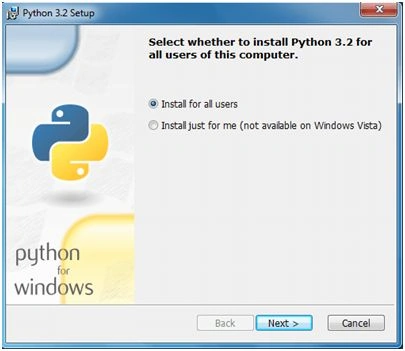
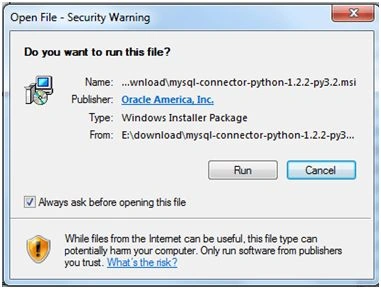 Click the next button to install for the user.
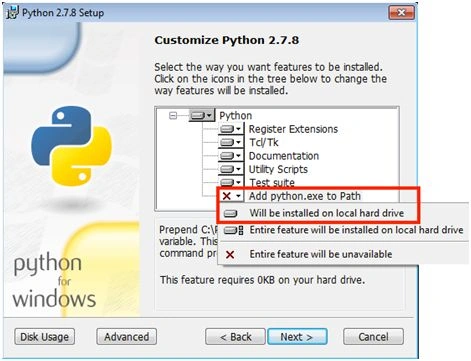
 Click the next button.
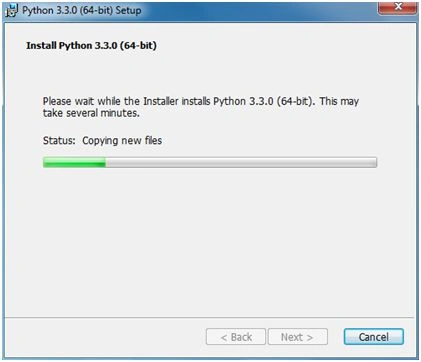
 In this Window, the files are copying and when the files are copied, click next.
 Click finish. Python has been installed successfully.
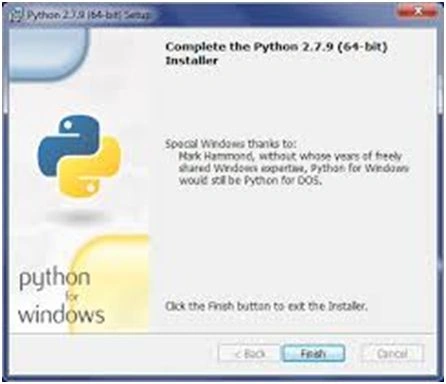 Now, we have seen how Python is installed. In the next article, I will explain about connecting Arduino and Python in a single coding and the output will be displayed in Python's new world.
Let us start by combining Arduino with Python,
Now, we have seen how Python is installed. In the next article, I will explain about connecting Arduino and Python in a single coding and the output will be displayed in Python's new world.
Let us start by combining Arduino with Python,
- First, we can start with a simple program by blinking the LED in the serial monitor.
- Tak the LED and connect with the pin. The positive pin is to be connected with 13 and the negative pin is to be connected to Gnd.
Program in Arduino IDE
- int led = 13;
- void setup()
- {
- Serial.begin(9600);
- pinMode(led, OUTPUT);
- }
- void loop()
- {
- char leitura = Serial.read();
- if (leitura == '1')
- {
- digitalWrite(led, HIGH);
- }
- else if (leitura == '0')
- {
- digitalWrite(led, LOW);
- }
- }
- Upload the program.
- This is to be done on the Arduino side and then we have to write the Python program in the IDLE (Python GUI).
Python Program
- import serial
- porta= "COM6"
- velocidade = 9600
- conexao = serial.Serial(porta, velocidade);
- opcao = 0;
- while opcao != "2":
- opcao = raw_input("Digita1 para Ligar\nDigital 0 para Desligar\nDigital 2 para sair!\n")
- if opcao != "2":
- conexao.write(opcao);
- conexao.close()
- In Python, the output will be displayed in the new world. It is very simple to connect Arduino and Python. In Python, we have to give the port of the Arduino board in Python. Afterward, it will be connected.
- In the run Window, type 1 and the LED will switch ON.
- In the run Window type 0 and the LED will switch OFF.
Hussain PatelPosted Nov 2, 2016, 10:38 AM
Nice article
Debendra DashPosted Jul 9, 2016, 3:44 PM
Nice one....
Shobana JPosted Jul 8, 2016, 4:07 AM
Keep sharing.Nice one
Sr KarthigaPosted Jul 5, 2016, 10:31 AM
Thank you kumaresh sir
Sr KarthigaPosted Jul 5, 2016, 10:31 AM
Thank you vignesh mani sir
Sr KarthigaPosted Jul 5, 2016, 10:30 AM
Thank you kalu
Sr KarthigaPosted Jul 5, 2016, 10:30 AM
Thank you santhakumar sir
Sr KarthigaPosted Jul 5, 2016, 10:30 AM
Thank you raja
Kumaresh RajalingamPosted Jul 5, 2016, 10:00 AM
Nice share Karthiga
Vignesh ManiPosted Jun 30, 2016, 5:48 PM
Good one
kalu singh raoPosted Jun 30, 2016, 1:34 AM
Nice...
Santhakumar MunuswamyPosted Jun 30, 2016, 12:40 AM
Thank you for nice article
RajaPosted Jun 30, 2016, 12:26 AM
Nice Share....