

Why to Compress Web API Response?
Web API compression is very important to improve ASP.NET Web API performance. In the Web, the data transfers through the network in packages (data packets), increasing the size of the data package, which will increase the size as well as increase the response time of the Web API. Thus, reducing the data packet size improves the load performance of Web API.
By compressing the API Response, we have the following two advantages.
By compressing the API Response, we have the following two advantages.
- Data size will be reduced
- Response time will increase (increasing the speed of the communication between the Client and Server.)
Thus, in this article, I will show how to compress the Web API response to decrease the size of the data and increase the speed of the communication between the Server and Client.
In my Web API project, I have an Account Controller and in it, I am adding one Method called getData, as shown below:
- [HttpGet]
- [Route("getData")] s
- [AllowAnonymous]
- public async Task<IHttpActionResult> getData()
- {
- Stopwatch sw=new Stopwatch();
- sw.Start();
- Dictionary<object, object> dict = new Dictionary<object, object>();
- List<Employee> li = new List<Employee>();
- li.Add(new Employee {id="2",Name="Debendra",Id= "A123", Email="[email protected]"});
- li.Add(new Employee { id = "3", Name = "Sumit", Id = "A124", Email = "[email protected]" });
- li.Add(new Employee { id = "4", Name = "Jayant", Id = "A125", Email = "[email protected]" });
- li.Add(new Employee { id = "5", Name = "Kumar", Id = "A126", Email = "[email protected]" });
- sw.Stop();
- dict.Add("Details",li);
- dict.Add("Time", sw.Elapsed);
- return Ok(dict);
- }
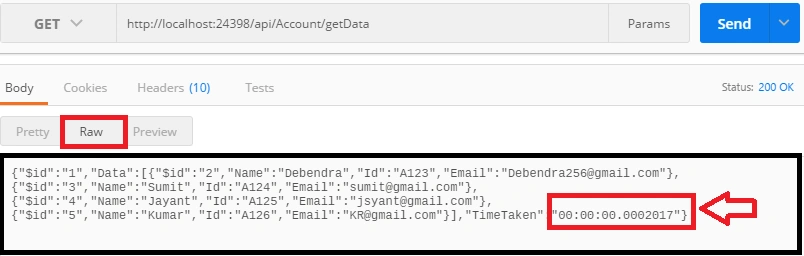
To check the size of the data, go to the header section and check the content-length.
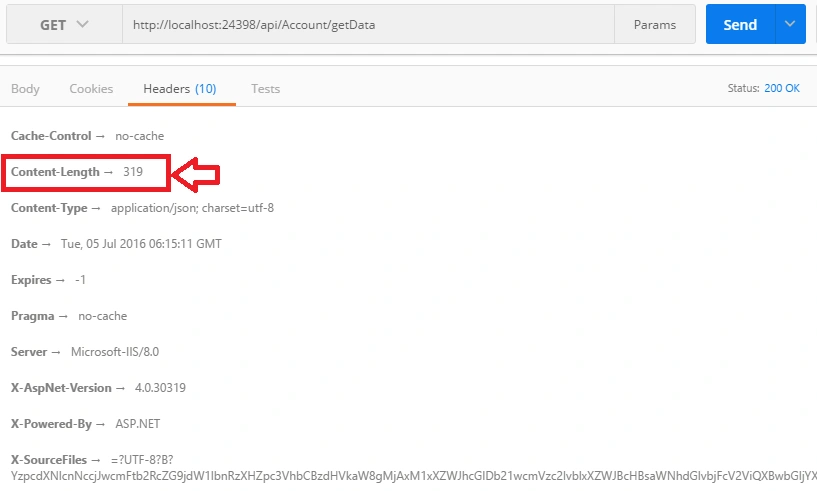
Content-Length
The content-length entity-header field indicates the size of the entity-body, in decimal number of OCTETs, sent to the recipient; or, in the case of the Head method, the size of the entity-body that would have been sent; had the request been a Get.
Now, lets use Gzip to compress the API response. For this, please add the following dll from NuGet-Package as follows:

Now, add the following class "DeflateCompression" in your project, which is derived from "ActionFilterAttribute", as follows:
- using System;
- using System.Collections.Generic;
- using System.IO;
- using System.Linq;
- using System.Net.Http;
- using System.Web;
- using System.Web.Http.Filters;
- namespace Webapi2
- {
- public class DeflateCompressionAttribute : ActionFilterAttribute
- {
- public override void OnActionExecuted(HttpActionExecutedContext actContext)
- {
- var content = actContext.Response.Content;
- var bytes = content == null ? null : content.ReadAsByteArrayAsync().Result;
- var zlibbedContent = bytes == null ? new byte[0] :
- CompressionHelper.DeflateByte(bytes);
- actContext.Response.Content = new ByteArrayContent(zlibbedContent);
- actContext.Response.Content.Headers.Remove("Content-Type");
- actContext.Response.Content.Headers.Add("Content-encoding", "deflate");
- actContext.Response.Content.Headers.Add("Content-Type","application/json");
- base.OnActionExecuted(actContext);
- }
- }
- public class CompressionHelper
- {
- public static byte[] DeflateByte(byte[] str)
- {
- if (str == null)
- {
- return null;
- }
- using (var output = new MemoryStream())
- {
- using (
- var compressor = new Ionic.Zlib.GZipStream(
- output, Ionic.Zlib.CompressionMode.Compress,
- Ionic.Zlib.CompressionLevel.BestSpeed))
- {
- compressor.Write(str, 0, str.Length);
- }
- return output.ToArray();
- }
- }
- }
- }
- [HttpGet]
- [Route("getData")]
- [AllowAnonymous]
- [DeflateCompression]
- public async Task<IHttpActionResult> getData()
- {
- Stopwatch sw=new Stopwatch();
- sw.Start();
- Dictionary<object, object> dict = new Dictionary<object, object>();
- List<Employee> li = new List<Employee>();
- li.Add(new Employee {id="2",Name="Debendra",Id= "A123", Email="[email protected]"});
- li.Add(new Employee { id = "3", Name = "Sumit", Id = "A124", Email = "[email protected]" });
- li.Add(new Employee { id = "4", Name = "Jayant", Id = "A125", Email = "[email protected]" });
- li.Add(new Employee { id = "5", Name = "Kumar", Id = "A126", Email = "[email protected]" });
- sw.Stop();
- dict.Add("Details",li);
- dict.Add("Time", sw.Elapsed);
- return Ok(dict);
- }
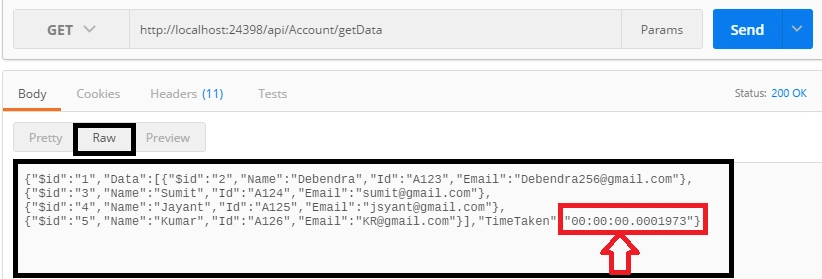
Now, check the size of the data after compressing.
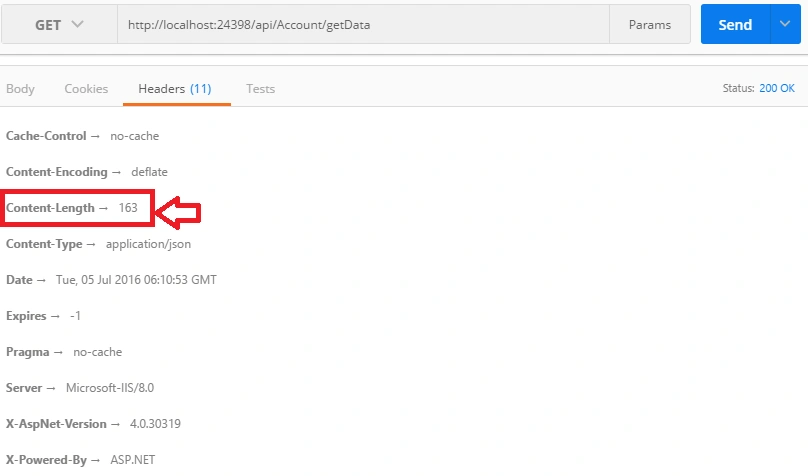
Here, I am showing the response before compressing and after compressing the data as follows:
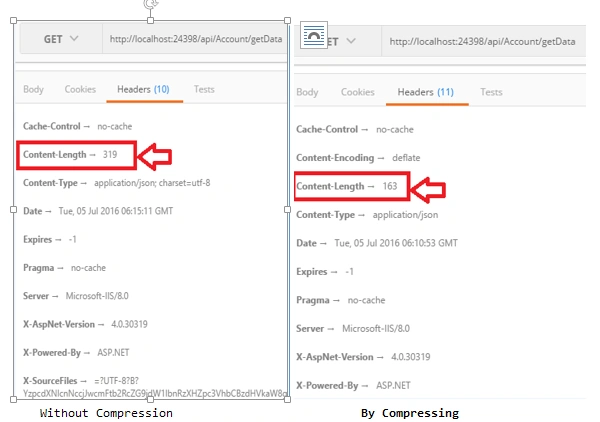
Thus, by using this DotNetZip compression, we can compress more then 50 percent of the data and reduce the response, time which is very, very important for Web API.
Pratik DarakPosted Nov 7, 2019, 7:39 AM
Implemented this code, but note getting any response in postman. Could you help me out on this
Srinivas MPosted Jan 2, 2019, 3:40 AM
I'm implemented it but not getting response in postman.
Srinivas MPosted Jan 2, 2019, 3:39 AM
What is use of DotnetZip where did we used it in the code.
Yannick BastiaensenPosted May 6, 2018, 11:27 PM
Setting the timer within the method doesn't really show much. the compression happens after. The length comparison is good, but the timer one is not correct. u need to put the timer on the client side :)
S JPosted Mar 13, 2017, 11:30 PM
How do you read the response on the client side? Please show that step thank you.
vinayPosted Jul 9, 2016, 3:01 AM
Good Article.
Rajeev PunhaniPosted Jul 7, 2016, 6:30 AM
Good Article.
kalu singh raoPosted Jul 7, 2016, 1:26 AM
Nice...
RajaPosted Jul 7, 2016, 12:14 AM
Good One...