

In one of my articles, I have discussed how to compress Web API Response, using DotNet Zip. You can find the link below:
Compressing Web API Response has two major advantages:
- Data size is reduced.
- Response time is optimized (increasing the speed of the communication between the Client and the Server).
In this article, I will show how to compress the Web API response to reduce the size of the data and increase the speed of the communication between the Server and the Client.
First of all, create a Web API which returns some data in JSON format. I have created my API, as follows:
First of all, create a Web API which returns some data in JSON format. I have created my API, as follows:
- [RoutePrefix("api/Home")]
- public class HomeController : ApiController
- {
- [Route("GetData")]
- public async Task<IHttpActionResult> getData()
- {
- Stopwatch sw = new Stopwatch();
- sw.Start();
- Dictionary<object, object> dict = new Dictionary<object, object>();
- List<Employee> li = new List<Employee>();
- li.Add(new Employee { id = 2, Name = "Debendra", Id = "A123", Email = "[email protected]" });
- li.Add(new Employee { id = 3, Name = "Sumit", Id = "A124", Email = "[email protected]" });
- li.Add(new Employee { id = 4, Name = "Jayant", Id = "A125", Email = "[email protected]" });
- li.Add(new Employee { id = 5, Name = "Kumar", Id = "A126", Email = "[email protected]" });
- sw.Stop();
- dict.Add("Details", li);
- dict.Add("Time", sw.Elapsed);
- return Ok(dict);
- }
- }
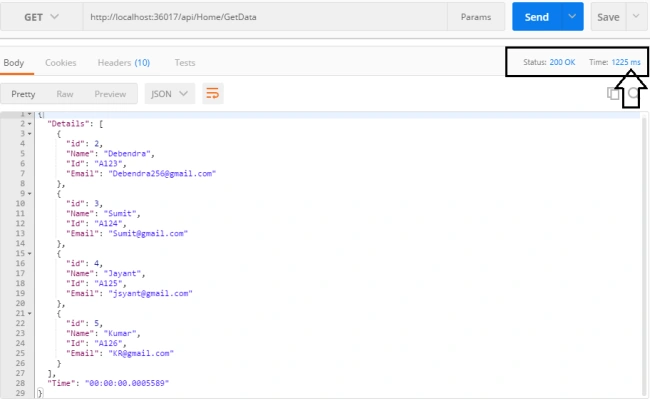
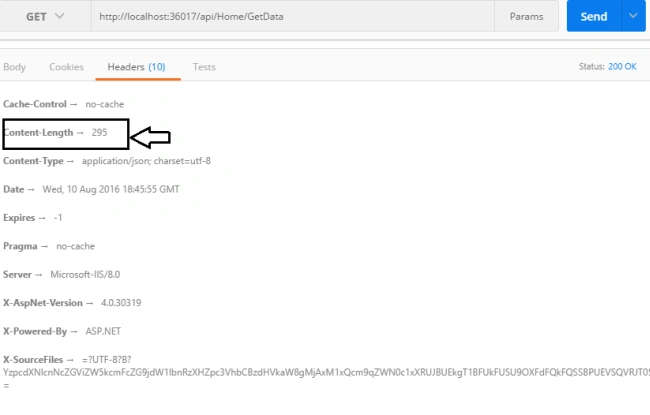
Now, check the actual size of the Response.
Now, I will check the API by compressing the result.
For compressing, I will create a custom Action Filter, add new class, and rename it as "CompressFilter.cs". Now, I will inherit this class from ActionFilterAttribute and write the following code:
- using System.Collections.Generic;
- using System.Linq;
- using System.Web;
- using System.Web.Http.Filters;
- namespace WEBAPI_OPERATION.Filter
- {
- [AttributeUsage(AttributeTargets.Class | AttributeTargets.Method)]
- public class CompressFilter : ActionFilterAttribute
- {
- public override void OnActionExecuted(HttpActionExecutedContext context)
- {
- var acceptedEncoding = context.Response.RequestMessage.Headers.AcceptEncoding.First().Value;
- if (!acceptedEncoding.Equals("gzip", StringComparison.InvariantCultureIgnoreCase)
- && !acceptedEncoding.Equals("deflate", StringComparison.InvariantCultureIgnoreCase))
- {
- return;
- }
- context.Response.Content = new CompressedContent(context.Response.Content, acceptedEncoding);
- }
- }
- }
We want API Response to compress. Thus, I write all my logic in "OnActionExecuted" event. This event is executed after execution of any action method.
Now, I will add another class CompressedContent.cs and write the code given below:
- using System;
- using System.Collections.Generic;
- using System.IO;
- using System.IO.Compression;
- using System.Linq;
- using System.Net;
- using System.Net.Http;
- using System.Threading.Tasks;
- using System.Web;
- namespace WEBAPI_OPERATION.Filter
- {
- public class CompressedContent : HttpContent
- {
- private readonly string _encodingType;
- private readonly HttpContent _originalContent;
- public CompressedContent(HttpContent content, string encodingType = "gzip")
- {
- if (content == null)
- {
- throw new ArgumentNullException("content");
- }
- _originalContent = content;
- _encodingType = encodingType.ToLowerInvariant();
- foreach (var header in _originalContent.Headers)
- {
- Headers.TryAddWithoutValidation(header.Key, header.Value);
- }
- Headers.ContentEncoding.Add(encodingType);
- }
- protected override bool TryComputeLength(out long length)
- {
- length = -1;
- return false;
- }
- protected override Task SerializeToStreamAsync(Stream stream, TransportContext context)
- {
- Stream compressedStream = null;
- switch (_encodingType)
- {
- case "gzip":
- compressedStream = new GZipStream(stream, CompressionMode.Compress, true);
- break;
- case "deflate":
- compressedStream = new DeflateStream(stream, CompressionMode.Compress, true);
- break;
- default:
- compressedStream = stream;
- break;
- }
- return _originalContent.CopyToAsync(compressedStream).ContinueWith(tsk =>
- {
- if (compressedStream != null)
- {
- compressedStream.Dispose();
- }
- });
- }
- }
- }
- [RoutePrefix("api/Home")]
- public class HomeController : ApiController
- {
- [Route("GetData")]
- [CompressFilter]
- public async Task<IHttpActionResult> getData()
- {
- Stopwatch sw = new Stopwatch();
- sw.Start();
- Dictionary<object, object> dict = new Dictionary<object, object>();
- List<Employee> li = new List<Employee>();
- li.Add(new Employee { id = 2, Name = "Debendra", Id = "A123", Email = "[email protected]" });
- li.Add(new Employee { id = 3, Name = "Sumit", Id = "A124", Email = "[email protected]" });
- li.Add(new Employee { id = 4, Name = "Jayant", Id = "A125", Email = "[email protected]" });
- li.Add(new Employee { id = 5, Name = "Kumar", Id = "A126", Email = "[email protected]" });
- sw.Stop();
- dict.Add("Details", li);
- dict.Add("Time", sw.Elapsed);
- return Ok(dict);
- }
- }
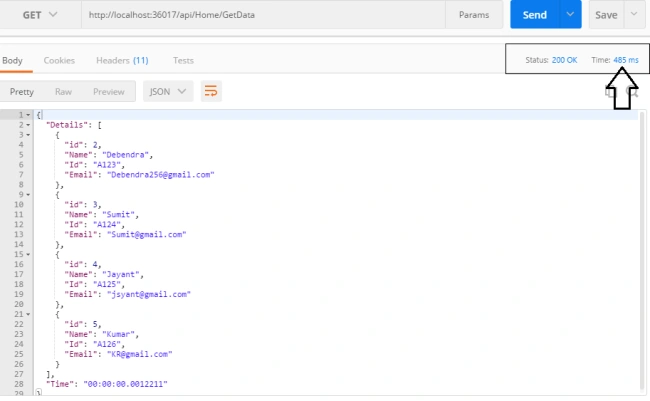
Here is the result. If you check the size in the header, you will get the actual compressed size.
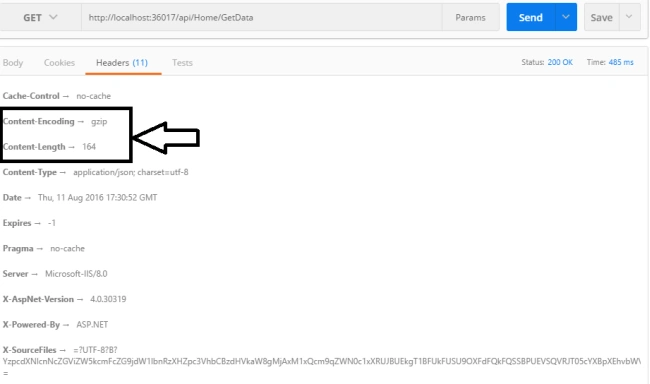
This way, we can compress the Web API Response to increase the API performance.
Johan EliassonPosted Oct 17, 2018, 3:54 AM
To use this for all controllers in a REST API, globally, add this to WebApiConfig.Register(): config.Filters.Add(new CompressFilter()); in .NET Core, just add these two lines in Startup.cs: public void ConfigureServices(IServiceCollection services) { services.AddResponseCompression(); } public void Configure(IApplicationBuilder app, IHostingEnvironment env) { app.UseResponseCompression(); } But Debendra, your code breaks if no content is returned, like when I do return (StatusCode((HttpStatusCode) 442); Could you update your code to handle such cases?
Bhavik PatelPosted Aug 15, 2016, 12:03 AM
Nice. Definitely try in my project.:-) I think protobuf is also a good option to improve webapi performance.
Gowtham KPosted Aug 14, 2016, 1:24 PM
Good One, Thanks for sharing:)
Ravi KandelPosted Aug 14, 2016, 2:52 AM
Nice
Pankaj Kumar ChoudharyPosted Aug 13, 2016, 8:13 PM
Thanks for such a useful, this is new for me so thanks for sharing....