

Introduction
This article explains the Undoable commands such as the actions Undo and Redo commands in F# console applications. Undo and Redo are part of the command patterns that ensures that every object receives its own commands and provides a decoupling between sender and receiver.
Undo and Redo
The Undo command changes the current state to an older state. Undo reverses the last action you performed and Redo undoes the last Undo action.
Undo and Redo Mechanism
At a minimum, an undo/redo mechanism should provide the ability to:
- Unexecute (undo) the last action performed.
- Reexecute (redo) the last undone action.
- Functions performed to reverse the action of an earlier action.
Undo Implementation
- Determine whether the UndoStack is empty. If empty, then return otherwise proceed.
- Then "pop" an command object from the UndoStack.
- Then "push" this command to the RedoStack.
- Then invoke the Execute method of the command object.
Redo Implementation
- Determine whether the RedoStack is empty. If empty, then return otherwise proceed.
- Then "pop" a Command object from the RedoStack.
- Then "push" this command to the UndoStack.
- Then invoke the execute method of the command object.
Command Object
Command objects act as receivers and execute requested functionality through the Execute method. The class named "Document" that contains two stacks. The first one is for Undo operations and the second one is for Redo operations.
Now I will show you how to perform the Undo and Redo operations in a Console Application. Use the following procedure to create the sample.
Step 1:
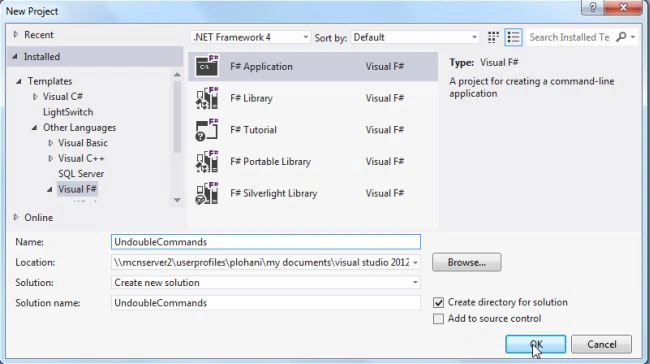
Open Visual Studio then select "Create New Project" --> "F# Console Application".
Step 2:
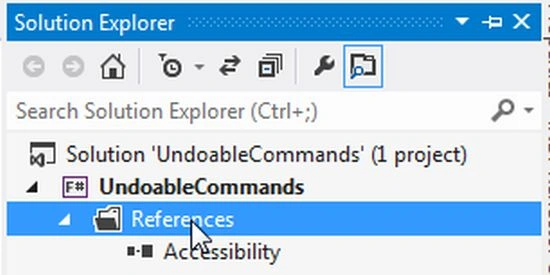
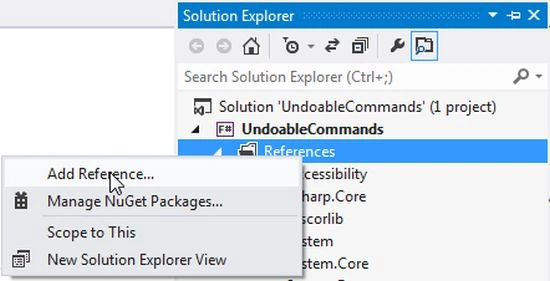
Now go to the Solution Explorer to the right side of the application. Right-click on "References" and select "Add references".
Step 3:
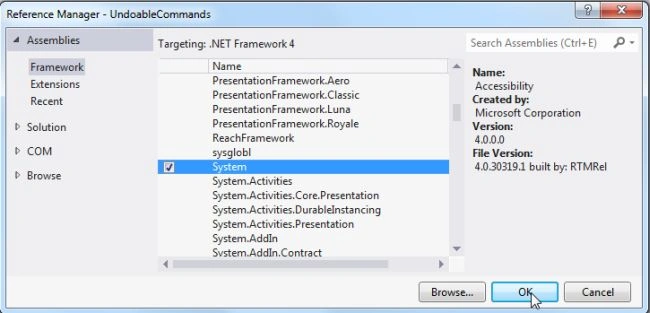
After selecting "Add References", in the framework template you need to select "System" and click on "Ok".
Step 4:
Use the following code for the Command Pattern Undo/Redo operations in a console application.
open System
open System.Collections.Generic
[<AbstractClass>]
type UndoableCommand(description:string) =
member this.Description = description
abstract Execute : unit->unit
abstract Undo : unit->unit
//Property changes by the class via a ref
type PropertyChangedUndoableCommand<'a>(description, fieldRef, newValue:'a) =
inherit UndoableCommand(description)
let oldValue = !fieldRef
override this.Execute() = fieldRef:=newValue
override this.Undo() = fieldRef:=oldValue
type DelegateUndoableCommand(description, doAction, undoAction) =
inherit UndoableCommand(description)
override this.Execute() = doAction()
override this.Undo() = undoAction()
//Document contains an example undo/redo stack
type Document() =
let undoStack = Stack()
let redoStack = Stack()
let execute (command : UndoableCommand) =
redoStack.Clear()
undoStack.Push(command)
command.Execute()
//Undo Implementation
let undo() =
if undoStack.Count > 0 then
let command = undoStack.Pop()
redoStack.Push(command)
command.Undo()
//Redo Implementation
let redo() =
if redoStack.Count> 0 then
let command = redoStack.Pop()
undoStack.Push(command)
command.Execute()
member this.ExecuteCommand command = execute command
member this.Undo() = undo()
member this.Redo() = redo()
member this.CanUndo = undoStack.Count > 0
member this.CanRedo = redoStack.Count > 0
type SomeObject(document:Document) =
let undovalue = ref 50//initial value is 50
member this.UndoableProperty with get() = !undovalue
and set(value) =
let command = PropertyChangedUndoableCommand("Changed", undovalue, value)
document.ExecuteCommand(command)
//Document object hold "do" and "Undone" values
let doc = Document()
let so = SomeObject(doc)
printf "Initial Value %d\n\n" so.UndoableProperty
so.UndoableProperty <- 100
printf "Updated Value %d\n\n" so.UndoableProperty
so.UndoableProperty <- 1000
printf "Updated Value %d\n\n" so.UndoableProperty
doc.Undo()
printf "Undo Value %d\n\n" so.UndoableProperty
doc.Undo()
printf "Undo Value %d\n\n" so.UndoableProperty
doc.Undo()
printf "Undo Value %d\n\n" so.UndoableProperty
doc.Undo()
printf "Undo Value %d\n\n" so.UndoableProperty
doc.Redo()
printf "Redo Value %d\n\n" so.UndoableProperty
doc.Redo()
printf "Redo Value %d\n\n" so.UndoableProperty
doc.Redo()
printf "Redo Value %d\n\n" so.UndoableProperty
System.Console.ReadLine()|>ignore
Output
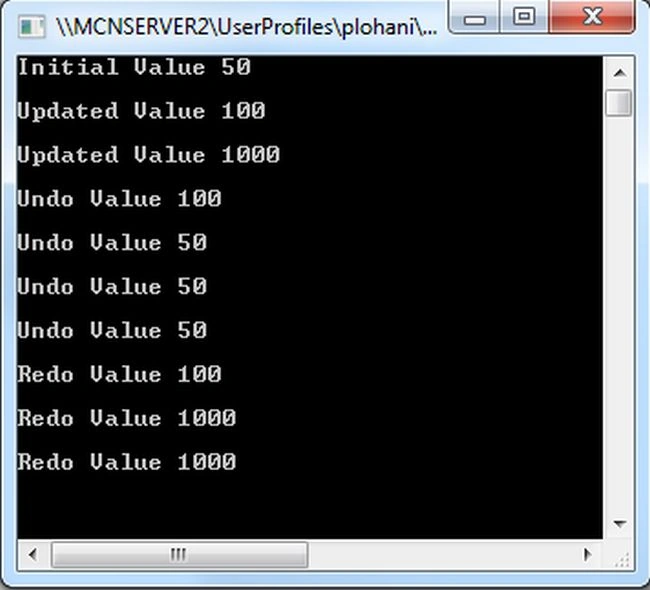
Debug the application by pressiing F5 to execute the console application. After debugging the application the output will be as in the following figure:
Summary
In this article you saw how to use Undo and Redo operations in console applications. Undo and Redo are generally a part of the Command Pattern.
Join the conversation! Your thoughts help the community grow.