

In this article, I will explain command patterns and how we can implement them with a third party library which is built on command patterns, and how we can use it in ASP.NET Core to solve our problems and make the code clean. So, we will be going through the following basics.
- What is a Command Pattern?
- A simple example of Command Patterns and a short description of Mediator Patterns.
- What are thin controllers in MVC, how our implementation makes the controller thin?
- What is MediatR?
- How we can use MediatR in our .NET Core application
- Examples using commands and events
Basically, a command pattern is a data-driven design pattern that falls in the category of behavior pattern. A command is some operation or action that we can perform and it can be the part of an activity. An activity can have one or many commands and implementations.
We can say that the request wrapped under an object as a command is passed to an invoker object. The Invoker (Broker) object looks for the appropriate object which can handle this command, and passes the command to the corresponding object which executes the command.
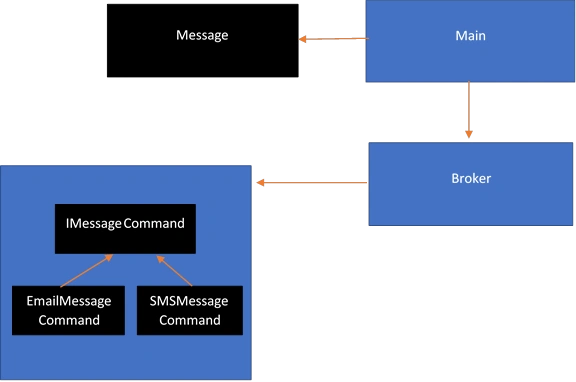
A simple example of this is messages of multiple types. The Message class contains properties and methods like SendEmail() and SendSms(). Two type of commands are used and an interface is required which should be inherited by EmailMessageCommand and SMSMessageCommand classes. A broker class is also used which invokes the particular type of message class to handle the operation.
- class Program
- {
- static void Main(string[] args)
- {
- Message message = new Message();
- message.CustomMessage = "Welcome by Email";
- EmailMessageCommand emailMessageCommand = new EmailMessageCommand(message);
- Message message2 = new Message();
- message2.CustomMessage = "Welcome by SMS";
- SmsMessageCommand smsMessageCommand = new SmsMessageCommand(message2);
- Broker broker = new Broker();
- broker.SendMessage(emailMessageCommand);
- broker.SendMessage(smsMessageCommand);
- Console.ReadKey();
- }
- }
- public class Message
- {
- public string CustomMessage { get; set; }
- public void EmailMessage()
- {
- Console.WriteLine($"{CustomMessage} : Email Message sent");
- }
- public void SmsMessage()
- {
- Console.WriteLine($"{CustomMessage} : Sms Message sent");
- }
- }
- public interface IMessageCommand
- {
- void DoAction();
- }
- public class Broker
- {
- public void SendMessage(IMessageCommand command)
- {
- command.DoAction();
- }
- }
- public class EmailMessageCommand : IMessageCommand
- {
- private Message oMessage;
- public EmailMessageCommand(Message oMessage)
- {
- this.oMessage = oMessage;
- }
- public void DoAction()
- {
- oMessage.EmailMessage();
- }
- }
- public class SmsMessageCommand : IMessageCommand
- {
- private Message oMessage;
- public SmsMessageCommand(Message oMessage)
- {
- this.oMessage = oMessage;
- }
- public void DoAction()
- {
- oMessage.SmsMessage();
- }
- }
When we start development in MVC framework, the logic is written in action methods of the controller; like we have a simple application of eCommerce where users are supposed to put orders. We have a controller, OrderController, which is used to manage the orders. When a user places the order, we are supposed to save records in the database.
Up until this, we have a simplified code. After some time, however, we realize that there is also a business requirement of the confirmation email. Now, the second step is to send the confirmation email to the customer. Later on, we realize that after this step, we need to perform another operation as well, i.e., logging the information and so on. In the end, we realize that we need to save this user's information to the CRM too. The point is that it will grow the size of the controller. Now, we can call it a fatty controller.
A Command-based architecture allows us to send commands to perform some operation and we a have separate handler of command that makes the separation of concern and improves the single responsibility as well. To implement this architecture, we can use a third-party library, like MediatR (Mediator Pattern) which does a lot of groundwork for us. The mediator pattern defines an object that encapsulates how a set of objects interact.
Advantages of Mediator Pattern and how MediatR can help us- The mediator pattern defines an object that encapsulates how a set of objects interact (as defined by Wikipedia).
- It promotes loose coupling by keeping the objects from referring to each other explicitly.
- It promotes the Single Responsibility Principle by allowing the communication to be offloaded to a class that handles just that.
How MediatR library helps us
MediatR allows us to decouple our controllers from our business logic by having our controller actions send a request message to a handler. The MediatR library supports two type of operations.
- Commands (Expect some output as result)
- Events (Caller do not care what happened next, do not expect result)
We have already discussed the command pattern so it is time to define some commands and issue the command by using MediatR.
Installation in ASP.NET CoreWe will need to install MediatR and MediatR.Extensions.Microsoft.DependencyInjection packages from NuGet.
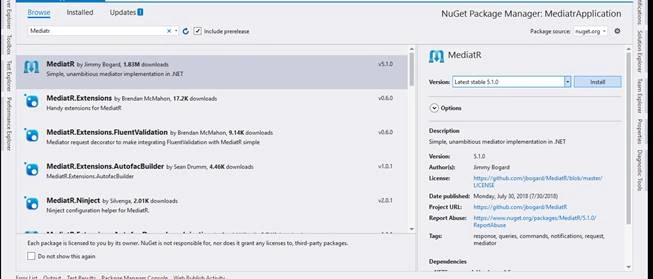
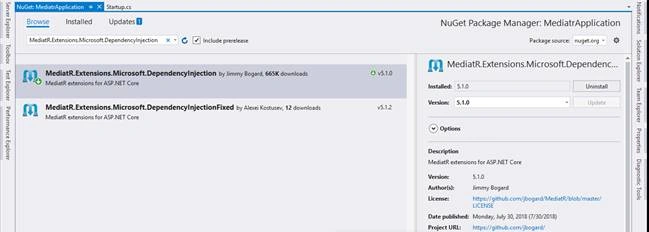
When these two packages get installed, then we need to add services.AddMediatR(); to the startup.cs file. It looks like this.
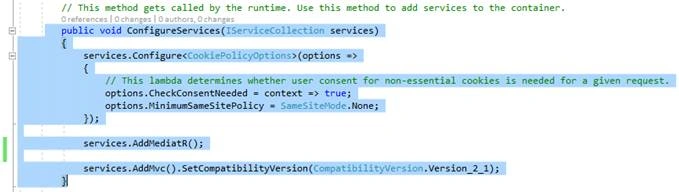
Now, we can use the MediatR library in our .NET Core project.
ExampleThe first example demonstrates the use of the Request/Response type of operation by using MediatR. It expects some response against the request.
The second example will show you an event where multiple handlers do their job and callers do not care about what is happening next and do not expect any result/response.
First ExampleIn this scenario, we want to register the user and expect some response against the request. If the response returns true, we can do further operations like a logged in user.
First, we need to create a class which is inherited from IRequest<T>.
- public class NewUser: IRequest<bool>
- {
- public string Username { get; set; }
- public string Password { get; set; }
- }
IRequest<bool> means that the response of request is boolean.
Now, a handler is required to handle this type of request.
- public class NewUserHandler : IRequestHandler<NewUser, bool>
- {
- public Task<bool> Handle(NewUser request, CancellationToken cancellationToken)
- {
- // save to database
- return Task.FromResult(true);
- }
- }
Now that we have the command and its handler, we can call MediatR to do some operation in our Controller.
These are the Home Controller action methods.
- public class HomeController : Controller
- {
- private readonly IMediator _mediator;
- public HomeController(IMediator mediator)
- {
- _mediator = mediator;
- }
- [HttpGet]
- public ActionResult Register()
- {
- return View();
- }
- [HttpPost]
- public ActionResult Register(NewUser user)
- {
- bool result = _mediator.Send(user).Result;
- if (result)
- return RedirectToAction("Login");
- return View();
- }
- }
The Register action method is decorated with [HttpPost] attribute and accepts the new user registration requests. Then, it asks MediatR to do action. It expects the result/response from the request and if the result is true, it redirects the user to the login page.
Here, we have clean code and most of the work is done outside of the Controller. This achieves the separation of concerns (SoC) and single responsibility in terms of the handler for different operations.
In our second example, we will demonstrate the scenario where multiple handlers are used to perform different operations against a command.
Second ExampleIn this case, we inherited the NewUser class from INotification.
- public class NewUser : INotification
- {
- public string Username { get; set; }
- public string Password { get; set; }
- }
Now, there are three handlers which are executed one by one to perform their job. These are inherited from INotificationHandler.
- public class NewUserHandler : INotificationHandler<NewUser>
- {
- public Task Handle(NewUser notification, CancellationToken cancellationToken)
- {
- //Save to log
- Debug.WriteLine(" **** Save user in database *****");
- return Task.FromResult(true);
- }
- }
The second handler is defined in the below code.
- public class EmailHandler : INotificationHandler<NewUser>
- {
- public Task Handle(NewUser notification, CancellationToken cancellationToken)
- {
- //Send email
- Debug.WriteLine(" **** Email sent to user *****");
- return Task.FromResult(true);
- }
- }
Here is the code for the third handler.
- public class LogHandler : INotificationHandler<NewUser>
- {
- public Task Handle(NewUser notification, CancellationToken cancellationToken)
- {
- //Save to log
- Debug.WriteLine(" **** User save to log *****");
- return Task.FromResult(true);
- }
- }
And, our controller code looks like this.
- public class AccountsController : Controller
- {
- private readonly IMediator _mediator;
- public AccountsController(IMediator mediator)
- {
- _mediator = mediator;
- }
- [HttpGet]
- public ActionResult Login()
- {
- return View();
- }
- [HttpGet]
- public ActionResult Register()
- {
- return View();
- }
- [HttpPost]
- public ActionResult Register(NewUser user)
- {
- _mediator.Publish(user);
- return RedirectToAction("Login");
- }
- }
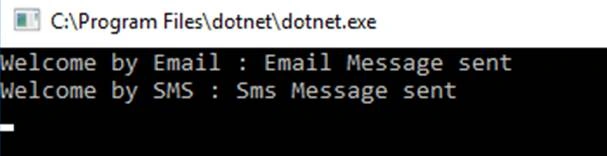
The output of this application is as following.
Here, we used a Publish method instead of the Send function. Publish will invoke all handlers that subscribe to the type of NewUser class. This is just an example, we can think in term of commands and then we can do some action accordingly as I discussed in the command pattern.
How can Mediatr be helpful?It can be used to hide the detail of implementation, used to make the controller code more clean and maintainable, multiple handlers can be reused, and each handler has its own responsibility so it is easy to manage and maintain.
In my next article, I will try to explain a CQRS architecture pattern and its advantages and how we can use MediatR to implement the CQRS.
Godwell MogoiPosted Oct 22, 2019, 5:07 AM
Thanks Great Article and easy to understand Cheers
YashPosted Sep 3, 2019, 3:52 AM
Thanks a lot for the nice article. I have one query i.e the above example how would we make sure that "NewUserHandler" going to be executed before "EmailHandler " and "Loghandler", in general how we can decide the order of handler execution.
eamhm21Posted Dec 23, 2018, 4:40 AM
Can you change the line `bool result = _mediator.Send(user).Result;` to `bool result = await _mediator.Send(user);` and convert the Action method to an `async` Action method. Synchronously calling `async` methods is completely discouraged, and more in ASP.NET Core. I know this is not the point of this article, but people with less knowledge about such topic will copy and paste it in their production code :)
Mateusz SzutaPosted Dec 3, 2018, 12:24 AM
When do you plan to publish article about Mediatr and CQRS ?
Ян СаладухаPosted Nov 16, 2018, 9:33 AM
Hi Khuram. I'm curious how mediatr knows about handlers? Ss you don't register them, does it scan domain and register those which implemrnt certain interfave?
Khuram ShahzadPosted Nov 7, 2018, 11:40 PM
I got it, i am working on it. Thanks for your view and comments.
Khuram ShahzadPosted Nov 4, 2018, 11:29 PM
I am sorry, i did not get your point, can you please explain,
zhu leiPosted Nov 4, 2018, 6:52 AM
What's the next article? expect!