

What is Command Design Pattern?
Command Design pattern is a behavioral design pattern in which a request can be turned to action.
Where to use Command Design Pattern?
When we have a requirement of,
- Do and undo action
- When you want to pass method as argument or in another way when you want to call callbackfunction
- When we want to log or track commands
Why use Command Design Pattern?
Command Design Pattern is a request driven design pattern. A request will help to choose which command needs to be executed without knowing which object.method to call. In this kind of case, command design pattern plays a key role which will make this easy by using ICommand. Command design pattern actually decouples command manager and command execution logic; i.e. Actual implementation.
Players in this pattern
- ICommand – an interface which will do action and undo action
- ConcreateCommand – implements ICommand
- Invoker – carries out the action
- Receive -- receives action from invoker and performs action
Problem definition
Provide interface to user to open and close the door. And if user want,s user should be able to undo his/her last action.
This example actually showcases the use case of do and undo action requirement. For other requirements I will write separate articles.
Players here,
- ICommand – ICommand
- ConcreateCommand – DoorCommand
- Invoker – client, in our case client operation in main function
- Receiver – Door
We will first define actions which we want to execute,
- package com.sample.Command.Design.Pattern;
- public enum Action
- {
- DOOR_OPEN,
- DOOR_CLSOE
- }
Below is the ICommand interface which will define contact to implement
- package com.sample.Command.Design.Pattern;
- public interface ICommand {
- void execute(Action action);
- void undoExecute();
- }
Below is the DoorCommand class which implements the ICommand contract
- package com.sample.Command.Design.Pattern;
- public class DoorCommand implements ICommand {
- private Door door;
- Action lastAction;
- public DoorCommand()
- {
- door = new Door();
- }
- public void execute(Action doorAction)
- {
- switch (doorAction)
- {
- case DOOR_OPEN:
- door.open();
- break;
- case DOOR_CLSOE:
- door.close();
- break;
- default:
- return;
- }
- lastAction = doorAction;
- }
- public void undoExecute()
- {
- switch (lastAction)
- {
- case DOOR_OPEN:
- door.close();
- break;
- case DOOR_CLSOE:
- door.open();
- break;
- default:
- return;
- }
- }
- }
Below is the Door class, it actually has core logic implementation
- package com.sample.Command.Design.Pattern;
- public class Door {
- public void open() {
- System.out.println("------------Door Opened---------------");
- }
- public void close(){
- System.out.println("------------Door Closed---------------");
- }
- }
Below is the Invoker, which requests for some action
- package com.sample;
- import com.sample.Command.Design.Pattern.DoorCommand;
- import com.sample.Command.Design.Pattern.ICommand;
- import static com.sample.Command.Design.Pattern.Action.DOOR_CLSOE;
- import static com.sample.Command.Design.Pattern.Action.DOOR_OPEN;
- public class Main {
- public static void main(String[] args) {
- ICommand command = new DoorCommand();
- command.execute(DOOR_OPEN);
- command.execute(DOOR_CLSOE);
- command.undoExecute();
- }
- }
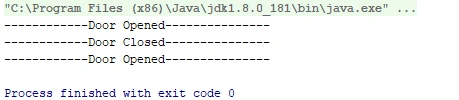
Below is the output Snap
Summary
In this article we understood about usage of command design pattern mainly concentrating on do and undo operations.
Join the conversation! Your thoughts help the community grow.