

Introduction
A Command Design pattern is a behavioural design pattern. In which a request can be turned to action.
Where to use a Command Design Pattern?
When we want to,
- Do/undo action
- When you want to pass a method as an argument or when you want call callbackfunction
- When you want to log or track commands
Why use a Command Design Pattern?
Command Design Pattern is a request-driven design pattern. A request will help to choose which command needs to get executed without knowing which object.method to call. In this case, command design patterns play a key role which will make this easy by using ICommand. A Command design pattern actually decouples command manager and command execution logic i.e. Actual implementation.
Players in this pattern:
- ICommand – its interface which will do action undo action
- ConcreateCommand – it’s one who implements ICommand
- Invoker – One who carries out the action
- Receiver: One who receives action from invoker and perform action
Example
Problem definition - Provide an interface to the user to open and close the door. And if the user wants, they should be able to undo his/her last action.
This example actually showcases the use case of Do and undo action requirement. For other requirements, I will write separate articles.
In this:
- ICommand – ICommand
- ConcreateCommand – DoorCommand
- Invoker – client, in our case we will client operation in main function
- Receiver – Door
Below is the ICommand interface which will define contact to implement:
- namespace Command.Design.Pattern
- {
- public interface ICommand
- {
- void Execute(Action action);
- void UndoExecute();
- }
- }
We will create enum for peroming Action
- public enum Action
- {
- DOOR_OPEN,
- DOOR_CLSOE
- }
Below is the DoorCommand class which implements the ICommand contract :
- namespace Command.Design.Pattern
- {
- public class DoorCommand : ICommand
- {
- private readonly Door door;
- Action lastAction { get; set; }
- public DoorCommand()
- {
- door = new Door();
- }
- public void Execute(Action doorAction)
- {
- switch (doorAction)
- {
- case Action.DOOR_OPEN:
- door.Open();
- break;
- case Action.DOOR_CLSOE:
- door.Close();
- break;
- default:
- return;
- }
- lastAction = doorAction;
- }
- public void UndoExecute()
- {
- switch (lastAction)
- {
- case Action.DOOR_OPEN:
- door.Close();
- break;
- case Action.DOOR_CLSOE:
- door.Open();
- break;
- default:
- return;
- }
- }
- }
- }
Below is the Door class, it actually has core logic implementation:
- using static System.Console;
- namespace Command.Design.Pattern
- {
- public class Door
- {
- public void Open() => WriteLine("------------Door Opened---------------");
- public void Close()=> WriteLine("------------Door Closed---------------");
- }
- }
Below is the Invoker, which requests some action:
- using static System.Console;
- namespace Command.Design.Pattern
- {
- class Home
- {
- static void Main(string[] args)
- {
- ICommand command = new DoorCommand();
- command.Execute(Action.DOOR_OPEN);
- command.Execute(Action.DOOR_CLSOE);
- command.UndoExecute();
- ReadLine();
- }
- }
- }
Below is the output window:
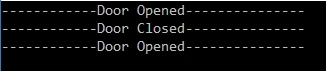
Summary
In this article, we learned of usage of the command design pattern, mainly concentrating on the do and undo operation.
Upendra Pratap ShahiPosted Dec 6, 2019, 7:12 AM
Nice one...keep it up..
Sourav Kumar DasPosted Dec 3, 2019, 10:36 PM
Nice Article.