

Column Resizing in GridView
The ASP.NET GridView does not support column resiziing. You must use a third party server control like:
http://demos.telerik.com/aspnet-ajax/grid/examples/client/resizing/defaultcs.aspx
http://demos.devexpress.com/aspxgridviewdemos/Columns/ColumnResizing.aspx
http://ideasparks.codeplex.com/
I recommend using coolgrid control of irespaks.
CoolGridView is a web control that extends or enhances an ASP.NET GridView control to deliver the following features:
- Display fix column headers, footer and pager
- Supports scrollable content
- User-resizeable column widths (New!)
- Maintains scroll position and column widths after a postback or callback (New!)
You can also make a resizable GridView using jQuery colResizable-1.3.min.js.You can download it from http://quocity.com/colresizable/
Step 1: Your .aspx page like:
<%@ Page Language="C#" AutoEventWireup="true" CodeFile="Default.aspx.cs" Inherits="_Default" %>
<!DOCTYPE html PUBLIC "-//W3C//DTD XHTML 1.0 Transitional//EN" "http://www.w3.org/TR/xhtml1/DTD/xhtml1-transitional.dtd">
<html xmlns="http://www.w3.org/1999/xhtml">
<head runat="server">
<title></title>
<link href="css/main.css" rel="stylesheet" type="text/css" />
<script src="Scripts/jquery.js" type="text/javascript"></script>
<script src="Scripts/colResizable-1.3.min.js" type="text/javascript"></script>
</head>
<body>
<form id="form1" runat="server">
<div class="center">
<asp:GridView ID="GridView1" runat="server" AutoGenerateColumns="False" Width="100%"
border="0" CellPadding="0" >
<Columns>
<asp:BoundField DataField="Empid" HeaderText="Empid">
<ItemStyle CssClass="left" />
</asp:BoundField>
<asp:BoundField DataField="Empname" HeaderText="Empname">
<ItemStyle CssClass="left" />
</asp:BoundField>
<asp:BoundField DataField="City" HeaderText="City">
<ItemStyle CssClass="left" />
</asp:BoundField>
</Columns>
</asp:GridView>
</div>
</form>
<script type="text/javascript">
$(function () {
$('#<%=GridView1.ClientID %>').colResizable({
liveDrag: true,
gripInnerHtml: "<div class='grip'></div>",
draggingClass: "dragging",
});
});
</script>
</body>
</html>
Step 2 : Your .cs page:
using System;
using System.Collections.Generic;
using System.Linq;
using System.Web;
/// <summary>
/// Summary description for DataHelper
/// </summary>
public class DataHelper
{
Employee employee = new Employee();
public DataHelper()
{
//
// TODO: Add constructor logic here
//
}
public List<Employee> GetEmployeeData()
{
List<Employee> emplist = new List<Employee>();
for (int i = 1; i <= 25; i++)
{
employee = new Employee();
employee.Empid = i;
employee.Empname = "Employee " + i.ToString();
employee.City = "City Name " + i.ToString();
emplist.Add(employee);
}
return emplist;
}
}
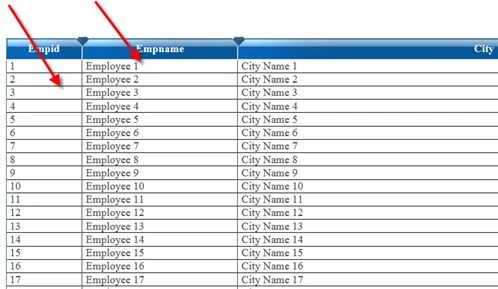
Output: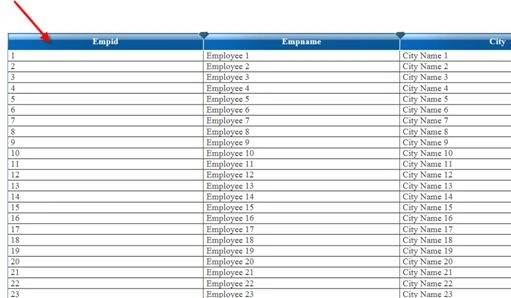
Haroon AnsariPosted Nov 29, 2017, 2:27 AM
Where i s source code for this
SubashPosted Jul 29, 2016, 8:34 AM
Nice Share
Abhishek KumarPosted Sep 23, 2015, 3:49 AM
sr, i want to drag a grid view column and drop it into another grid view.. its very urgent
bogala kotiPosted Dec 28, 2014, 10:03 PM
if i want to resize option for first 2 columns only..instead of all.. how to do that..?
Sakthi SPosted Nov 26, 2013, 8:52 AM
it wont work after post back in user control
Gohil JayendrasinhPosted Sep 7, 2012, 2:11 AM
Put the javascript before </form> or end of the page.
Srinivas TamminenieditedPosted Aug 24, 2012, 2:28 AMEdited Aug 24, 2012, 2:32 AM
Hi I have same problem after page partial post back script is not working I used bellow code in Update panel but no use It is not working can you suggest any Idea.
ajay KalyaneditedPosted Apr 3, 2012, 7:30 AMEdited Apr 3, 2012, 7:32 AM
This code works fine on page load... but stops working when page partially post back.. by using custom paging Kindly mail me solution on my email id [email protected]
Abhishek DubeyPosted Mar 1, 2012, 11:16 PM
Thanks for sharing it.
Stephen JohnsonPosted Mar 1, 2012, 11:09 PM
You have presented your article very nicely.
Amit MaheshwariPosted Mar 1, 2012, 11:08 PM
It's a great effort to accomplish such task about resizing of columns in Gridview, So keep it up and thanks for sharing...
Jimmy UnderwoodeditedPosted Mar 1, 2012, 10:55 PMEdited Mar 1, 2012, 10:55 PM
Really thanks for sharing this great article.