

Introduction
Visual Studio 2022 provides a Code Cleanup feature that formats your code and applies code style rules automatically. This helps keep your codebase clean, readable, and maintainable.
What is Code Cleanup?
Code Cleanup applies refactoring and formatting rules to your code files. It includes:
- Removing unnecessary usings/Imports
- Sorting usings/Imports
- Applying naming conventions
- Formatting spacing and indentation
- Converting var to explicit types (or vice versa)
- Removing unused variables
How to Use Code Cleanup
1. Using the Toolbar Button
- Open a C#, VB.NET, or other supported code file.
- Click the broom icon 🧹 on the bottom-right corner of the editor.
- There may be two profiles (
Profile 1,Profile 2). Click the dropdown arrow to choose or configure a profile. - Click the broom icon to run the cleanup.
2. Using a Keyboard Shortcut
- Default shortcut:
Ctrl + K,Ctrl + E
(You can customize it in Tools > Options > Keyboard).
3. Context Menu
- Right-click anywhere in your code editor.
- Select Run Code Cleanup
Configure Code Cleanup Profiles
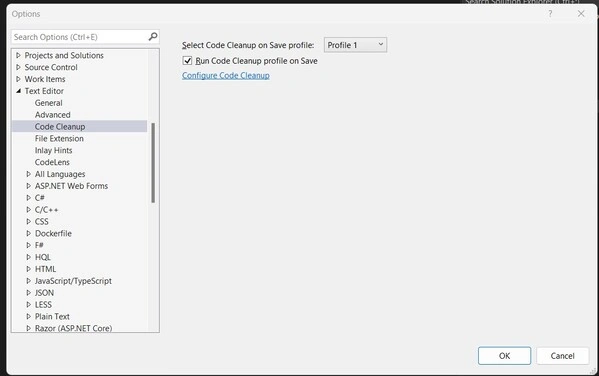
- Go to: Tools > Options > Text Editor > [Your Language, e.g., C#] > Code Style > Code Cleanup
- There are two profiles (Profile 1 & Profile 2). Each can be customized with:
-
Format document
-
Sort and remove usings
-
Apply file header
-
Apply naming rules
-
Remove unnecessary code
-
-
Click Configure Code Cleanup to choose what each profile should do.
Run Cleanup on Entire Solution or Project
-
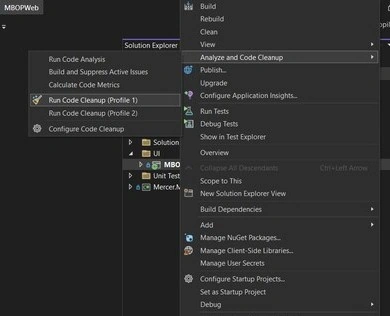
Right-click on the Solution or Project in Solution Explorer.
-
Choose Analyze and Code Cleanup > Run Code Cleanup.
Note: By default, this only formats open documents. To apply it to all files, use a tool like Roslyn analyzers or the dotnet format CLI (for .NET Core/.NET 5+ projects).
Optional Tools for Deeper Cleanup
-
.editorconfig file: Store consistent code style settings in the repo.
-
Roslyn Analyzers: Enforce rules across the solution.
-
Refactoring Suggestions: Lightbulb actions (Ctrl + .)
Conclusion
In this article, I have tried to cover Code cleanup in Visual Studio 2022.
Join the conversation! Your thoughts help the community grow.