
This is simple Client/Server (multi-threading) program that transfers data. Server can handle multiple clients.
I have used VS.NET to implement this program. Double click on ClientServer.Zip and extract all the files and folders to a folder in C drive.
Run the project using VS.NET:
Double click on Client.sln (Project file) and Server.sln (Project file). Then run the project (press F5).
Run using command-line prompt.
Copy Server (Form1.cs) files in to a folder (Server) in C drive. Then copy Client (From1.cs, LoginInfo.cs) in to another folder (Client) in C drive and compile it using
C:\FolderName> csc *.cs
This will create a Form1.exe file inside the folder. You have to compile files in both folders separately. Then run the Server and Client by double clicking on each Form.exe file.
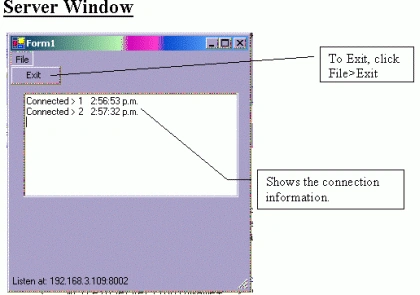
Important: Make sure that you enter the correct IP address of your computer. To find out the IP address of your computer type c:\>ipconfig and press enter. Port number is 8002. This will display the IP address of your computer. Enter that value in the Form1.cs
private string ipAddress = "Your IP Address";
For example:
private string ipAddress = "192.168.5.106";
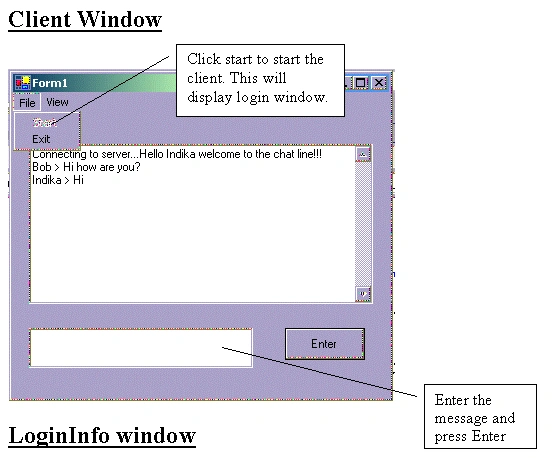
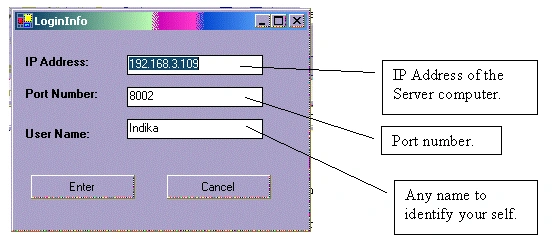
Fill all the details and press enter to connect to the server.Have Fun!!!!
vikas nPosted Jun 30, 2012, 12:44 PM
hi, i can login from client program . and the server side is showing that conect id and time. but in client side i can not see any greeting message like welcome to chat indika. i think the writeToServer() function is not working . can u tell why its not working and what is the possible solution. thanks for post . and hope to hear from u soon.
ahmed sheimyPosted May 24, 2010, 1:26 PM
the server code need some modification to work this the working code /* Author: Indika M Wickramanayake Date: 7th November 2002 Email: [email protected] */ using System; using System.Collections; using System.Windows.Forms; using System.Threading; using System.Net.Sockets; using System.IO; namespace Server { /* This stores data about each client */ public struct ClientData { public Socket structSocket; public Thread structThread; } /// <summary> /// Summary description for Form1. /// </summary> public class Form1 : System.Windows.Forms.Form { private System.Windows.Forms.MainMenu mainMenu1; private System.Windows.Forms.MenuItem menuItem1; private System.Windows.Forms.MenuItem menuItemExit; private System.Windows.Forms.StatusBar statusBar1; private TcpListener tcpLsn; private Hashtable dataHolder = new Hashtable(); private static long connectId=0; private System.Windows.Forms.TextBox textBox1; private Thread tcpThd; private string ipAddress = "169.254.148.164"; delegate void SetTextCallBack(string text); /// <summary> /// Required designer variable. /// </summary> private System.ComponentModel.Container components = null; public Form1() { InitializeComponent(); tcpLsn = new TcpListener(System.Net.IPAddress.Parse(ipAddress),8002); tcpLsn.Start(); statusBar1.Text = "Listen at: " + tcpLsn.LocalEndpoint.ToString(); tcpThd = new Thread(new ThreadStart(WaitingForClient)); tcpThd.Start(); } /// <summary> /// Clean up any resources being used. /// </summary> protected override void Dispose( bool disposing ) { if( disposing ) { if (components != null) { components.Dispose(); } } base.Dispose( disposing ); } #region Windows Form Designer generated code /// <summary> /// Required method for Designer support - do not modify /// the contents of this method with the code editor. /// </summary> private void InitializeComponent() { this.mainMenu1 = new System.Windows.Forms.MainMenu(); this.menuItem1 = new System.Windows.Forms.MenuItem(); this.menuItemExit = new System.Windows.Forms.MenuItem(); this.statusBar1 = new System.Windows.Forms.StatusBar(); this.textBox1 = new System.Windows.Forms.TextBox(); this.SuspendLayout(); // // mainMenu1 // this.mainMenu1.MenuItems.AddRange(new System.Windows.Forms.MenuItem[] { this.menuItem1}); // // menuItem1 // this.menuItem1.Index = 0; this.menuItem1.MenuItems.AddRange(new System.Windows.Forms.MenuItem[] { this.menuItemExit}); this.menuItem1.Text = "File"; // // menuItemExit // this.menuItemExit.Index = 0; this.menuItemExit.Text = "Exit"; this.menuItemExit.Click += new System.EventHandler(this.menuItemExit_Click); // // statusBar1 // this.statusBar1.Location = new System.Drawing.Point(0, 251); this.statusBar1.Name = "statusBar1"; this.statusBar1.Size = new System.Drawing.Size(292, 22); this.statusBar1.TabIndex = 1; this.statusBar1.Text = "Start the Server"; // // textBox1 // this.textBox1.Location = new System.Drawing.Point(16, 32); this.textBox1.Multiline = true; this.textBox1.Name = "textBox1"; this.textBox1.Size = new System.Drawing.Size(264, 128); this.textBox1.TabIndex = 2; this.textBox1.Text = ""; // // Form1 // this.AutoScaleBaseSize = new System.Drawing.Size(5, 13); this.ClientSize = new System.Drawing.Size(292, 273); this.Controls.AddRange(new System.Windows.Forms.Control[] { this.textBox1, this.statusBar1}); this.Menu = this.mainMenu1; this.Name = "Form1"; this.Text = "Form1"; this.Load += new System.EventHandler(this.Form1_Load); this.ResumeLayout(false); } #endregion /// <summary> /// The main entry point for the application. /// </summary> [STAThread] static void Main() { Application.Run(new Form1());} public void WaitingForClient() { ClientData CData; while(true) { /* Accept will block until someone connects */ CData.structSocket = tcpLsn.AcceptSocket(); Interlocked.Increment(ref connectId); CData.structThread = new Thread(new ThreadStart(ReadSocket)); lock(this) { // it is used to keep connected Sockets and active thread dataHolder.Add(connectId, CData); upDateDataGrid("Connected > "+connectId+" "+DateTime.Now.ToLongTimeString()); } CData.structThread.Start(); } } public void ReadSocket() { /* realId will be not changed for each thread, but connectId is * changed. it can't be used to delete object from Hashtable*/ long realId = connectId; Byte[] receive; ClientData cd = (ClientData)dataHolder[realId]; Socket s = cd.structSocket; int ret = 0; while (true) { if(s.Connected) { receive = new Byte[100] ; try { /* Receive will block until data coming ret is 0 or Exception * happen when Socket connection is broken*/ ret = s.Receive(receive,receive.Length,0); if (ret>0) { foreach(ClientData clntData in dataHolder.Values) { if(clntData.structSocket.Connected) clntData.structSocket.Send(receive,ret,SocketFlags.None); } } else { break; } } catch (Exception e) { upDateDataGrid(e.ToString()); if( !s.Connected ) break; } } } CloseTheThread(realId); } private void CloseTheThread(long realId) { try { ClientData clientData = (ClientData)dataHolder[realId]; clientData.structThread.Abort(); } catch(Exception e) { lock(this) { dataHolder.Remove(realId); upDateDataGrid("Disconnected > "+realId+" "+DateTime.Now.ToLongTimeString()); } } } public void upDateDataGrid(string displayString) { if (this.textBox1.InvokeRequired) { SetTextCallBack t = new SetTextCallBack(upDateDataGrid); this.Invoke(t, new object[] { displayString }); } else { textBox1.AppendText(displayString + "\r\n"); } } private void Form1_Load(object sender, System.EventArgs e) { } private void menuItemExit_Click(object sender, System.EventArgs e) { if (tcpLsn!=null) { tcpLsn.Stop(); } foreach (ClientData cd in dataHolder.Values) { if(cd.structSocket.Connected) cd.structSocket.Close(); if(cd.structThread.IsAlive) cd.structThread.Abort(); } if(tcpThd.IsAlive) tcpThd.Abort(); Application.Exit(); } } }
Muhammad UmairPosted Feb 27, 2008, 10:21 AM
hi InDika how r u .friend i run ur this program when i give ip and port in client and try to connect to the server the exception rises here public void upDateDataGrid(string displayString) { textBox1.AppendText(displayString + DateTime.Now); } Cross-thread operation not valid: Control 'textBox1' accessed from a thread other than the thread it was created on. this eroor generated in server code
wrade63Posted Jul 4, 2007, 6:23 AM
hi, i can login from client program . and the server side is showing that conect id and time. but in client side i can not see any greeting message like welcome to chat indika. i think the writeToServer() function is not working . can u tell why its not working and what is the possible solution. thanks for post . and hope to hear from u soon.