

This article outlines an intelligent document‑classification solution that automatically distinguishes Invoice and Non‑Invoice documents using Microsoft AI Builder integrated with Power Automate. The goal is to streamline document routing, reduce manual review, and enable downstream automation for finance operations.
System Overview
| Component | Role | Key Features |
|---|---|---|
| AI Builder Document Classification Model | Core Intelligence | Trained on labeled invoice/non‑invoice samples; returns prediction and confidence score |
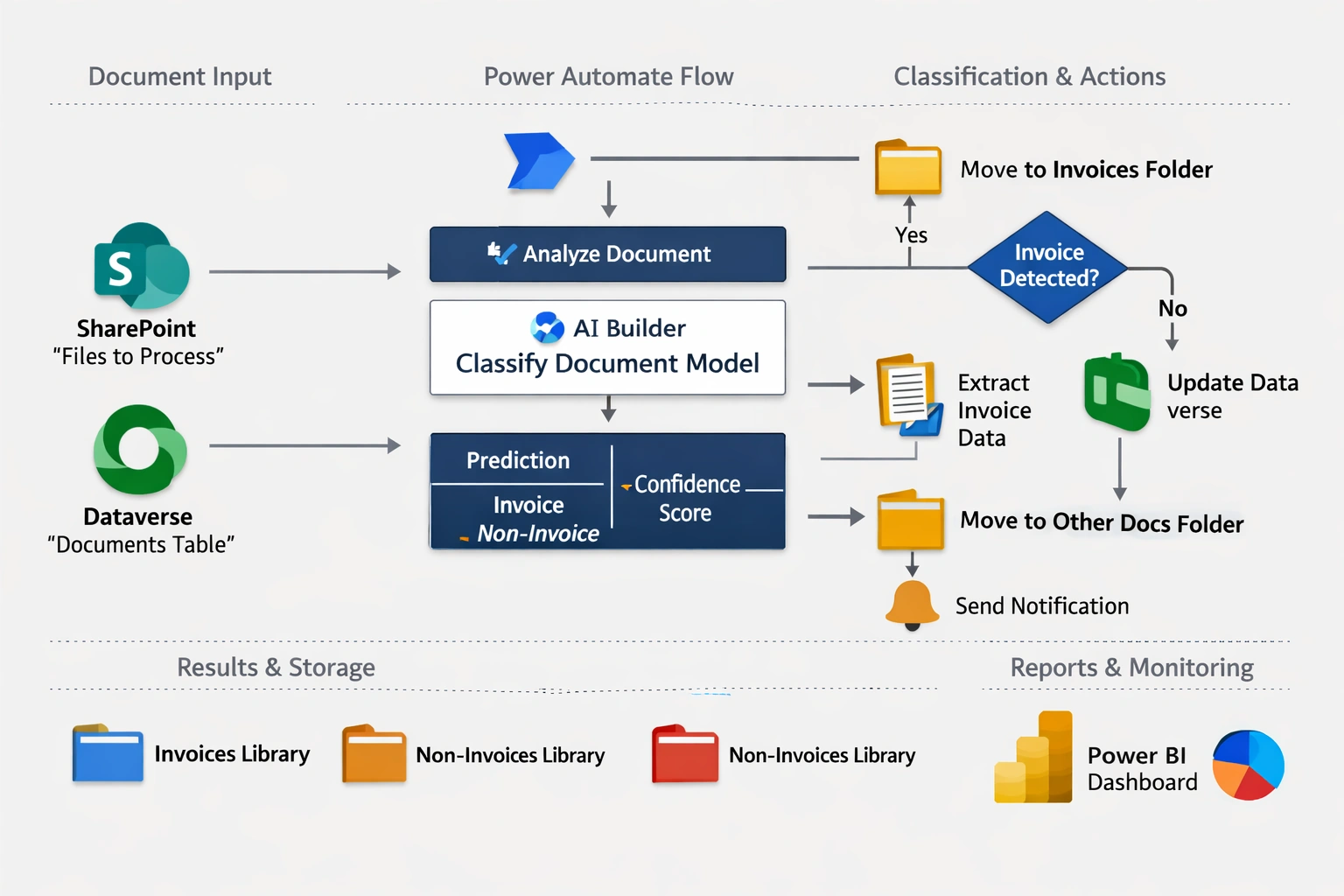
| Power Automate Flow | Orchestration layer | Triggers on document upload; invokes AI Builder; applies conditional logic |
| SharePoint / Dataverse | Storage and metadata | Stores documents, classification results, and audit trail |
| Power BI Dashboard | Monitoring | Tracks classification accuracy, confidence trends, and workflow performance |
Implementation Steps
1. AI Builder Model
Type: Document Classification model
Training Data:
Collect sample documents (PDF, Word, images).
Label them as Invoice or Non‑Invoice.
Training Process:
Upload at least 50–100 documents per category for accuracy.
Train and publish the model in AI Builder.
2. Dataverse / SharePoint Storage
Store incoming documents in a SharePoint library or Dataverse table.
Metadata fields:
Document Name
Classification Result
Confidence Score
Processing Status
3. Power Automate Flow
Trigger Options:
SharePoint: "When a file is created in a folder"
Dataverse: "When a row is added"
Flow Steps
Input Document
Get file content from SharePoint/Dataverse.
Call AI Builder Model
Use AI Builder – Classify documents action.
Pass the file content to the trained model.
Process Output
Model returns:
Predicted Category (Invoice / Non‑Invoice)
Confidence Score
Conditional Logic
If Invoice:
Move to "Invoices" folder or update Dataverse record.
Trigger downstream workflows (e.g., extract invoice data, send to Finance).
If Non‑Invoice:
Move to "Other Documents" folder.
Optionally notify or archive.
Notifications
Send email/Teams alert with classification result and confidence score.
Example Flow (Step-by-Step)
Trigger: File uploaded to SharePoint → "Invoices-Processing" library.
Action: AI Builder → Classify document.
Condition:
If result = "Invoice" → Move to "Invoices" library.
Else → Move to "Non-Invoices" library.
Update Metadata: Add classification result + confidence score.
Notify: Email Finance team with document details.
Benefits
Eliminates manual sorting.
Improves accuracy and auditability.
Enables end‑to‑end automation for finance workflows.
Provides real‑time insights via Power BI.
Future Enhancements
Add multi‑class classification (e.g., Purchase Orders, Receipts).
Integrate with Dynamics 365 Finance for automated posting.
Extend to multilingual document support.
Join the conversation! Your thoughts help the community grow.