
The Main Heart of the program is taken from the sample program of Gopalan Suresh Raj modified as per requirement & presented in front of you.... Hope it would be helpful for somebody
How to Run the Chat Server and the Client?
- First start the server.exe
- Next start formclient.exe
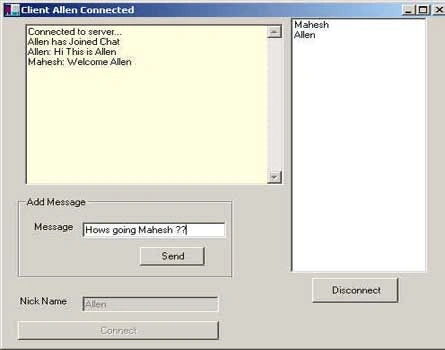
- Give you nick name "xyz" & click the connect button .... you will be connected to the server & a message will be displaed in the yellow box
- Run formclient.exe again with start-->run-->formclient.exe & give another
nick name for trial & error.
The Server Code: The server code is implemented in newServer.cs.
/**
* Article: Channels and .NET Remoting
* Copyright (c) 2000, Gopalan Suresh Raj. All Rights Reserved.
* File: NewServer.cs
* ... Thanks Saurabh for great help to make it lively Your Knowledge Rules ....
* ... Thanks Mahesh for Loading it on Site .... It Rocks
* ... Thanks to You for Reading it You know better who you are :)
* ... The Main Heart of the program is taken from the sample program of Gopalan Suresh Raj
* ... modified as per requirement & presented in front of you.... Hope it would be helpful for somebody
*/
using System;
using System.IO;
using System.Collections;
using System.Runtime.Remoting;
using System.WinForms ;
using System.Runtime.Remoting.Channels.HTTP;
namespace com.icommware.PublishSubscribe
{
public class Topic : MarshalByRefObject
{
ArrayList userlist = new ArrayList() ;
ArrayList textboxlist = new ArrayList() ;
ArrayList listboxlist = new ArrayList() ;
///<summary>
/// Input : string username (by value) and RichTextBox , ListBox (by refrence)
/// Output: bool 'true' if username is unique else 'false '
///</summary>
public bool addUser(string user, ref RichTextBox textBox1, ref ListBox listBox1)
{
//check is username is present in the userlist 'ArrayList'
bool test=userlist.Contains(user) ;
if(test)
{
//if present then Give the message to use and return 'false'
textBox1.Text+="This Nick has already been taken, try changing your Nick \n" ;
return false ;
}
else
{
//user is unique hence add him to the userlist
userlist.Add(user) ;
//add the RichTextBox reference to textboxlist
textboxlist.Add(textBox1);
//add to existing users list
foreach(ListBox lb in listboxlist)
{
lb.Items.Add(user) ;
}
//add the ListBox reference to listboxlist
listboxlist.Add(listBox1) ;
//Send to message only to the client connected
textBox1.Text+="Connected to server... \n" ;
//send message to everyone .
sendMessage(user+" has Joined Chat") ;
//add all the usernames in the ListBox of the client
foreach(string users in userlist)
{
listBox1.Items.Add(users) ;
}
return true ;
}
}
///<summary>
/// Input: string username
/// It is called when the user quits chat
///</summary>
public void removeUser(string user)
{
//check is the user is present in the userlist
try
{
if(userlist.Contains(user))
{
//get the position of user in userlist
int i=userlist.IndexOf(user) ;
//remove user from userlist
userlist.Remove(user) ;
//remove user's RichTextBox reference from textboxarray
textboxlist.RemoveAt(i) ;
//remove user's ListBox refrence from listboxarray
listboxlist.RemoveAt(i) ;
//Inform all users about user quiting
sendMessage(user+" has quit Chat") ;
//remove the user from all users ListBox
foreach(ListBox lb in listboxlist)
{
lb.Items.Remove((object)user) ;
}
}
}
catch(Exception ed)
{
Console.WriteLine(ed) ;
}
}
///<summary>
/// Input: string message
/// it sends the message to all users connected to the server
///<summary>
public void sendMessage(string message)
{
//write the message on the server console
Console.WriteLine ("Added Message : {0}", message);
//for each user connected, send the message to them
foreach(RichTextBox rf in textboxlist)
{
rf.Text+=message+"\n" ;
}
}
}
public class TheServer
{
public static void Main ()
{
int listeningChannel = 1099;
// Create a New HTTP Channel that listens on Port listeningChannel
// TCPChannel channel = new TCPChannel (listeningChannel);
HTTPChannel channel = new HTTPChannel (listeningChannel);
// Register the channel with the runtime
ChannelServices.RegisterChannel (channel);
// Expose the Calculator Object from this Server
RemotingServices.RegisterWellKnownType ("Server",
"com.icommware.PublishSubscribe.Topic",
"Topic.soap",
WellKnownObjectMode.Singleton);
// Keep the Server running until the user presses enter
Console.WriteLine ("The Topic Server is up and running on port {0}", listeningChannel);
Console.WriteLine ("Press enter to stop the server...");
Console.ReadLine ();
}
}
}
// That's all ... it's all easy if you are willing understand !
// Make a printout of it & open your .net sdk for better understanding :)
The Client Code: The client code reside in newFormclient.cs.
/**
* Article: Channels and .NET Remoting
* Copyright (c) 2000, Gopalan Suresh Raj. All Rights Reserved.
* ... Thanks Saurabh for great help to make it lively .... thanks :)
* ... Thanks Mahesh for Loading it on Site .... It Rocks :)
* ... Thanks to You for Reading it You know better who you are :)
* ... The Main Heart of the program is taken from the sample program of Gopalan Suresh Raj
* ... modified as per requirement & presented in front of you.... Hope it would be helpful for somebody
*/
// Win32Form1.cs
namespace Win32Form1Namespace
{
using System;
using System.Drawing;
using System.ComponentModel;
using System.WinForms;
using System.Runtime.Remoting;
using System.Runtime.Remoting.Channels.HTTP;
using com.icommware.PublishSubscribe;
using System.Collections;
/// <summary>
/// Summary description for Win32Form1.
/// </summary>
public class Win32Form1 : System.WinForms.Form
{
/// <summary>
/// Required by the Win Forms designer
/// </summary>
private System.ComponentModel.Container components;
private System.WinForms.Button nickname_btn;
private System.WinForms.TextBox nickname_txtbox;
private System.WinForms.Label nickname;
private System.WinForms.Button btnListname;
private System.WinForms.Button button1;
private System.WinForms.TextBox textBox2;
private System.WinForms.Label label1;
private System.WinForms.GroupBox groupBox1;
//useing RichTextBox insted of TextBox since It supports many more enhancements private System.WinForms.RichTextBox textBox1;
private System.WinForms.ListBox listBox1;
private Topic topic ;
private string username ;
private bool connected=false ;
private HTTPChannel channel ;
public Win32Form1()
{
// Required for Win Form Designer support
InitializeComponent();
// TODO: Add any constructor code after InitializeComponent call
}
/// <summary>
/// Clean up any resources being used
/// </summary>
public override void Dispose()
{
quitclient() ;
base.Dispose();
components.Dispose();
}
/// <summary>
/// The main entry point for the application.
/// </summary>
public static void Main(string[] args)
{
Application.Run(new Win32Form1());
}
/// <summary>
/// Required method for Designer support - do not modify
/// the contents of this method with an editor
/// </summary>
private void InitializeComponent()
{
this.components = new System.ComponentModel.Container();
this.button1 = new System.WinForms.Button();
this.listBox1 = new System.WinForms.ListBox();
this.groupBox1 = new System.WinForms.GroupBox();
this.label1 = new System.WinForms.Label();
this.nickname_btn = new System.WinForms.Button();
this.textBox2 = new System.WinForms.TextBox();
this.nickname = new System.WinForms.Label();
this.nickname_txtbox = new System.WinForms.TextBox();
this.btnListname = new System.WinForms.Button();
this.textBox1 = new System.WinForms.RichTextBox();
//@design this.TrayHeight = 0;
//@design this.TrayLargeIcon = false;
//@design this.TrayAutoArrange = true;
button1.Location = new System.Drawing.Point(136, 64);
button1.Size = new System.Drawing.Size(72, 24);
button1.TabIndex = 4;
button1.Text = "Send";
button1.Click += new System.EventHandler(button1_Click);
listBox1.Location = new System.Drawing.Point(320, 0);
listBox1.Size = new System.Drawing.Size(152, 329);
listBox1.TabIndex = 0;
groupBox1.Location = new System.Drawing.Point(16, 232);
groupBox1.TabIndex = 0;
groupBox1.TabStop = false;
groupBox1.Text = "Add Message";
groupBox1.Size = new System.Drawing.Size(240, 104);
label1.Location = new System.Drawing.Point(16, 32);
label1.Text = "Message";
label1.Size = new System.Drawing.Size(56, 23);
label1.TabIndex = 0;
nickname_btn.Location = new System.Drawing.Point(16, 392);
nickname_btn.Size = new System.Drawing.Size(224, 24);
nickname_btn.TabIndex = 2;
nickname_btn.Text = "Connect";
nickname_btn.Click += new System.EventHandler(nickname_btn_Click);
textBox2.Location = new System.Drawing.Point(72, 32);
textBox2.TabIndex = 3;
textBox2.Size = new System.Drawing.Size(160, 20);
textBox2.Click += new System.EventHandler(button1_Click);
nickname.Location = new System.Drawing.Point(16, 360);
nickname.Text = "Nick Name";
nickname.Size = new System.Drawing.Size(72, 16);
nickname.TabIndex = 0;
nickname_txtbox.Location = new System.Drawing.Point(88, 360);
nickname_txtbox.TabIndex = 1;
nickname_txtbox.Size = new System.Drawing.Size(152, 20);
nickname_txtbox.Click += new System.EventHandler(nickname_btn_Click);
btnListname.Location = new System.Drawing.Point(344, 336);
btnListname.Size = new System.Drawing.Size(96, 32);
btnListname.TabIndex = 5;
btnListname.Text = "Disconnect";
btnListname.Enabled=false ;
btnListname.Click += new System.EventHandler(btnListname_Click);
textBox1.Location = new System.Drawing.Point(24, 8);
textBox1.Multiline = true;
textBox1.TabIndex = 0;
textBox1.Size = new System.Drawing.Size(288, 208);
textBox1.BackColor = System.Drawing.SystemColors.Info;
this.Text = "Client";
this.AutoScaleBaseSize = new System.Drawing.Size(5, 13);
this.ClientSize = new System.Drawing.Size(496, 425);
groupBox1.Controls.Add(button1);
groupBox1.Controls.Add(textBox2);
groupBox1.Controls.Add(label1);
this.Controls.Add(nickname_btn);
this.Controls.Add(nickname_txtbox);
this.Controls.Add(nickname);
this.Controls.Add(btnListname);
this.Controls.Add(groupBox1);
this.Controls.Add(textBox1);
this.Controls.Add(listBox1);
}
///<summary>
/// Does the cleaning up when client diconnects
///</summary>
private void quitclient()
{
if(topic!=null)
{
try
{
//remove the user from the server
topic.removeUser(username) ;
connected=false ;
//set the buttons
btnListname.Enabled=false;
nickname_txtbox.Enabled=true ;
nickname_btn.Enabled=true ;
listBox1.Items.Clear() ;
//unregister to channel so we can connect some other place
ChannelServices.UnregisterChannel(channel) ;
}
catch(Exception ed)
{
//this exception will occur when a 2 clients are running on the same machine and
//one try's to disconnect.
//Since both are using the same port (i.e. '0') to conect to server
//if you see above we are calling 'ChannelServices.UnregisterChannel(channel)'
//this will try to close the port '0' but since another client is
//using this port a exception will occur
Console.WriteLine(ed) ;
}
}
}
protected void nickname_btn_Click(object sender, System.EventArgs e)
{
try
{
// codeing manipulation starts here ...
if(!connected)
{
int listeningChannel = 0;
// Create and register a channel to communicate to the server
// The Client will use the port passed in as args to listen for callbacks
channel = new HTTPChannel (listeningChannel);
ChannelServices.RegisterChannel (channel);
// Create an instance on the remote server and call a method remotely
topic = (Topic) Activator.GetObject (typeof (Topic), // type to create
"http://localhost:1099/Topic.soap" // URI
);
username = nickname_txtbox.Text ;
//add the user to the server
bool check = topic.addUser(nickname_txtbox.Text, ref textBox1 ,ref listBox1) ;
if(!check)
{
//if server rejected user then do cleanup
connected=false ;
btnListname.Enabled=false;
nickname_txtbox.Enabled=true ;
nickname_btn.Enabled=true ;
ChannelServices.UnregisterChannel (channel);
topic=null ;
nickname_txtbox.Text="" ;
}
else
{
//set up variables and buttons
connected=true ;
btnListname.Enabled=true;
nickname_txtbox.Enabled=false ;
nickname_btn.Enabled=false ;
this.Text="Client "+username+" Connected" ;
}
}
}
catch(Exception ed)
{
MessageBox.Show(this, "Exception occured"+ed.ToString());
}
}
protected void btnListname_Click(object sender, System.EventArgs e)
{
//call the mothod to quit rom server
quitclient() ;
}
protected void button1_Click(object sender, System.EventArgs e)
{
//send the message to everyone
if(textBox2.Text!="")
{
topic.sendMessage(username+": "+textBox2.Text) ;
textBox2.Text="";
}
}
}
}
// That's all ... it's all easy if you are willing understand !
// Make a printout of it & open your .net sdk for better understanding :)
If you have any comments or doubts or find something terrible wrong in program or comments. Please feel free to e-mail me !
Rajagopal AswinPosted Mar 8, 2017, 2:40 PM
or call me @+919443195053 i want help as soo n as possible i am doing BE so or my mini project i am asking
Rajagopal AswinPosted Mar 8, 2017, 2:39 PM
please help me at mail ---- [email protected]
Rajagopal AswinPosted Mar 8, 2017, 2:37 PM
how to chat between two computers using asp.net
Rajagopal AswinPosted Mar 8, 2017, 2:37 PM
how to chat between two computers using asp.net
Sunil DeshalahrePosted Feb 6, 2013, 6:47 AM
Such a nice project...thank you for this...
Ashutosh AlexandarPosted Jan 21, 2013, 1:14 AM
can we do the same in web form application..plz reply at [email protected]
nasr adnanPosted Jul 22, 2012, 8:49 PM
"The application was unable to start correctly (0xc000007b). click ok to close the applicatin" Sir why is this appearing? please I need y help [email protected]
Wilson LastimozaPosted Mar 19, 2012, 9:00 AM
Hi, For creating a Silverlight chat application I can recommend the Ozeki VoIP SIP SDK. For sample source codes check this: www.voip-sip-sdk.com/p_257-silverlight-video-chat-example-voip.html The support team is also responsive so you can make your project even faster with the help of them. BR
T WeihsbachPosted Jan 19, 2012, 9:10 AM
How can i find private Topic topic ; in C#?
Basit SyedPosted Aug 18, 2010, 5:34 AM
Sir as i posted you the problem i faced. you can tell me the solution on the following email adress [email protected] Regards, Syed Basit ali shah
Basit SyedPosted Aug 18, 2010, 1:02 AM
whatever you think is great. Sir i have downloaded the files but when i click on server.exe this message is displayed "The application failed to initialize properly (0xc00000007b) click ok to terminate" Sir why is this appearing?
doguPosted Jun 4, 2010, 4:58 AM
very good
amin rahdarPosted May 23, 2010, 7:08 AM
Thanks
behrang binaPosted Apr 18, 2010, 4:06 AM
It didn work work for me.."application unable to start correctly..." is it possible to have a sourcecode:") [email protected]
timePosted May 12, 2009, 11:28 AM
I need some help if you can ^_^
maisa baniessaPosted Apr 23, 2009, 7:20 AM
can you provide me with pvm program for bubbil sort? please help me.
karla manchaPosted Feb 25, 2009, 1:50 PM
good program
divya vPosted Feb 25, 2009, 1:57 AM
the gui in server is to monitor client sessions, view message log and so.... it will be better if you post seperate client server application each developed using windows forms with GUI. Thanks
Sutee LeelahawongPosted Jan 19, 2009, 11:28 PM
I cannot run your file because it have some problems about initialize properly
Madhava NarayanPosted Sep 23, 2008, 10:05 AM
how did you create the exe .. do u hav code for it??
paresh masaniPosted Feb 3, 2008, 7:23 AM
Will it work as a multithreaded server? Thanks, Paresh
marian biruPosted Jan 11, 2008, 5:18 AM
i am trying to compile this code but i don't know what i hawe to include to declare "private Topic topic" pls help meee
Ricky PatnaikPosted Jan 2, 2008, 7:39 AM
how can we introduce chat rooms in this example.
shivkanteditedPosted Dec 5, 2007, 6:14 AMEdited Dec 5, 2007, 6:15 AM
hi, I find that your code is good but have a difficulty while adding the nickname in the list the error pop-ups and also would like to inform you about one more problem that is: RemotingServices.RegisterWellKnownType ("Server", "com.icommware.PublishSubscribe.Topic", "Topic.soap", WellKnownObjectMode.Singleton); is no more exist in .NET Framework 2.0 + . so finded alternative. RemotingConfiguration.RegisterWellKnownServiceType( Type.GetType("com.icommware.PublishSubscribe.Topic"), "Topic.soap",WellKnownObjectMode.Singleton); i got error to the line given below: bool check = topic.addUser(nickname_txtbox.Text, ref textBox1, ref listBox1); while addig the nickname etc to the server.(list box) if u can help me out i'll be thankfull to you. it's very urgent.
Ankush KushwahaPosted Sep 21, 2007, 10:48 AM
can we do the same in web application ... can u help me for the same. My Email address is [email protected] Thanks
wiola jasioPosted Jun 9, 2007, 8:53 PM
hi recently I started writing a chat. Connection between server and multiple clients is done, but I'd like to provide connection between clients, for example after double clicking on list of contacts in client's window, so that another window for conversation could open I'm just a beginner, so will be greatful for some "simple" explanation of how to do it, and some examples if possible Thanks in advance Wiola