

Today we learn how to capture photos and videos from a capture device, such as a webcam, and how to preview the video live, rotate the video and the shakiness in capturing the video from a camera or webcam in a Windows Store App using C#.
I will use a CaptureElement object and the Windows.Media.Capture API to render video streams in a Windows Store app built for Windows using C#.
How to create the application.
Step 1
Create a Blank Windows Store App using C#.
Step 2
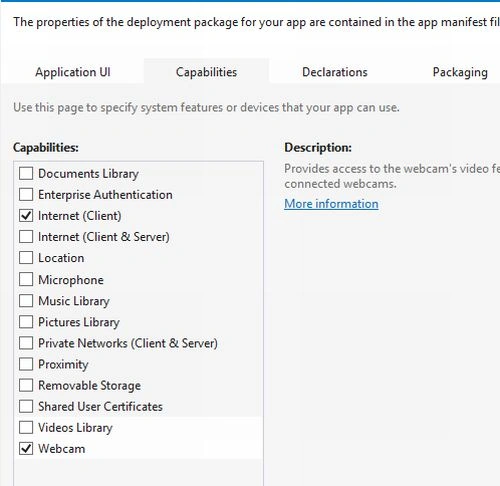
First of all you will need to set the device capability in your application to access the webcam.
- In Microsoft Visual Studio 2012 for Windows 8, in Solution Explorer, open the designer for the application manifest by double-clicking the package.appxmanifest item.
- Click Capabilities.
- Check the box for the webcam.
Step 3
Now, I will create a CaptureElement to render the captured video in the application. For this write the following code in XAML file:
<CaptureElement Name="capturePreview" Height="400" />
Step 4
Include the following namespaces in the .cs file:
using Windows.Media.Capture;
using Windows.Media;
Step 5
Here we use the MediaCapture class to preview the captured video. MediaCapture class contains the various methods and properties that allows us to set up and manage the videos. I am going to create an object of the MediaCapture Class as in:
MediaCapture captureMgr = new MediaCapture();
Step 6
After creating an object of the MediaCapture class I call InitializeAsync to initialize the MediaCapture object to the default settings, as in:
await captureMgr.InitializeAsync();
Step 7
In this step I will set the rotation of the video for previewing. Here I use the VideoRotation enumeration value to SetPreviewRotation of the MediaCapture object; see:
captureMgr.SetPreviewRotation(VideoRotation.Clockwise90Degrees);
captureMgr.SetRecordRotation(VideoRotation.Clockwise90Degrees);
You can specify the amount of rotation that you want to rotate the video. It contains values for None (0), 90, 180, and 270 degrees.
Step 8
Here I am getting the rotation value for the preview of a video by calling GetPreviewRotation() method of the MediaCapture class. This method returns a VideoRotation enum.
VideoRotation previewRotation = captureMgr.GetPreviewRotation();Step 9Now, I am going to add a video stabilization effect to the captured video. It helps to reduce shakiness in the video, such as from a hand-held camera. To add the stabilization effect during live capture
I use the MediaCapture.AddEffectAsync method. This method takes the following parameters:
MediaStreamType: This specifies the type of Stream.
EffectActivationID: This specify the implements the effect.
EffectSettings: This specifies the additional configuration parameters for the effect.
await captureMgr.AddEffectAsync(MediaStreamType.VideoRecord,
VideoEffects.VideoStabilization,null);
You can also clear all the effects from the captured video that we applied earlier if required. Call the ClearEffectsAsync method to clear all of the effects from the stream; see:
// captureMgr is of type MediaCapture.
await captureMgr.ClearEffectsAsync(MediaStreamType.VideoRecord);
Step 11
Now I am going to Start the Video preview. I use the StartPreviewAsync() method, as in:
capturePreview.Source = captureMgr;
await captureMgr.StartPreviewAsync();
In the preceding code the CaptureElement.Source is set to the MediaCapture object and the preview is started using StartPreviewAsync.
Here is full code:
MediaCapture captureMgr = new MediaCapture();
await captureMgr.InitializeAsync();
captureMgr.SetPreviewRotation(VideoRotation.Clockwise90Degrees);
captureMgr.SetRecordRotation(VideoRotation.Clockwise90Degrees);
VideoRotation previewRotation = captureMgr.GetPreviewRotation();
await captureMgr.AddEffectAsync(MediaStreamType.VideoRecord,
VideoEffects.VideoStabilization,null);
// Start capture preview.
// capturePreview is a CaptureElement defined in XAML.
capturePreview.Source = captureMgr;
await captureMgr.StartPreviewAsync();
Summary
In this article we learned how preview a live video and rotate a video captured from a camera or webcam.
Marcel BendersPosted Aug 17, 2014, 2:05 PM
It works good with the emulator. But when i debug with my Lumia 625 it crashes down at: await captureMgr.InitializeAsync(); Any solutions?
Deepak MiddhaPosted Sep 19, 2012, 4:45 AM
Hi gaurav!your article is very good and provide a deep knowledge of the subject.