
It is a good idea to check your .NET Framework SDK documentation, especially, Interoperating with Unmanaged Code. For a start, we will first check the managed side of the story. To expose the managed types, properties, fields, or events to COM, they must be public. Types can't be abstract and they must have a default constructor. It's recommended to define interface explicitly but it is not necessary. The tools provided with .NET Platform are capable of creating this for you. Let's try it.
- using System;
- public class T {
- public string A(string s) {
- return s + " from C#";
- }
- }
csc /t:library str.cs
tlbexp str.dll /out:str.tlb
regasm str.dll
- Copy str.dll and str.tlb to MS Office directory. Typically, it is "C:\Program Files\Microsoft Office\Office".
- Now, open your favorite MS Office application, i.e., Excel and open Visual Basic Editor (Alt + F11).
- To check the early binding, add a reference to your library, browse to and select str.tlb.
- Insert a new module into the project and paste the following code in the code editor.
- Sub Test()
- Dim o As New T
- MsgBox(o.A("Hello"), , "VBA test")
- End Sub
- Sub LBTest()
- Dim o
- o = CreateObject("T")
- MsgBox(o.A("Hello"), , "VBA late binding test")
- End Sub
If you like to do the same from VB script, copy str.dll and str.tlb to "C:\WINNT\system32" because wscript.exe will need these to execute your script. Create a new .VBS file and paste into it the following.
- Dim o
- Set o = CreateObject("T")
- MsgBox o.A("Hello"), , "VBS test"
When you are done with testing, don't forget to unregister your str.dll. To do that, execute from the command line "regasm str.dll /unregister". Also, deleting str.dll and str.tlb copies from "C:\Program Files\Microsoft Office\Office" and "C:\WINNT\system32" is a good idea. But some developers will be interested to examine the closer details of what is in str.tlb.
- // Generated .IDL file (by the OLE/COM Object Viewer)
- //
- // typelib filename: str.tlb
- [
- uuid(AD7B6A7C - 4 F96 - 3710 - B1AC - 5170E611 BA57),
- version(1.0),
- custom(90883 F05 - 3 D28 - 11 D2 - 8 F17 - 00 A0C9A6186D, str, Version = 0.0 .0 .0, Culture = neutral, PublicKeyToken = null)
- ]
- library str {
- // TLib : // TLib : Common Language Runtime Library : {BED7F4EA-1A96-11D2-8F08-00A0C9A6186D}
- importlib("mscorlib.tlb");
- // TLib : OLE Automation : {00020430-0000-0000-C000-000000000046}
- importlib("stdole2.tlb");
- // Forward declare all types defined in this typelib
- interface _T;
- [
- uuid(4996 A037 - 02 BD - 3839 - A363 - A9A321885D2C),
- version(1.0),
- custom(0 F21F359 - AB84 - 41E8 - 9 A78 - 36 D110E6D2F9, T)
- ]
- coclass T {
- [
- default
- ] interface _T;
- interface _Object;
- };
- [
- odl,
- uuid(742 F958A - 4 C27 - 399 F - 89 DD - 5368588 B63B7),
- hidden,
- dual,
- oleautomation,
- custom(0 F21F359 - AB84 - 41E8 - 9 A78 - 36 D110E6D2F9, T)
- ]
- interface _T: IDispatch {};
- };
What is wrong there? Our public string A method is nowhere to be seen. Also, the familiar methods belonging to the object are hidden.
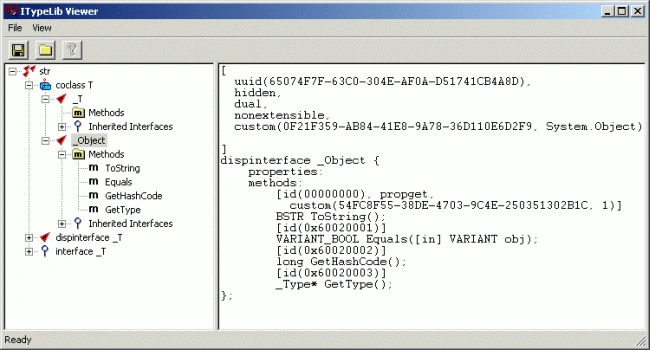
That means the VBA code editor won't be able to help in to show methods and properties of the class. So what could be done to improve that kind of situation? The help comes from attributes. Change your C# code into this.
- using System;
- using System.Runtime.InteropServices;
- [ClassInterface(ClassInterfaceType.AutoDual)]
- public class T {
- public string A(string s) {
- return s + " from C#";
- }
- }
Repeat the above-mentioned steps to compile. Get tlb and register library, copy str.dll and str.tlb to MS Office directory "C:\Program Files\Microsoft Office\Office" and try early binding. Everything will work fine.
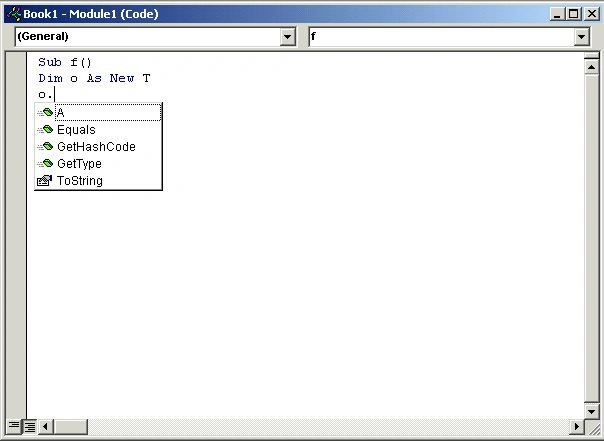
Again, we will check what things look like in OLE/COM Object Viewer.
- // Generated .IDL file (by the OLE/COM Object Viewer)
- //
- // typelib filename: str.tlb
- [
- uuid(AD7B6A7C - 4 F96 - 3710 - B1AC - 5170E611 BA57),
- version(1.0),
- custom(90883 F05 - 3 D28 - 11 D2 - 8 F17 - 00 A0C9A6186D, str, Version = 0.0 .0 .0, Culture = neutral, PublicKeyToken = null)
- ]
- library str {
- // TLib : // TLib : Common Language Runtime Library : {BED7F4EA-1A96-11D2-8F08-00A0C9A6186D}
- importlib("mscorlib.tlb");
- // TLib : OLE Automation : {00020430-0000-0000-C000-000000000046}
- importlib("stdole2.tlb");
- // Forward declare all types defined in this typelib
- interface _T;
- [
- uuid(4996 A037 - 02 BD - 3839 - A363 - A9A321885D2C),
- version(1.0),
- custom(0 F21F359 - AB84 - 41E8 - 9 A78 - 36 D110E6D2F9, T)
- ]
- coclass T {
- [
- default
- ] interface _T;
- interface _Object;
- };
- [
- odl,
- uuid(C145FF57 - 9 C23 - 355 C - B068 - BADECB60531B),
- hidden,
- dual,
- nonextensible,
- oleautomation,
- custom(0 F21F359 - AB84 - 41E8 - 9 A78 - 36 D110E6D2F9, T)
- ]
- interface _T: IDispatch {
- [id(00000000), propget,
- custom(54 FC8F55 - 38 DE - 4703 - 9 C4E - 250351302 B1C, 1)
- ]
- HRESULT ToString([out, retval] BSTR * pRetVal);
- [id(0x60020001)]
- HRESULT Equals(
- [ in ] VARIANT obj,
- [out, retval] VARIANT_BOOL * pRetVal);
- [id(0x60020002)]
- HRESULT GetHashCode([out, retval] long * pRetVal);
- [id(0x60020003)]
- HRESULT GetType([out, retval] _Type ** pRetVal);
- [id(0x60020004)]
- HRESULT A(
- [ in ] BSTR s,
- [out, retval] BSTR * pRetVal);
- };
- };
If you like, it's possible to do things slightly differently. You can generate tlb in one go using the following command.
REGEDIT4
[HKEY_CLASSES_ROOT\T]
@="T"
[HKEY_CLASSES_ROOT\T\CLSID]
@="{4996A037-02BD-3839-A363-A9A321885D2C}"
[HKEY_CLASSES_ROOT\CLSID\{4996A037-02BD-3839-A363-A9A321885D2C}]
@="T"
[HKEY_CLASSES_ROOT\CLSID\{4996A037-02BD-3839-A363-A9A321885D2C}\InprocServer32]
@="C:\WINNT\System32\mscoree.dll"
"ThreadingModel"="Both"
"Class"="T"
"Assembly"="str, Version=0.0.0.0, Culture=neutral, PublicKeyToken=null"
"RuntimeVersion"="v1.0.3705"
[HKEY_CLASSES_ROOT\CLSID\{4996A037-02BD-3839-A363-A9A321885D2C}\ProgId]
@="T"
[HKEY_CLASSES_ROOT\CLSID\{4996A037-02BD-3839-A363-A9A321885D2C}\Implemented Categories\{62C8FE65-4EBB-45E7-B440-6E39B2CDBF29}]
Join the conversation! Your thoughts help the community grow.