

Introduction
This is a continuation of the previous article, creating ‘Azure AD Applications’. This console app calls the graph API service to get the users' information in your tenant.
Please note that .NET 5 provides capabilities of .NET Core and .NET framework. This is still platform-independent, which means the code will run on Windows machines and as well as Linux, MAC OS machines.
Note
You need to have the latest version of Visual Studio Code installed to implement this project by the following steps. This console app is developed using VS Code.
In a nutshell, this is overall what your application does.
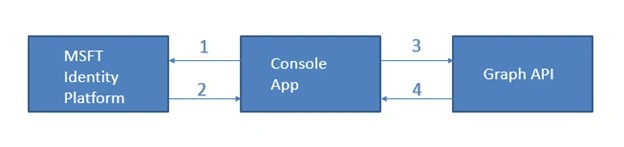
- Console app requests for token
- MS Identity platform sends access token on successful authentication.
- Console app sends Access Token in the authorization header
- Console app gets HTTP response back from the Graph API service
Steps
Step1
To perform the steps you need to make sure .NET 5 SDKs are installed. To check the version of SDKs installed, open the command prompt and enter the following command
dotnet --list-sdks

Please check the references section, on how to install .NET 5 SDK.
Step 2
Create the console app by running the following command.
dotnet new console -o consoleapp1.
Make sure to create a console app under a specific directory. In this case, I have it installed under C:\Users\Documents\VSCode and created a folder called ‘MSGraph’. This can be created anywhere on your machine.
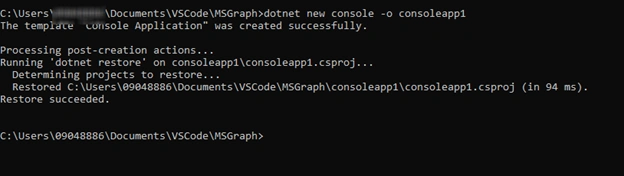
This is just similar to creating a new console app in visual studio IDE.
Step 3
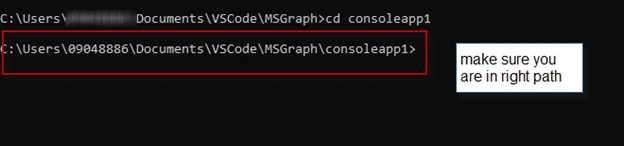
Install the following dependencies for the console app to consume the graph API successfully. first, change the director to consoleapp1 that just got created.
cd consoleapp1
Then run the following commands in sequence
Microsoft.Identity.Client
dotnet add package Microsoft.Identity.Client
This command installs the MSAL client into your program, which takes care of generating tokens (Access Token and Refresh Token) for you. ‘dotnet add package’ provides a convenient way to add the NuGet packages to your project.

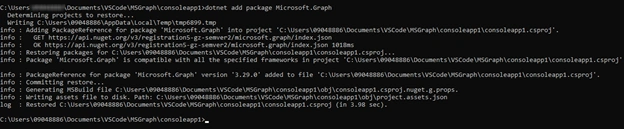
Microsoft.Graph
dotnet add package Microsoft.Graph
This command installs the models and requests builders to access the v1.0 endpoint with fluent API.
Microsoft.Extensions.Configuration
dotnet add package Microsoft.Extensions.Configuration
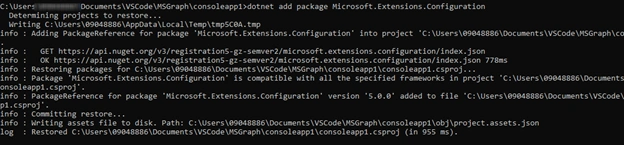
Microsoft.Extensions.Configuration.FileExtensions
dotnet add package Microsoft.Extensions.Configuration.FileExtensions

Microsoft.Extensions.Configuration.Json
dotnet add package Microsoft.Extensions.Configurations.Json

Step 4
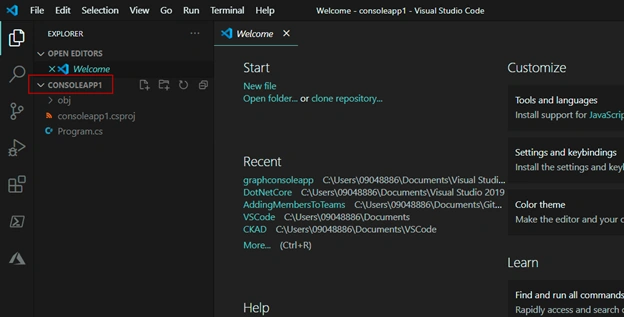
Open the Visual studio code by typing the command "code .". This directly opens VS code with the correct folder.

Note
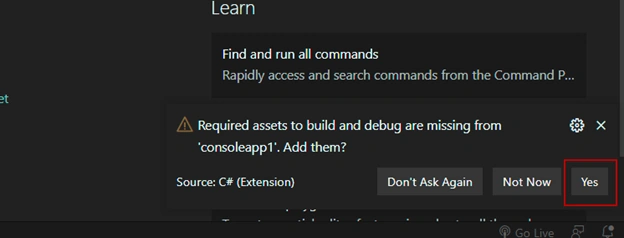
You might be getting a window message saying ‘Required assets to build and debug”. Just click on yes.
Step 5
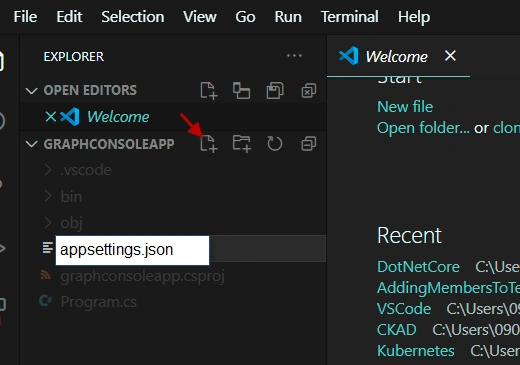
Create a file called ‘appsettings.json’ in the consoleapp1 project.
Step 6
Update the properties. you should be having following values ready from the previous article ‘Creating Azure AD Application’
- Tenant ID:
- Application ID:
- Application Secret:

Step 7
Create new folder called ‘Helpers’. Add the helper classes ‘AuthHandler.cs’. This is used to handle the authentication in your application to access the v1.0 endpoint Graph API service.
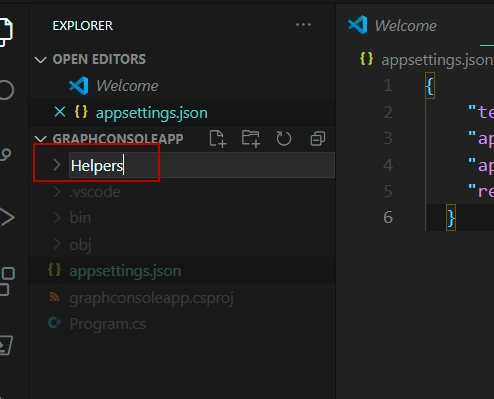
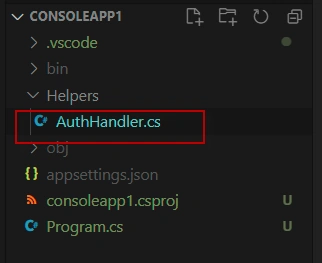
Add the following code in AuthHandler.cs code
- using System.Net.Http;
- using System.Threading.Tasks;
- using Microsoft.Graph;
- using System.Threading;
- namespace Helpers
- {
- public class AuthHandler : DelegatingHandler
- {
- private IAuthenticationProvider _authenticationProvider;
- public AuthHandler(IAuthenticationProvider authenticationProvider, HttpMessageHandler innerHandler)
- {
- InnerHandler = innerHandler;
- _authenticationProvider = authenticationProvider;
- }
- protected override async Task<HttpResponseMessage> SendAsync(HttpRequestMessage request, CancellationToken cancellationToken)
- {
- await _authenticationProvider.AuthenticateRequestAsync(request);
- return await base.SendAsync(request, cancellationToken);
- }
- }
- }
Step 8
In a similar way create MsalAutheticationProvider.cs in the Helpers folder. This takes care of token generation and token renewals which is required to access the Graph api.
This also adds access token to the authentication header and sends requests to Graph API.
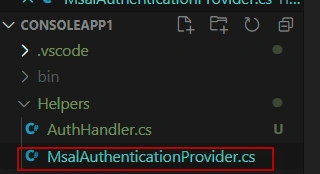
add the following code in 'MsalAuthenticationProvider.cs' class
- using System.Net.Http;
- using System.Net.Http.Headers;
- using System.Threading.Tasks;
- using Microsoft.Identity.Client;
- using Microsoft.Graph;
- namespace Helpers
- {
- public class MsalAuthenticationProvider : IAuthenticationProvider
- {
- private IConfidentialClientApplication _clientApplication;
- private string[] _scopes;
- public MsalAuthenticationProvider(IConfidentialClientApplication clientApplication, string[] scopes)
- {
- _clientApplication = clientApplication;
- _scopes = scopes;
- }
- public async Task AuthenticateRequestAsync(HttpRequestMessage request)
- {
- var token = await GetTokenAsync();
- request.Headers.Authorization = new AuthenticationHeaderValue("bearer", token);
- }
- public async Task<string> GetTokenAsync()
- {
- AuthenticationResult authResult = null;
- authResult = await _clientApplication.AcquireTokenForClient(_scopes).ExecuteAsync();
- return authResult.AccessToken;
- }
- }
- }
Step 9
Consume the Graph API responses in the console app. This is a bit tedious part. So please follow carefully.
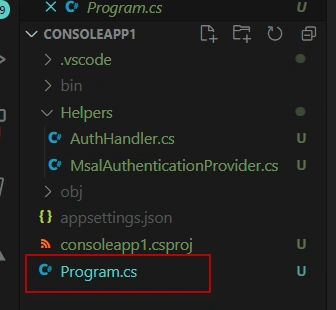
In the main program.cs add the following references.
- using System.Collections.Generic;
- using Microsoft.Graph;
- using Microsoft.Identity.Client;
- using Microsoft.Extensions.Configuration;
- using Helpers;
Add the static member of type ‘GraphServiceClient’ to the program.cs file which is used to instantiate the client used to call MS Graph.
- private static GraphServiceClient _graphClient;
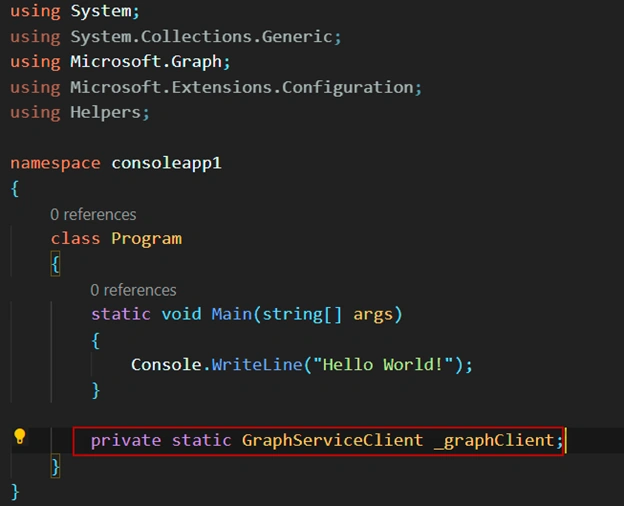
for simplicity I have tried to add the lines of code after the main method. Just don’t disturb main method.
Step 10
It is required to get the configuration settings which is updated in file ‘appsettings.json’. add the following lines of code.
- private static IConfigurationRoot LoadAppSettings()
- {
- try
- {
- var config = new ConfigurationBuilder()
- .SetBasePath(System.IO.Directory.GetCurrentDirectory())
- .AddJsonFile("appsettings.json", false, true)
- .Build();
- if (string.IsNullOrEmpty(config["applicationId"]) ||
- string.IsNullOrEmpty(config["applicationSecret"]) ||
- string.IsNullOrEmpty(config["redirectUri"]) ||
- string.IsNullOrEmpty(config["tenantId"]))
- {
- return null;
- }
- return config;
- }
- catch (System.IO.FileNotFoundException)
- {
- return null;
- }
- }
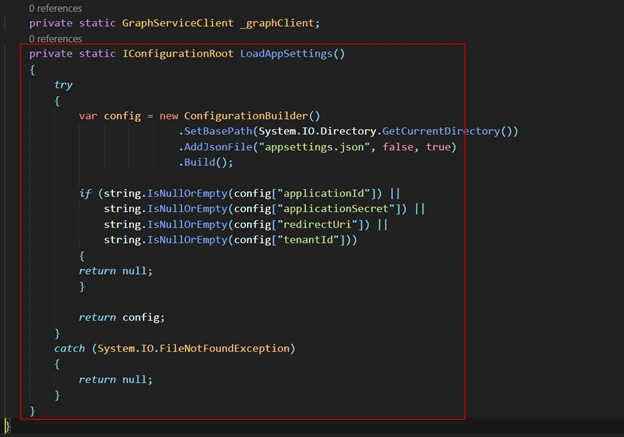
observe that method is just after the static member we just created.
Step 11
Create method called ‘AuthorizationProvider’ which will take the setting values from appsettings.json and builds the service to Graph API.
- private static IAuthenticationProvider CreateAuthorizationProvider(IConfigurationRoot config)
- {
- var clientId = config["applicationId"];
- var clientSecret = config["applicationSecret"];
- var redirectUri = config["redirectUri"];
- var authority = $"https://login.microsoftonline.com/{config["tenantId"]}/v2.0";
- List<string> scopes = new List<string>();
- scopes.Add("https://graph.microsoft.com/.default");
- var cca = ConfidentialClientApplicationBuilder.Create(clientId)
- .WithAuthority(authority)
- .WithRedirectUri(redirectUri)
- .WithClientSecret(clientSecret)
- .Build();
- return new MsalAuthenticationProvider(cca, scopes.ToArray());
- }
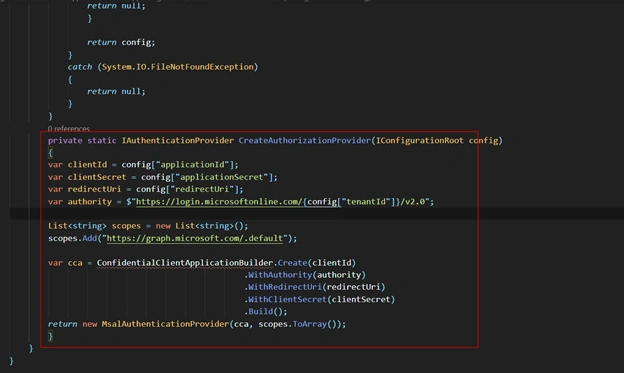
Notice that this method ‘AuthorizationProvider’ is just after the method LoadAppSettings()
Step 12
Now consume the response from the Graph API service. For this you need to have the following method ‘GetAuthenticatedGraphClient’ to the program class. this method creates an instance of the graph service client object, which is used to capture the http response.
- private static GraphServiceClient GetAuthenticatedGraphClient(IConfigurationRoot config)
- {
- var authenticationProvider = CreateAuthorizationProvider(config);
- _graphClient = new GraphServiceClient(authenticationProvider);
- return _graphClient;
- }
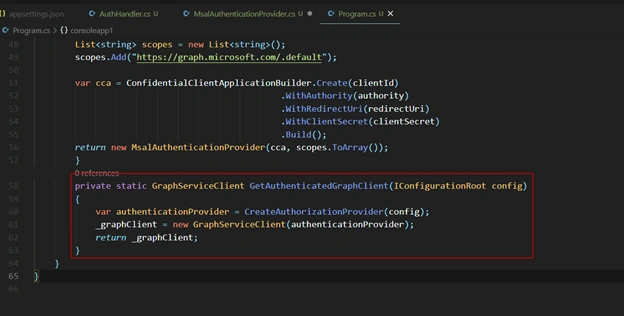
Notice that this method ‘GetAuthenticatedGraphClient’ is just after the ‘CreateAuthorizationProvider’ method.
Step 13
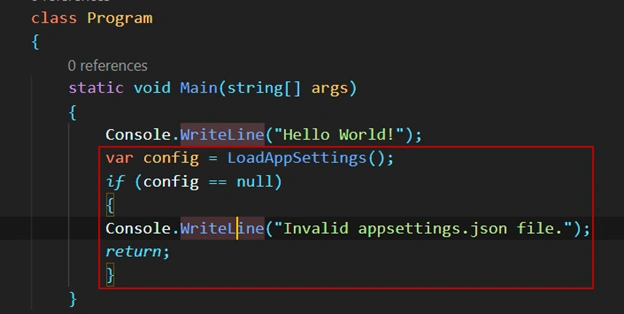
Now locate the main method and now add the following code to load the values from appsettings.json file.
- var config = LoadAppSettings();
- if (config == null)
- {
- Console.WriteLine("Invalid appsettings.json file.");
- return;
- }
Step 14
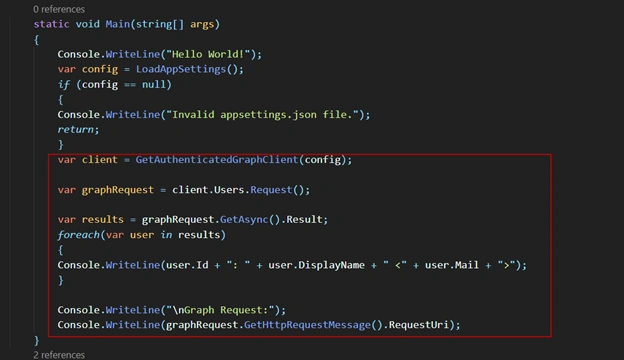
Now add the following code just after the LoadAppSettings() code that is written before. This code get the authenticated instance of the graph service client, and then writes back the request results got from Graph API service to the console.
- var client = GetAuthenticatedGraphClient(config);
- var graphRequest = client.Users.Request();
- var results = graphRequest.GetAsync().Result;
- foreach(var user in results)
- {
- Console.WriteLine(user.Id + ": " + user.DisplayName + " <" + user.Mail + ">");
- }
- Console.WriteLine("\nGraph Request:");
- Console.WriteLine(graphRequest.GetHttpRequestMessage().RequestUri);
- }
Below is the complete code for program.cs
- using System;
- using System.Collections.Generic;
- using Microsoft.Graph;
- using Microsoft.Identity.Client;
- using Microsoft.Extensions.Configuration;
- using Helpers;
- namespace consoleapp1
- {
- class Program
- {
- static void Main(string[] args)
- {
- Console.WriteLine("Hello World!");
- var config = LoadAppSettings();
- if (config == null)
- {
- Console.WriteLine("Invalid appsettings.json file.");
- return;
- }
- var client = GetAuthenticatedGraphClient(config);
- var graphRequest = client.Users.Request();
- var results = graphRequest.GetAsync().Result;
- foreach(var user in results)
- {
- Console.WriteLine(user.Id + ": " + user.DisplayName + " <" + user.Mail + ">");
- }
- Console.WriteLine("\nGraph Request:");
- Console.WriteLine(graphRequest.GetHttpRequestMessage().RequestUri);
- }
- private static GraphServiceClient _graphClient;
- private static IConfigurationRoot LoadAppSettings()
- {
- try
- {
- var config = new ConfigurationBuilder()
- .SetBasePath(System.IO.Directory.GetCurrentDirectory())
- .AddJsonFile("appsettings.json", false, true)
- .Build();
- if (string.IsNullOrEmpty(config["applicationId"]) ||
- string.IsNullOrEmpty(config["applicationSecret"]) ||
- string.IsNullOrEmpty(config["redirectUri"]) ||
- string.IsNullOrEmpty(config["tenantId"]))
- {
- return null;
- }
- return config;
- }
- catch (System.IO.FileNotFoundException)
- {
- return null;
- }
- }
- private static IAuthenticationProvider CreateAuthorizationProvider(IConfigurationRoot config)
- {
- var clientId = config["applicationId"];
- var clientSecret = config["applicationSecret"];
- var redirectUri = config["redirectUri"];
- var authority = $"https://login.microsoftonline.com/{config["tenantId"]}/v2.0";
- List<string> scopes = new List<string>();
- scopes.Add("https://graph.microsoft.com/.default");
- var cca = ConfidentialClientApplicationBuilder.Create(clientId)
- .WithAuthority(authority)
- .WithRedirectUri(redirectUri)
- .WithClientSecret(clientSecret)
- .Build();
- return new MsalAuthenticationProvider(cca, scopes.ToArray());
- }
- private static GraphServiceClient GetAuthenticatedGraphClient(IConfigurationRoot config)
- {
- var authenticationProvider = CreateAuthorizationProvider(config);
- _graphClient = new GraphServiceClient(authenticationProvider);
- return _graphClient;
- }
- }
- }
Build and Test the application
Step 1
Run the following command in command prompt to ensure the developer certificate has been trusted.

In this case, I might have already trusted the developer certificates in my previous projects. Usually you will be prompted with a message box, to trust the developer certificates, and select yes.
Step 2
build the application by simply running the following command. This is similar to building application making sure it is compiled successfully in visual studio IDE.

Step 3
Run the application by running the following command
Step 4
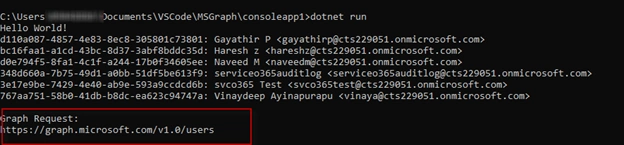
Observe that now on successful compilation and run, you should have all the users displayed in your tenant. Since this is developer tenant, I have only few users in this case.
Also notice that the URL that is generated by SDK, which is used to send to Graph API service.
Conclusion
The complete source code is mentioned in the references section. Thus in this article, we have created a console app using .Net 5 which requests token from the Microsoft IDentity platform, with that access token it calls the Graph API service to get the information about the users in the Office 365 Tenant.
References
- Source Code: available here
- https://dotnet.microsoft.com/download/dotnet/5.0
- https://docs.microsoft.com/en-us/azure/active-directory/develop/tutorial-v2-windows-desktop
- https://docs.microsoft.com/en-us/graph/sdks/sdk-installation
- https://docs.microsoft.com/en-us/aspnet/core/fundamentals/configuration/?view=aspnetcore-5.0
- https://docs.microsoft.com/en-us/archive/msdn-magazine/2016/february/essential-net-configuration-in-net-core
- https://stackoverflow.com/questions/52156484/how-exactly-does-microsoft-extensions-configuration-dependent-on-asp-net-core
- https://www.nuget.org/packages/Microsoft.Extensions.Configuration.FileExtensions/
- https://docs.microsoft.com/en-us/learn/modules/optimize-data-usage/3-exercise-retrieve-control-information-returned-from-microsoft-graph
mayur patelPosted Feb 10, 2023, 9:43 PM
ConfigurationBuilder unable to find a file Exception thrown: 'System.IO.FileNotFoundException' in System.Private.CoreLib.dll
Bobindra KumarPosted Nov 18, 2022, 12:41 PM
Hi Vinay Do you know how to create Microsoft Graph Notifications subscription to get any mail into my outlook I Need to track mail content using console application with application permission.
Vinay AyinapurapuPosted Oct 14, 2022, 4:07 AM
Hi Manish, have you defined client ID and client secret details as mentioned in references creating Azure AD Graph? Also did you get a chance to look into Step 14? i have also made the complete source code avaialble here. You just need to replace the client ID and Client secret details in the config file. Please let me know if you still get stuck.
Manish PatilPosted Oct 12, 2022, 11:00 AM
While implementing above solution with .Net Framework 4.6.2 I am getting ERROR 12029, "A connection with the server could not be establishd" can you please help me in this .?var currentUser = graphClient.Me.Request.GetAsync().Result;
Vinay AyinapurapuPosted Mar 22, 2022, 9:43 PM
May i know what is the end point you are trying to call using Graph API?
Sampada ModakPosted Mar 22, 2022, 2:43 PM
Hi, in my asp.net website. I am using this code to access the onedrive files. Right now, I am getting following compile time error. On line var config = new Microsoft.Extensions.Configuration.ConfigurationBuilder() .SetBasePath(System.IO.Directory.GetCurrentDirectory()) .AddJsonFile("appsettings.json", false, true) .Build(); Could not load file or assembly 'System.Runtime.CompilerServices.Unsafe, Version=4.0.4.1, Culture=neutral, PublicKeyToken=b03f5f7f11d50a3a' or one of its dependencies. The located assembly's manifest definition does not match the assembly reference. (Exception from HRESULT: 0x80131040) I am not sure if this is possible with this code. Could you please guide me?
A DKPosted Oct 11, 2021, 5:42 PM
How to get Auth token and token expiry? Public async Task<string> GetTokenAsync(). does not do anything or help to retrieve token ?
Aurora WebPosted Jul 29, 2021, 5:43 AM
Perfect code man :). You Rock
amar nandhaPosted Jul 24, 2021, 4:48 PM
Hi Vinay, do you know how to get the call id from MS TEAMS via the Graph API? I am trying to get a list of calls per user and all the details but am having trouble getting the call id.
Mohsin AzamPosted Apr 20, 2021, 5:36 AM
Nice Artcile.Well i am also working on Graph API to Add/update Contacts in Bulk.I have one Issue,can we skip this Microsoft Authentication popup for(username and password) and can get access token.i am working on this thing.https://docs.microsoft.com/en-us/graph/api/resources/contact?view=graph-rest-1.0