

Introduction
Twilio provide Services to send the verification code with call and text. In this article, I am using Twilio calling Service. For this, we need to install two NuGet packages, as shown in the figure, given below-
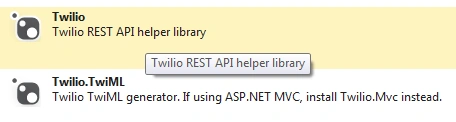
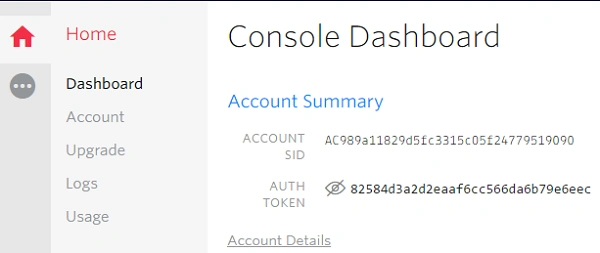
Afterwards, visit Twilio's official site and register itself( https://www.twilio.com). After registration, you need to provide your account Sid, Auth token, Phone number, as shown in the depicted figure, given below-
Here, we use Web API to develop the verification Service .
Create MVC Application
Step 1 - Go to File-> New-> Project.
Step 2 - Choose "ASP.NET MVC 4 Web Application" from the list, provide the Application name as " TwilioService" and set the path in the location input, where you want to create the Application.
Step 3 - Now, choose the Project Template "Web API".
Step 4 - Add API empty controller and class with name “Twilio”
Step 5 - Create model class with name Verification and it contains two properties.
- public class Verification
- {
- public string MobileNumber { get; set; }
- public string VerificationCode { get; set; }
- }
Afterwards, create method inside Twilio controller with the name VerificationCall.
- public class TwilioController : ApiController
- {
- [HttpPost]
- [ActionName("VerificationCall")]
- public HttpResponseMessage VerificationCall(Verification verification)
- {
- HttpResponseMessage response = new HttpResponseMessage();
- //get twilio accountsid and authentication key
- string accountSid = ConfigurationManager.AppSettings["TwilioAccountSid"].ToString();
- string authToken = ConfigurationManager.AppSettings["TwilioAuthKey"].ToString();
- //get number which provided by twilio
- string twilioNumber = ConfigurationManager.AppSettings["TwilioNumber"].ToString();
- try
- {
- var client = new Twilio.TwilioRestClient(accountSid, authToken);
- if (string.IsNullOrEmpty(verification.MobileNumber))
- {
- response = Request.CreateResponse(HttpStatusCode.NotFound, "wrong number");
- }
- else
- {
- Regex regex = new Regex(@"^[0-9]*$");
- string mobileno = string.Empty;
- if (verification.MobileNumber.Contains("-"))
- {
- string[] number = verification.MobileNumber.Split('-');
- mobileno = number[1];
- }
- Match m = regex.Match(verification.MobileNumber);
- //get autoriztion code which need to be for user authorization
- verification.VerificationCode = string.Empty;
- Random random = new Random();
- string pinCode = (random.Next() % 90000 + 10000).ToString();
- //it for check which process user want to authorization call/sms.
- verification.VerificationCode = pinCode.ToString();
- //voice message
- string message = "Welcome%20to%20Atul%20Your%20authorization%20code%20is%20" + HttpUtility.UrlPathEncode(String.Join<char>(" ", pinCode.ToString())) + "&";
- //voice call url
- string content = "http://twimlets.com/message?Message%5B0%5D=" + message + "";
- //call option which is used to provide caller phone no and twilio url for call
- var options = new Twilio.CallOptions();
- options.Url = content;
- options.From = twilioNumber;
- options.To = ConfigurationManager.AppSettings["CountryCode"] + verification.MobileNumber;
- options.Method = "GET";
- options.FallbackMethod = "GET";
- options.StatusCallbackMethod = "GET";
- // call
- var callResponse = client.InitiateOutboundCall(options);
- if (!object.Equals(callResponse.Sid, null))
- {
- response = Request.CreateResponse(HttpStatusCode.OK,"Please wait for call for your verification code");
- }
- else
- {
- response = Request.CreateResponse(HttpStatusCode.NotFound, "");
- }
- }
- }
- catch (Exception)
- {
- throw;
- }
- return response;
- }
- }
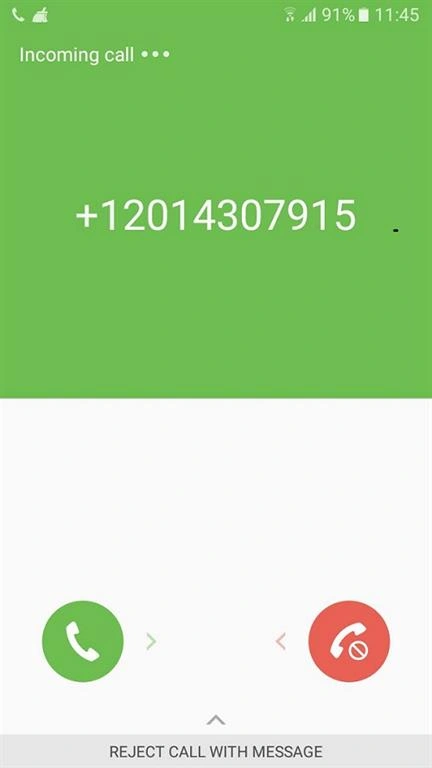
Output
Summary
In this article, we learned how to create Verification calling Service, using Web API and Twilio.
Starhack VickyPosted May 21, 2018, 2:25 AM
How to run this code
Bhavik PatelPosted Sep 7, 2016, 12:49 AM
Nice