
This article introduces the various options for calculating the date difference in C#.
- DateTime Structure: This datatype is used to represent a time instant in C#
- TimeSpan Structure: The TimeSpan datatype is used to represent time interval
Calculating the Date Difference - Subtract Method
The DateTime.Substract method may be used in order to find the date/time difference between two instances of the DateTime method. This method does not change the value of the DateTime instance on which the method has been invoked. The result of the operation is stored in the new TimeSpan structure.
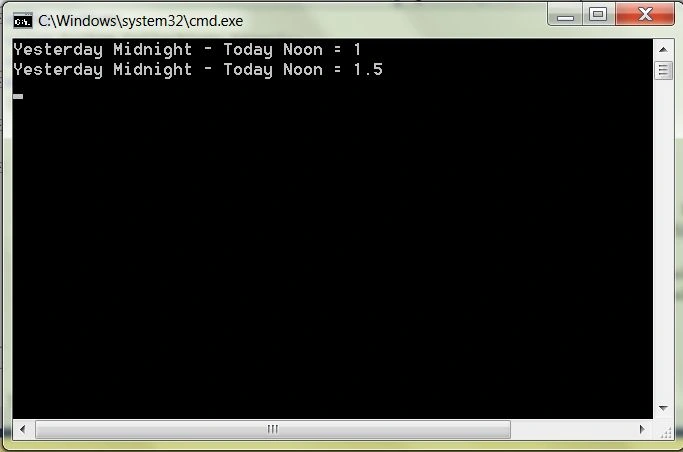
The TimeSpan class has a dual set of properties, one set represents the time durations in integers and another set of properties, with the names prefixed with "Total" represents the result in fractional values. The following sample code illustrates the use of the DateTime.Subtract method and the Days and TotalDays properties of the TimeSpan structure.
The TimeSpan structure has additional properties for the Hours, Minutes, Seconds and Milliseconds and for TotalHours, TotalMinutes, TotalSeconds and TotalMilliseconds.
The DateTime structure also has an overload for the Subtract method which accepts a TimeSpan and returns the DateTime value which is the result of subtracting the Timespan argument from the value of the DateTime structure on which the Subtract method has been invoked.
Code Sample: Calculating the Date Difference - Subtract Method.
using System;
using System.Collections.Generic;
using System.Text;

namespace Console_DateTime
{
    class Program
    {
        static void Main(string[] args)
        {
            System.DateTime dtTodayNoon = new System.DateTime(2018, 9, 13, 12, 0, 0);
            System.DateTime dtTodayMidnight = new System.DateTime(2018, 9, 12, 0, 0, 0);
            System.TimeSpan diffResult = dtTodayNoon.Subtract(dtTodayMidnight);
            Console.WriteLine($"Yesterday Midnight - Today Noon = {diffResult.Days}");
            Console.WriteLine($"Yesterday Midnight - Today Noon = {diffResult.TotalDays}");
            Console.ReadLine();
        }
    }
}
Image: Results for Calculating the Date Difference - Subtract Method.
Calculating the Date Difference - Subtraction Operator
A more intuitive method for calculating the Date Difference is through the use of the Subtraction Operator (the minus sign). The following code sample yields the same result as the first code sample using the Subtract Method.
Code Sample: Calculating the Date Difference - Subtraction Operator.
using System;
using System.Collections.Generic;
using System.Text;
namespace Console_DateTime
{
    class Program
    {
        static void Main(string[] args)
        {
            System.DateTime dtTodayNoon = new System.DateTime(2018, 9, 13, 12, 0, 0);
            System.DateTime dtYestMidnight = new System.DateTime(2018, 9, 12, 0, 0, 0);
            System.TimeSpan diffResult = dtTodayNoon - dtYestMidnight;
            Console.WriteLine($"Yesterday Midnight - Today Noon = {diffResult.Days}");
            Console.WriteLine($"Yesterday Midnight - Today Noon = {diffResult.TotalDays}");
            Console.ReadLine();
        }
    }
}
DateDiff Function
A third alternative for date subtraction in C# is by importing the Microsoft.VisualBasic namespace and invoking the DateDiff method. Opponents of this technique offer the critique that importing the namespace involves extra weight. Proponents of the technique provide contradictory arguments.
If the requirements are only restricted to calculating a basic date difference, the direct use of the DateTime structure is recommended.
Impact of TimeZones
The techniques described above do not take factors such as TimeZone and Daylight Savings Time into account. The operations assume that both the date arguments have been converted to the same time zone before the operation is invoked.
Impact of DayLight Savings Time
If the date calculations are performed in a locale involving Daylight Savings Time, an additional step is required to convert the DateTime object values to Universal Time by using the ToUniversalTime method.
System.TimeSpan diffResult = dtTodayNoon.ToUniversalTime().Subtract(dtYestMidnight.ToUniversalTime());
This article is aimed at providing a quick reference for options in the framework for performing basic Date Calculations. For detailed information on DateTime manipulations, refer to Dan Roger's Coding Best Practices Using DateTime in the .NET Framework.
Conclusion
In this article, we saw the techniques and options for calculating the difference between two dates in C#. Note that the arithmetic operations do not take inherently take timezone differences into account.
Special credit goes to Carl Camera for pointing out the issues with Daylight Savings Time and the resource on .Net DateTime best practices.
Jiyaul MustaphaPosted Jul 12, 2019, 1:09 AM
DECLARE @Firstdate DATE='2016-04-01', @LastDate DATE=GETDATE(),/*get today date*/ @resultDay int=null SET @resultDay=(SELECT DATEDIFF(d, @Firstdate, @LastDate)) PRINT @resultDay
Ramesh PalaniappanPosted Aug 19, 2016, 3:40 AM
Nice
kalu singh raoPosted Jul 7, 2016, 8:41 AM
Nice...
SharadPosted Jul 17, 2015, 3:40 AM
good one...
Prasad BhagatPosted Aug 11, 2014, 4:54 AM
for calculating the age from date of birth
Prasad BhagatPosted Aug 11, 2014, 4:49 AM
<asp:ScriptManager ID="sp" runat="server"></asp:ScriptManager> <asp:TextBox ID="txt" runat="server" ontextchanged="txt_TextChanged" AutoPostBack="true"></asp:TextBox><cc1:CalendarExtender ID="CalendarExtender1" runat="server" TargetControlID="txt"> </cc1:CalendarExtender><asp:TextBox ID="txtage" runat="server"></asp:TextBox> using System; using System.Collections.Generic; using System.Linq; using System.Web; using System.Web.UI; using System.Web.UI.WebControls; namespace css { public partial class WebForm3 : System.Web.UI.Page { protected void Page_Load(object sender, EventArgs e) { } protected void txt_TextChanged(object sender, EventArgs e) { string s = txt.Text; DateTime dob = Convert.ToDateTime(s); DateTime currentdate = Convert.ToDateTime(DateTime.Now); TimeSpan time = currentdate.Subtract(dob); int total = (time.Days) / 365; txtage.Text = total.ToString(); } } }
Prasad BhagatPosted Aug 11, 2014, 4:49 AM
just llok at this code for
Pavani ReddyReddyPosted Nov 19, 2010, 9:30 AM
How to get difference between dates in Years, months and days
sheir aliPosted Jan 7, 2010, 3:11 PM
What about using the System.Data.Linq namespace and its SqlMethods.DateDiffMonth method? For example, say... DateTime starDT = {01-Jul-2009 12:00:00 AM} DateTime endDT = {01-Nov-2009 12:00:00 AM} then int monthDiff = System.Data.Linq.SqlClient.SqlMethods.DateDiffMonth(startDT, endDT); ==> 4 There are other DateDiff static methods in the SqlMethods class.
Gary StephensPosted Feb 4, 2009, 9:48 AM
In the sample code below, the variable "dtYestMidnight" is not declared. Only dtTodayMidnight is declared. Is this a typo? using System; using System.Collections.Generic; using System.Text; namespace Console_DateTime { class Program { static void Main(string[] args) { System.DateTime dtTodayNoon = new System.DateTime(2006, 9, 13, 12, 0, 0); System.DateTime dtTodayMidnight = new System.DateTime(2006, 9, 13, 0, 0, 0); System.TimeSpan diffResult = dtTodayNoon.Subtract(dtYestMidnight); Console.WriteLine("Yesterday Midnight - Today Noon = " + diffResult.Days); Console.WriteLine("Yesterday Midnight - Today Noon = " + diffResult.TotalDays); Console.ReadLine(); } } }