

To calculate simple interest in Java, you can use a straightforward formula and implement it using a console application. The simple interest formula is given by:

Where
- P = Principal amount (the initial sum of money)
- R = Rate of interest (annual interest rate)
- T = Time (in years)
Below, we will walk through how to implement this calculation in Java, including user input handling.
Java Program to Calculate Simple Interest
Step-by-Step Implementation
- Import the Scanner Class: This class is used to take input from the user.
- Declare Variables: You will need variables for the principal, rate, time, and the calculated simple interest.
- Take User Input: Prompt the user to enter the principal, rate, and time.
- Calculate Simple Interest: Use the formula to compute the interest.
- Display the Result: Print out the calculated simple interest.
Code Example
Here’s a complete Java program that implements the above steps:
import java.util.Scanner;

public class SimpleInterestCalculator {
    public static void main(String[] args) {
        // Create an instance of Scanner class
        Scanner scanner = new Scanner(System.in);

        // Take input from users
        System.out.print("Enter the Principal amount: ");
        double principal = scanner.nextDouble();

        System.out.print("Enter the Rate of interest (in %): ");
        double rate = scanner.nextDouble();

        System.out.print("Enter the Time period (in years): ");
        double time = scanner.nextDouble();

        // Calculate simple interest
        double simpleInterest = (principal * rate * time) / 100;

        // Display the result
        System.out.println("The Simple Interest is: " + simpleInterest);

        // Close the scanner
        scanner.close();
    }
}
How to run the Java Program?
- Compile: Save the code in a file named
SimpleInterestCalculator.java. Open your terminal or command prompt and navigate to the directory where your file is saved. Compile it using:javac SimpleInterestCalculator.java - Execute: Run the compiled program with:
java SimpleInterestCalculator -
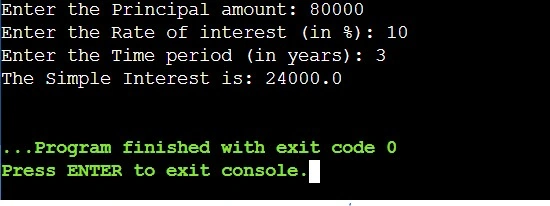
Input Values: When prompted, enter values for principal, rate, and time.
Output
How can I handle invalid input for principal, rate, and time in Java?
To handle invalid input for principal, rate, and time in a Java program, you can use loops and exception handling to ensure that the user provides valid numeric values. Below is a detailed explanation of how to implement this, along with a code example.
Steps to Handle Invalid Input
- Use a Loop: Implement a loop that continues to prompt the user until valid input is received.
- Try-Catch Block: Use a try-catch block to catch exceptions that may occur during input parsing (e.g., if the user enters non-numeric values).
- Validation Checks: After parsing the input, check if the values are within acceptable ranges (e.g., principal should be non-negative, rate should be between 0 and 100, and time should be non-negative).
Code Example
Here’s a complete Java program that calculates simple interest while handling invalid input:
import java.util.Scanner;

public class SimpleInterestCalculator {
    public static void main(String[] args) {
        Scanner scanner = new Scanner(System.in);
        double principal = 0;
        double rate = 0;
        double time = 0;

        // Input for Principal
        while (true) {
            System.out.print("Enter the Principal amount (non-negative): ");
            try {
                principal = Double.parseDouble(scanner.nextLine());
                if (principal < 0) {
                    System.out.println("Invalid input. Principal must be non-negative.");
                    continue; // Prompt again
                }
                break; // Valid input
            } catch (NumberFormatException e) {
                System.out.println("Invalid input. Please enter a valid number.");
            }
        }

        // Input for Rate
        while (true) {
            System.out.print("Enter the Rate of interest (0-100): ");
            try {
                rate = Double.parseDouble(scanner.nextLine());
                if (rate < 0 || rate > 100) {
                    System.out.println("Invalid input. Rate must be between 0 and 100.");
                    continue; // Prompt again
                }
                break; // Valid input
            } catch (NumberFormatException e) {
                System.out.println("Invalid input. Please enter a valid number.");
            }
        }

        // Input for Time
        while (true) {
            System.out.print("Enter the Time period (non-negative): ");
            try {
                time = Double.parseDouble(scanner.nextLine());
                if (time < 0) {
                    System.out.println("Invalid input. Time must be non-negative.");
                    continue; // Prompt again
                }
                break; // Valid input
            } catch (NumberFormatException e) {
                System.out.println("Invalid input. Please enter a valid number.");
            }
        }

        // Calculate simple interest
        double simpleInterest = (principal * rate * time) / 100;

        // Display the result
        System.out.println("The Simple Interest is: " + simpleInterest);

        // Close the scanner
        scanner.close();
    }
}
Explanation of the Code
- Scanner: The Scanner class is used to read user inputs.
- Loops: Each input section is wrapped in a while (true) loop, which continues until valid input is provided.
- Try-Catch: The try block attempts to parse the user input as a double. If parsing fails due to an invalid format, it throws a NumberFormatException, which is caught in the catch block, prompting the user for valid input.
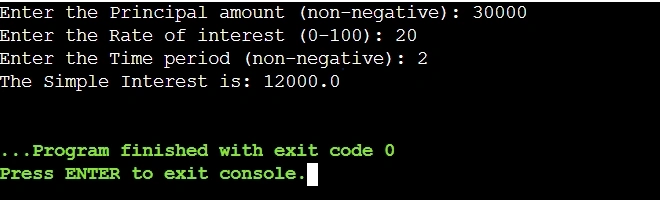
- Input Validation: After parsing, additional checks ensure that the principal is non-negative, the rate is between 0 and 100, and time is non-negative.
Output
Conclusion
This article provides a robust solution for calculating simple interest while effectively handling user input and validation. By incorporating loops, exception handling, and clear validation checks, it ensures accurate calculations and a seamless user experience. This approach not only demonstrates fundamental Java programming concepts but also highlights best practices for building reliable console-based applications. Further enhancements, such as supporting multiple interest calculation types or integrating advanced validation mechanisms, can make the program even more versatile and user-friendly.
Join the conversation! Your thoughts help the community grow.