

Introduction:
In my last article, I discussed how to create an Azure CDN using the Azure Storage Service. Now, in this article, we will see how to play with caching rules in the Azure CDN.
Caching Rules in Azure CDN
By default, Azure CDN TTL (Time to Live) is applied for 7 days. If the TTL for the file hasn’t expired, the edge server returns the file from the cache, which will be faster.
We can set two types of rule for the Azure CDN.
- Global Rule
- Custom Rule
1. Global Rule
Let’s set a global rule for the CDN which was created in my last article.
Step 1
Go to the Azure portal from CDN profile, select the End Point for the blob.
Step 2
From the setting, select Caching rules.

Figure 1
Step 3
The Caching rules window will appear. Right now, we don’t have any caching rules applied to the endpoint. You can see that, by default, it holds 7 days of TTL.
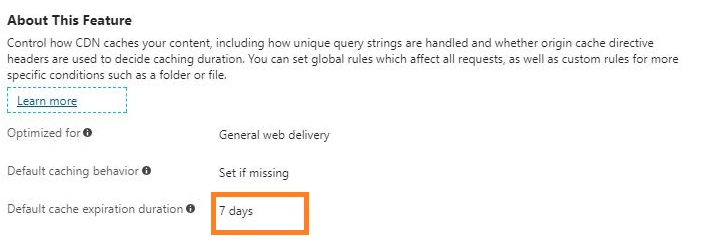
Figure 2
Step 4
Now, we need to set a global rule. Under the global caching rule section, select the Caching behavior as Override; make Cache expiration duration as 10 days, since our end point doesn’t contain any query string, let it ignore the query string for Query string caching behavior. Finally, select Save.
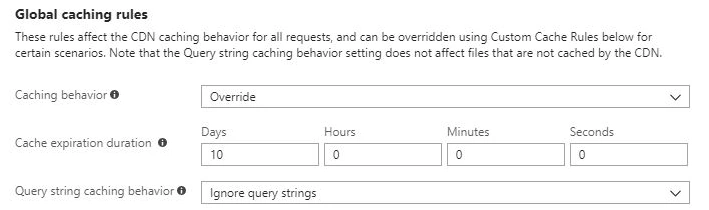
Figure 3
It can take up to 90 minutes for the settings to reach every CDN POP (point of presence).
Custom Rule
Custom rule is very handy when we are dealing with multiple endpoints.
In the caching rule setting page, go to custom caching rules and choose the match condition as a path. The matched value should be the path /[container_name]/[blob_name], the caching rule should be overridden as we did in the Global rule. You can set the time based on your requirement. In my case, I set it as 10 days.

Figure 4
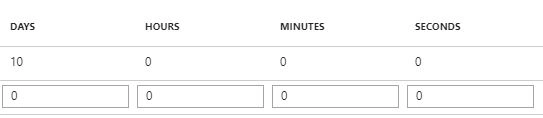
Figure 5
It can take up to 90 minutes for the settings to reach every CDN POP (point of presence). I'm running the application using above CDN in the browser.
- <!DOCTYPE html>
- <html>
- <head>
- <meta charset="utf-8">
- <title>Untitled</title>
- <link rel="stylesheet" href="https://kendo.cdn.telerik.com/2018.1.117/styles/kendo.common.min.css">
- <link rel="stylesheet" href="https://kendo.cdn.telerik.com/2018.1.117/styles/kendo.rtl.min.css">
- <link rel="stylesheet" href="https://kendo.cdn.telerik.com/2018.1.117/styles/kendo.default.min.css">
- <link rel="stylesheet" href="https://kendo.cdn.telerik.com/2018.1.117/styles/kendo.mobile.all.min.css">
- <script src="https://code.jquery.com/jquery-1.12.3.min.js"></script>
- <script src="https://kendo.cdn.telerik.com/2018.1.117/js/angular.min.js"></script>
- <script src="https://kendo.cdn.telerik.com/2018.1.117/js/jszip.min.js"></script>
- <script src="https://kendo.cdn.telerik.com/2018.1.117/js/kendo.all.min.js"></script>
- <!--<script src="http://localhost:11207/JS/autocomplete.js"></script>-->
- <script src="https://autocompletefilter.azureedge.net/js-resource/autocomplete.js"></script> <!-- Azure CDN -->
- </head>
- <body>
- <input id="autocomplete" />
- </body>
- </html>
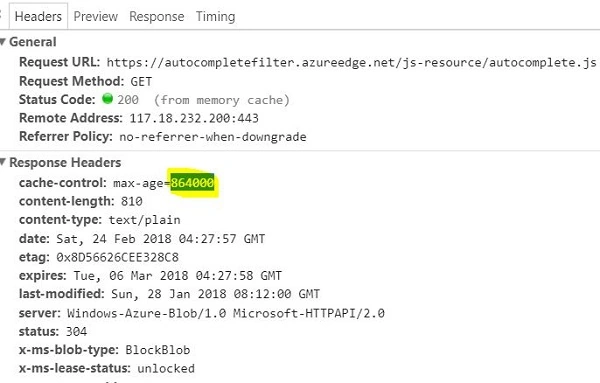
From the above figure, you can notice that the cache-control - max-age = 864000, which means 10 days.
Koshila SenadhiraPosted Nov 30, 2022, 6:52 AM
Interesting Article!