

OAuth is a token-based authorization mechanism for REST Web API. You develop the authorization with the API only once, up until the token expires. The generated token is then used each time the REST Web API is called, saving an authorization step every time the REST Web API is called. Authentication is still there and has been replaced with the generated authorized token that is available for a certain period.
Today, I shall be demonstrating the consumption of OAuth token-based authorization for REST Web API methods using a C#.NET Console Application.
Prerequisites
The following are some prerequisites before you proceed any further in this tutorial.
- Understanding of JSON Object Mapper.
- Knowledge of REST Web API.
- Knowledge of ASP.NET MVC5.
- Knowledge of C# Programming.
The example code is being developed in Microsoft Visual Studio 2019 Professional. I have used ASP.NET MVC - OAuth 2.0 REST Web API Authorization solution on the server side.
Let's begin now.
Step 1. Create a new C#.NET Console Application project and name it "AccessOAuthRESTApi".
Step 2. Create target JSON object mappers for request/response objects according to ASP.NET MVC - OAuth 2.0 REST Web API Authorization server-side solution.
Step 3. Install "Newtonsoft.Json" & "Microsoft.AspNet.WebApi.Client" NuGet libraries.
Step 4. Create the "GetAuthorizeToken(...)" method in the "Program. cs" file and replace the following code in it i.e.
public static async Task<string> GetAuthorizeToken()
{
  // Initialization
  string responseObj = string.Empty;

  // Posting
  using (var client = new HttpClient())
  {
    // Setting Base address
    client.BaseAddress = new Uri("http://localhost:3097/");
    // Setting content type
    client.DefaultRequestHeaders.Accept.Add(new MediaTypeWithQualityHeaderValue("application/json"));
    // Initialization
    HttpResponseMessage response = new HttpResponseMessage();
    List<KeyValuePair<string, string>> allInputParams = new List<KeyValuePair<string, string>>();
    // Convert Request Params to Key Value Pair (missing implementation)
    // URL Request parameters
    HttpContent requestParams = new FormUrlEncodedContent(allInputParams);
    // HTTP POST
    response = await client.PostAsync("Token", requestParams).ConfigureAwait(false);
    // Verification
    if (response.IsSuccessStatusCode)
    {
      // Reading Response (missing implementation)
    }
  }
  return responseObj;
}
In the above code, I am using a POST-type API call to authorize and generate the authorization token, which will then be used to authenticate and access the REST Web API methods. I have also passed the required authorization scheme and authorization credentials to the API server as a key-value pair. The returning JSON packet will provide the access token along with the access token type and expiration.
Step 5. Now, create the "GetInfo(...)" method in the "Program. cs" file and replace the following code in it i.e.
...
        public static async Task<string> GetInfo(string authorizeToken)
        {
            // Initialization.
            string responseObj = string.Empty;

            // HTTP GET.
            using (var client = new HttpClient())
            {
                // Initialization
                string authorization = authorizeToken;

                // Setting Authorization.
                client.DefaultRequestHeaders.Authorization = new AuthenticationHeaderValue("Bearer", authorization);

                // Setting Base address.
                client.BaseAddress = new Uri("https://localhost:44334/");

                // Setting content type.
                client.DefaultRequestHeaders.Accept.Add(new MediaTypeWithQualityHeaderValue("application/json"));

                // Initialization.
                HttpResponseMessage response = new HttpResponseMessage();

                // HTTP GET
                response = await client.GetAsync("api/WebApi").ConfigureAwait(false);

                // Verification
                if (response.IsSuccessStatusCode)
                {
                    // Reading Response.
...
                }
            }

            return responseObj;
        }
...
In the above code, I am first providing an authorized access token, which I have just generated to my REST Web API call for authentication. Then, I called my REST Web API, and finally, I read the response and processed it according to my business requirements.
Step 6. In the "Program. cs" file "Main" method, write the following line of code to first generate an authorized access token and then call the GET type REST Web API method i.e.
// Generate Authorize Access Token to authenticate REST Web API.
string oAuthInfo = Program.GetAuthorizeToken().Result;
// Process response access token info (missing implementation)
// Call REST Web API method with authorize access token.
string responseObj = Program.GetInfo(oAuthInfo).Result;
// Process Result (missing implementation)
In the above lines of code, I generate an authorized access token first, and after processing the response packet, I call the GET type REST web API method and process my response accordingly.
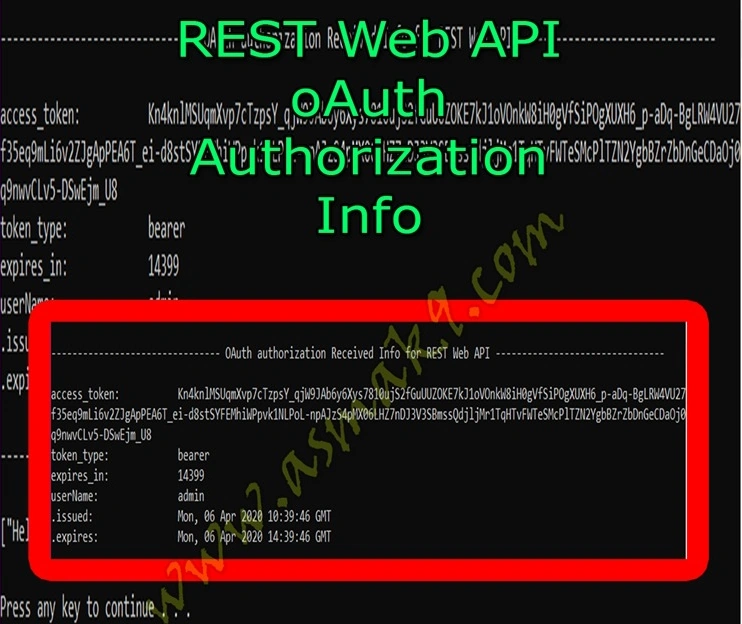
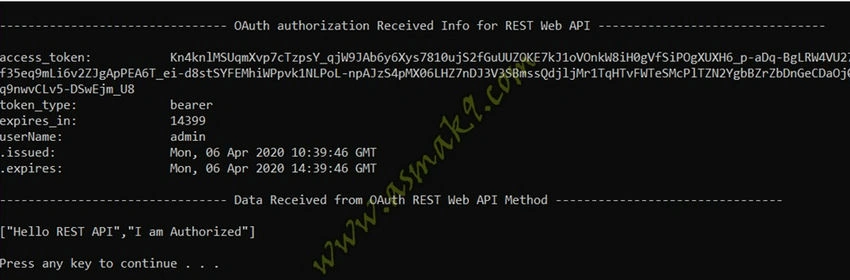
Step 7. If you execute the provided solution, you will be able to see the following, but you will need to execute the ASP.NET MVC - OAuth 2.0 REST Web API Authorization server-side solution first i.e.
Conclusion
In this article, you will learn to consume OAuth token-based authorization type API for REST Web API methods using C#.NET Console Application. You will also learn to utilize the "HttpClient" library to consume REST Web APIs. You will learn to generate authorized access tokens for REST Web API method authentication, and finally, you will also learn to call GET type REST web API with access tokens for authentication.
Ravinder SharmaPosted Sep 17, 2024, 11:34 AM
Hi Asma Khalid, i can not find the said method "GetInfo(...)". Please help to highlight.
Satish BhuktarPosted Aug 23, 2022, 11:08 AM
Is this the OAuth or basic token-based authentication that uses token & bearer token?
Yuri StaubPosted Jul 19, 2021, 3:32 PM
In Main procedure is not clear what is obj, where is declaration and initialisation?
Atarpan DPosted Oct 22, 2020, 6:07 AM
Source is no longer available . Its downloaded as txt file and asking us to download it from some malicious site.
David SablePosted Oct 13, 2020, 3:07 PM
Hi Asma! Thank you for the good lesson. What code do I have to add in order to pass a user name and user secret? This does not seem to work: // Initialization. HttpResponseMessage response = new HttpResponseMessage(); List<KeyValuePair<string, string>> allIputParams = new List<KeyValuePair<string, string>>(); allIputParams.Add(new KeyValuePair<string, string>("Authorization", "Basic " + "User name:User Secret" + "")); allIputParams.Add(new KeyValuePair<string, string>("grant_type", "client_credentials"));
John DoePosted Aug 13, 2020, 4:22 AM
The link to the source code makes you download a zip with two link to the "original" article (very original...) on a paid content site..
cheela shekarPosted Jul 7, 2020, 5:34 AM
Whether 4.0 .net framework supports OAuth authentication
Felix CabreraPosted Jun 17, 2020, 2:19 PM
Hi, I would like to know how to integrate it into an MVC project, for user authentication
amit guravPosted Jun 4, 2020, 6:57 AM
Hi, I run the code but it is not work for me. I have client id and client secret. Please help me into this. Thanks in advance.