
Introduction
Input The <input> tag specifies an input field where the user can enter data. These attributes make it easier to create forms and set automatic validation. An input field can be a text field, a
checkbox, a password field, a radio button, a button, and more.
Input Button Tag
The button tag gives you a way to create simple input buttons with custom text. It is similar to the INPUT submit tag but is slightly more flexible. You can say a
button tag creates a push button. It is a clickable button that can send a request using a GET or a POST and also performs a client-side action in JavaScript. The
<button> tag is supported in all major browsers.
Syntax
<button
name=""
type=""
value="">HTML</button>
Attributes
| Attributes | Value | Description |
| autofocus(New) | autofocus | Specifies that a button should have focus when the page loads. |
| disabled | disabled | Specifies that a button should be disabled. |
| form (New) | form_name | Specifies which form the button belongs to |
| formaction (New) | URL | Specifies where to send the form-data when a form is submitted. Overrides the form's action attribute. |
| formenctypeNew | application/x-www-form-urlencoded
|
Specifies how form-data should be encoded before sending it to a server. Overrides the form's enctype attribute. |
| formmethod (New) | get
|
Specifies how to send form-data. Overrides the form's action attribute. |
| formnovalidate (New) | formnovalidate | If present indicates that the form should not be validated when submitted. Overrides the form's validating attribute. |
| formtarget (New) | _blank
|
Specifies where to open the action URL. Overrides the form's target attribute. |
| name | button_name | Specifies a name for the button |
| type | button
|
Specifies the type of button |
| value | text | Specifies an initial value for the button. The value can be changed by a script |
Event Handler Content Attributes
Here are the standard HTML 5 event handler content
attributes.
| onabort | onerror* | onmousewheel |
| onblur* | onfocus* | onpause |
| oncanplay | onformchange | onplay |
| oncanplaythrough | onforminput | onplaying |
| onchange | oninput | onprogress |
| onclick | oninvalid | onratechange |
| oncontextmenu | onkeydown | onreadystatechange |
| ondblclick | onkeypress | onscroll |
| ondrag | onkeyup | onseeked |
| ondragend | onload* | onseeking |
| ondragenter | onloadeddata | onselect |
| ondragleave | onloadedmetadata | onshow |
| ondragover | onloadstart | onstalled |
| ondragstart | onmousedown | onsubmit |
| ondrop | onmousemove | onsuspend |
| ondurationchange | onmouseout | ontimeupdate |
| onemptied | onmouseover | onvolumechange |
| onended | onmouseup | onwaiting |
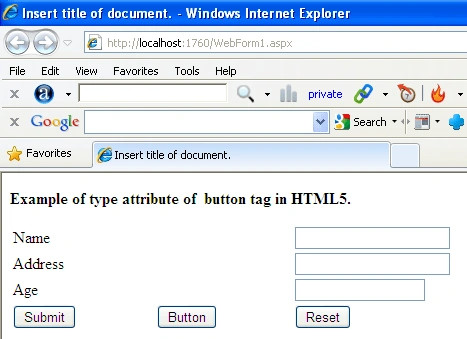
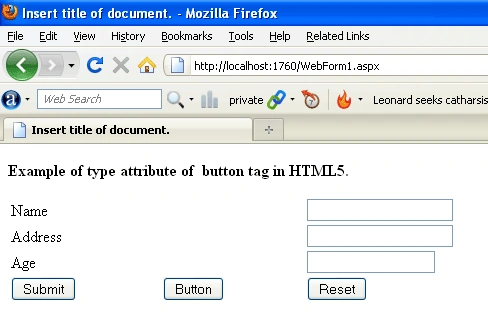
Type attribute example of button Tag
This attribute specifies the type of
button.
- <!doctype html><html ><head><title> Insert title of document. </title></head><body><p><b>Example of type attribute of button tag in HTML5.</b></p><form><table style="width: 50%"></tr><tr><td>Name</td><td> </td><td><input name="Text4" type="text"></td></tr><tr><td>Address</td><td> </td><td><input name="Text2" type="text"></td></tr><tr><td>Age</td><td> </td><td><input name="Text5" type="text" style="width: 124px"></td></tr><tr><td><button type="submit" > Submit</button></td><td><button type="button" >Button</button></td><td><button type="reset" >Reset</button></td></tr></table></form></body></html>
Internet explorer
FireFox
Value
attribute example of button Tag
The value attribute
specifies an initial value for the button. The value can be changed by a
script.
Create a html page.
- <!DOCTYPE HTML>
- <html>
- <body>
- <form action="HTMLPage1.htm" method="get">
- <div>
- <button name="subject" type="submit" >SQLSERVER</button>
- <button name="subject" type="submit" value="JavaScript">CSS</button>
- </div>
- </form>
- </body>
- </html>
Disable
attribute example of button Tag
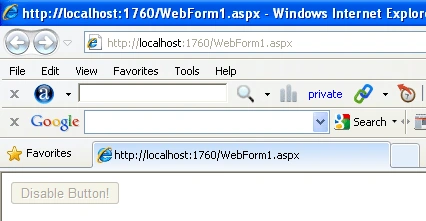
This attribute specifies that a button
should be disabled.
- <!DOCTYPE HTML>
- <html>
- <body>
- <button type="button" disabled="disabled">Disable Button!</button>
- </body>
- </html>
Internet explorer
Autofocus
attribute example of button Tag
This attribute
specifies that a button should have focus when the page loads.
- <!DOCTYPE HTML>
- <html>
- <body>
- <button type="button" autofocus="autofocus">Button Autofocus!</button>
- </body>
- </html>
Join the conversation! Your thoughts help the community grow.