

This article shows how to do bulk upload in .NET Core. Earlier versions of .NET Core did not have any SQLBulkCopy but the latest version of .NET Core does support bulk copy through SQLBulkCopy class.
However, there is no DataTable in .NET Core though which we can do upload, using SQLBulkCopy. .NET Core uses DBDataReader to write the data, using SQLBulkCopy but using DBDataReader is very cumbersome, since you will have to write all the get and set methods and mapping of properties all by yourself.
Thus, we are going to use another class, which will help us to do the bulk uploading in a very easy way.
However, there is no DataTable in .NET Core though which we can do upload, using SQLBulkCopy. .NET Core uses DBDataReader to write the data, using SQLBulkCopy but using DBDataReader is very cumbersome, since you will have to write all the get and set methods and mapping of properties all by yourself.
Thus, we are going to use another class, which will help us to do the bulk uploading in a very easy way.
For demo purposes, I will be uploading data from a CSV file, where my data is seperated by "|".
Requirements
- Visual Studio
- .NET Core
- SQL Server
Step 1
Create a .NET Core Console Application.
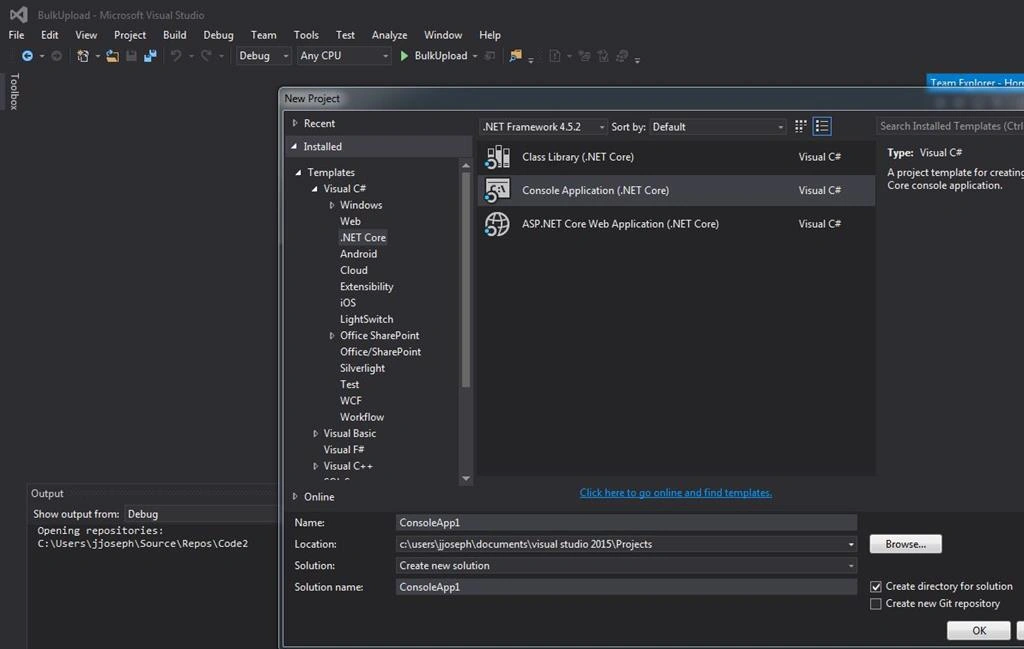
Create a .NET Core Console Application.
Step 2
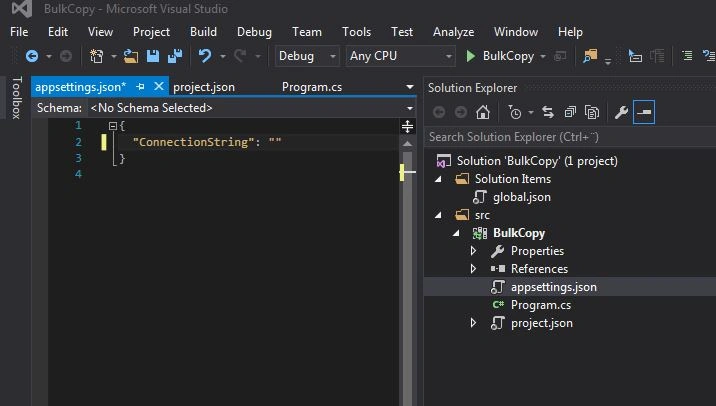
Add "appsettings.json" file and add the connection string property. We will use this connection string to connect to the database.
Add "appsettings.json" file and add the connection string property. We will use this connection string to connect to the database.
Step 3
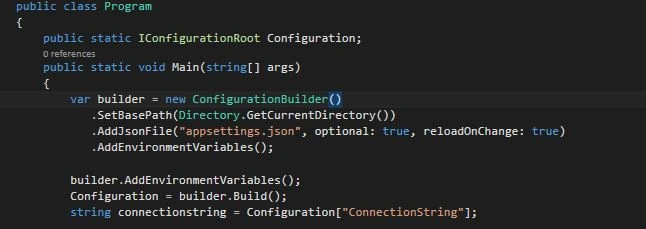
Add the code to read the settings from the Configuration Builder. (Find the package list at the bottom of the article).
Add the code to read the settings from the Configuration Builder. (Find the package list at the bottom of the article).
Step 4
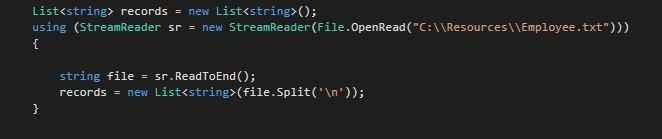
Add the code to read CSV file, which has data for the bulk upload. Read all the lines into a list of the string.
Add the code to read CSV file, which has data for the bulk upload. Read all the lines into a list of the string.
Step 5
Create a list of objects
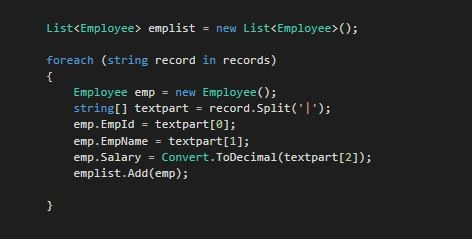
Here, I am splitting my columns into an object and add the object in a list.
My Employee class is given below.
Here, I am splitting my columns into an object and add the object in a list.
My Employee class is given below.
- class Employee
- {
- public string EmpId { get; set; }
- public string EmpName { get; set; }
- public decimal Salary { get; set; }
- }
Step 6
Use SQLBulkCopy to WritetoServer
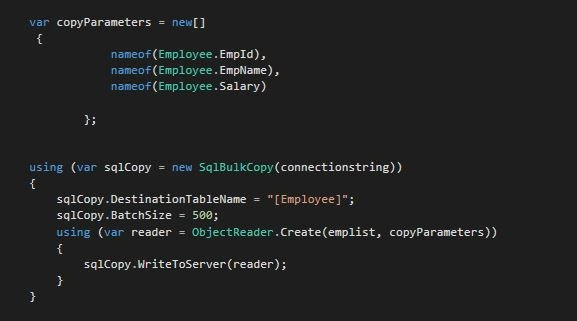
Here, I am creating a SQLBulkCopy Object. I am using the FastMember ObjectReader class, which creates a DBDataReader object by taking 2 parameters, my employee object list and the type of employee object members. In return, the ObjectReader creates a DBDataReader object, which I can pass in SQLBulkCopy.WriteToServer method.
It's done. Now, run the code and SQLBulkCopy should work on uploading all the records into the database.
Here, the full code is given below.
Here, I am creating a SQLBulkCopy Object. I am using the FastMember ObjectReader class, which creates a DBDataReader object by taking 2 parameters, my employee object list and the type of employee object members. In return, the ObjectReader creates a DBDataReader object, which I can pass in SQLBulkCopy.WriteToServer method.
It's done. Now, run the code and SQLBulkCopy should work on uploading all the records into the database.
Here, the full code is given below.
- using System;
- using System.Collections.Generic;
- using System.Data.SqlClient;
- using System.IO;
- using System.Linq;
- using System.Threading.Tasks;
- using Microsoft.Extensions.Configuration;
- using FastMember;
- namespace BulkCopy
- {
- public class Program
- {
- public static IConfigurationRoot Configuration;
- public static void Main(string[] args)
- {
- var builder = new ConfigurationBuilder()
- .SetBasePath(Directory.GetCurrentDirectory())
- .AddJsonFile("appsettings.json", optional: true, reloadOnChange: true)
- .AddEnvironmentVariables();
- builder.AddEnvironmentVariables();
- Configuration = builder.Build();
- string connectionstring = Configuration["ConnectionString"];
- List<string> records = new List<string>();
- using (StreamReader sr = new StreamReader(File.OpenRead("C:\\Resources\\Employee.txt")))
- {
- string file = sr.ReadToEnd();
- records = new List<string>(file.Split('\n'));
- }
- List<Employee> emplist = new List<Employee>();
- foreach (string record in records)
- {
- Employee emp = new Employee();
- string[] textpart = record.Split('|');
- emp.EmpId = textpart[0];
- emp.EmpName = textpart[1];
- emp.Salary = Convert.ToDecimal(textpart[2]);
- emplist.Add(emp);
- }
- var copyParameters = new[]
- {
- nameof(Employee.EmpId),
- nameof(Employee.EmpName),
- nameof(Employee.Salary)
- };
- using (var sqlCopy = new SqlBulkCopy(connectionstring))
- {
- sqlCopy.DestinationTableName = "[Employee]";
- sqlCopy.BatchSize = 500;
- using (var reader = ObjectReader.Create(emplist, copyParameters))
- {
- sqlCopy.WriteToServer(reader);
- }
- }
- }
- }
- class Employee
- {
- public string EmpId { get; set; }
- public string EmpName { get; set; }
- public decimal Salary { get; set; }
- }
- }
- {
- "version": "1.0.0-*",
- "buildOptions": {
- "emitEntryPoint": true
- },
- "dependencies": {
- "Microsoft.Extensions.Configuration": "1.1.0",
- "Microsoft.Extensions.Configuration.FileExtensions": "1.1.0",
- "Microsoft.Extensions.Configuration.Json": "1.1.0",
- "Microsoft.NETCore.App": {
- "type": "platform",
- "version": "1.0.1"
- },
- "System.IO.FileSystem": "4.3.0",
- "Microsoft.Extensions.Configuration.EnvironmentVariables": "1.1.0",
- "System.Data.SqlClient": "4.1.0",
- "FastMember": "1.1.0"
- },
- "frameworks": {
- "netcoreapp1.0": {
- "imports": "dnxcore50"
- }
- }
- }
The CSV Text File
- 111 | Jack1 | 50000
- 112 | Jack2 | 60000
- 113 | Jack3 | 70000
- 114 | Jack4 | 80000
Thanks for reading !!
Anslemo PelcastrePosted Mar 12, 2019, 7:32 PM
I try read a file excel, I use this code for this but actually my project is null, do you have an example using excel, sql and asp.net core?
Emil SödergrenPosted Aug 14, 2017, 1:00 PM
The code works and does what it's supposed to do. But the whole approach of nesting all code inside the application starting class/method is something I'd never recommend anyone to do. Would be much cleaner to extract the nested logic into separate files/classes and call them as needed.
Asanka DissanayakePosted Mar 16, 2017, 7:16 AM
Video tutorial is not working. Please check it.
Former memberPosted Feb 1, 2017, 3:03 AM
Ok i understand. thanks buddy.
JulianPosted Jan 31, 2017, 5:35 AM
SQLBulkCopy was not there in earlier release of .NET Core.
Former memberPosted Jan 31, 2017, 3:26 AM
SqlBulkCopy class had been introduced long time back. it is not new in core. what you try to pin point here.....please give a brief. thanks