

- Building Web Application Using Node.js - Part One
- Building Web Application Using Node.js - Part Two
- Building Web Application Using Node.js - Part Three
- Building Web Application Using Node.js - Part Four
- Building Web Application Using Node.js - Part Five
- Building Web Application Using Node.js - Part Six
- Building Web Applications Using Node.js - Part Seven
In my previous article Building Web Application Using Node.js - Part 1, I have explained how to start work with node Web Application, we have seen about initializing node project, Package.json file, using express, npm start command, Routing, using templates and Bower.
In this article, I will explain you how can we use templating engines in our Web Application. Thus, I will use same project and we will learn how can we modify our Website templates in node.js.
Templating Engines
JavaScript template engines are often used when writing thick JS-clients or as "normal" template engines when using Server side JS like Node.js. Instead of cluttering the code by generating HTML, using string concatenating etc., you instead use a template and interpolate variable in them.
In our Application, we will use templating to allow express to build HTML pages. All the data and everything will be retrieved from the database and data will process at Server side and will generate HTML. There are various types of templating engines available. Some popular templating engines are listed below.
- Mustache
- Jade
- Handlebars
- Dust
- doT
- Underscore
- EJS
In this Web Application, I am going to use EJS. Let's start step by step.
First of all, download ejs package from node package manager, using the command, mentioned below.
npm install ejs --save
After installing ejs, you can check your ejs dependency will be in your package.json file.
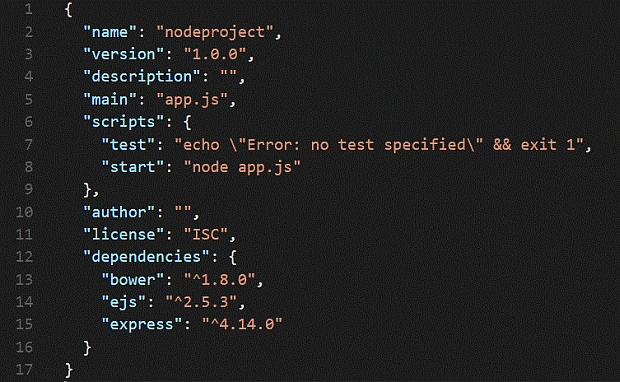
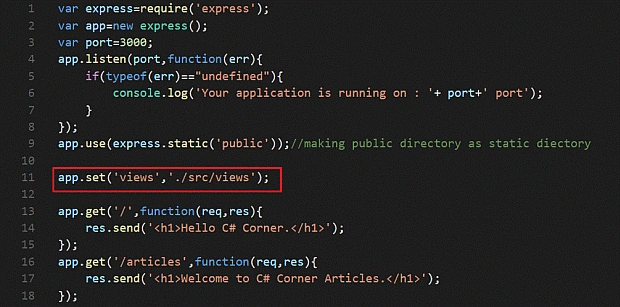
Now, open app.js file and now we will setup our environment for templating engine. Whenever we work with any templating engine, couple of things are required. First, we will tell express that where we will store our views, which is possible, using set function. Open app.js and set your views path, as shown below.
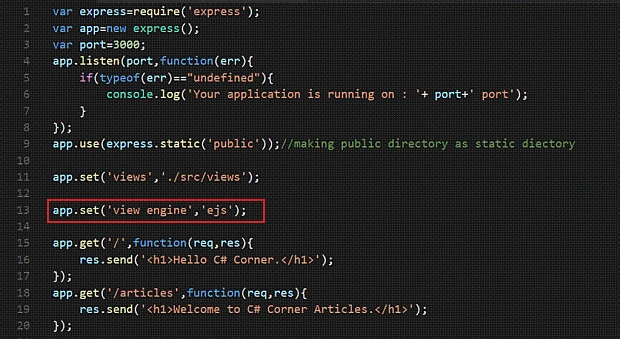
In the second step, we have to tell express; which template engine you are going to use? The snapshot given below helps you in regards to this.
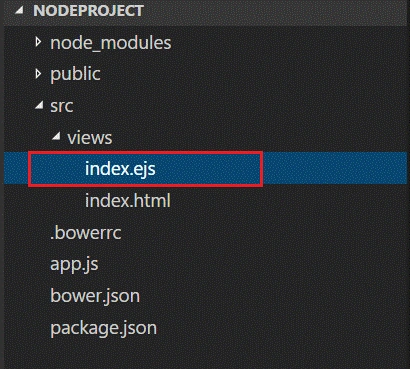
Now, in next step, I am going to copy my index.html file and save as index.ejs.
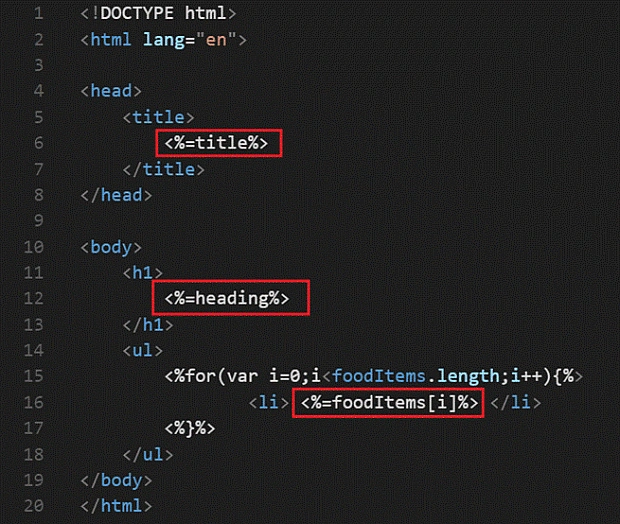
Now, write the code in ejs file, as shown below.
- <!DOCTYPE html>
- <html lang="en">
- <head>
- <title>
- <%=title%>
- </title>
- </head>
- <body>
- <h1>
- <%=heading%>
- </h1>
- <ul>
- <% for(var i=0;i<foodItems.length;i++){ %>
- <li>
- <%=foodItems[i]%>
- </li>
- <% } %>
- </ul>
- </body>
- </html>
Now, I am modifying my app.js file. I am writing the code, mentioned below.
- app.get('/', function(req, res) {
- res.render('index', {
- title: 'Web Application using Node.js',
- heading: 'Hello C# Corner, Welcome to Node.js Tutorial',
- foodItems: ['Pizza', 'Burger', 'Pasta']
- });
- });
- var express = require('express');
- var app = new express();
- var port = 3000;
- app.listen(port, function(err) {
- if (typeof(err) == "undefined") {
- console.log('Your application is running on : ' + port + ' port');
- }
- });
- app.use(express.static('public')); //making public directory as static diectory
- app.set('views', './src/views');
- app.set('view engine', 'ejs');
- app.get('/', function(req, res) {
- res.render('index', {
- title: 'Web Application using Node.js',
- heading: 'Hello C# Corner, Welcome to Node.js Tutorial',
- foodItems: ['Pizza', 'Burger', 'Pasta']
- });
- });
- app.get('/articles', function(req, res) {
- res.send('<h1>Welcome to C# Corner Articles.</h1>');
- });
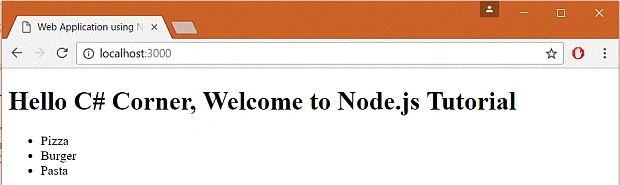
In next tutorial, we will learn about routing and we will explore more about ejs. Subsequently, after connecting our node program to the database and we will bind data in our Web Application.
<<Previous Article Next Article>>
Harish PaudelPosted Sep 16, 2020, 1:49 AM
Thank u very much sourabh for such a learning.
Naziya BhardePosted Sep 19, 2017, 7:43 AM
Keep posting such useful blogs
Manav PandyaPosted Aug 24, 2017, 2:43 AM
I want to ask that can we have any single file maintain for global settings like setting static directory etc .. ??
Manav PandyaPosted Aug 24, 2017, 2:42 AM
Nice post sourabh .....
Shaili DashoraPosted Dec 3, 2016, 11:30 AM
Nice Article series Sourabh :)
Mahesh ChandPosted Dec 3, 2016, 10:21 AM
Good one Saurabh. We should move your articles to the Learn series when you're done. Cheers!
Khaja MoizuddinPosted Dec 3, 2016, 12:51 AM
Nice Article Sourabh Somani Sir . I like all your Articles.