

Introduction
This simple application developed in HTML 5 helps to show how to move an image in a browser. We know that HTML stands for HyperText Markup Language and it helps to display the data in a browser. HTML 5 is the advanced version of HTML that can be used to develop 3D and animated applications. This article is for beginners to help show how to display a moving image in a browser.
DOM
DOM is the acronym for the Document Object Model. The DOM
is a W3C (World Wide Web Consortium) standard. The DOM defines a standard for accessing documents like XML and HTML. The W3C Document Object Model (DOM) is a
platform and language-neutral interface that allows programs and scripts to dynamically access and update the content structure and style of a document.
The DOM is separated into 3 different parts/levels:
- Core DOM - standard model for any structured document.
- XML DOM - standard model for XML documents.
- HTML DOM - standard model for HTML documents.
Canvas
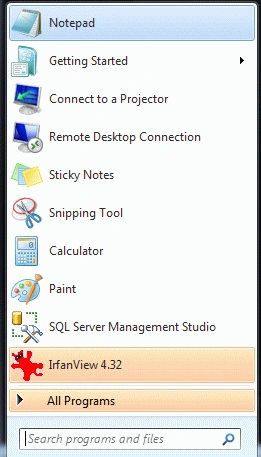
- Click the start button -> notepad.
- The name of the file is your choice.
- Here I am using the name "Tom".
Step 2 :
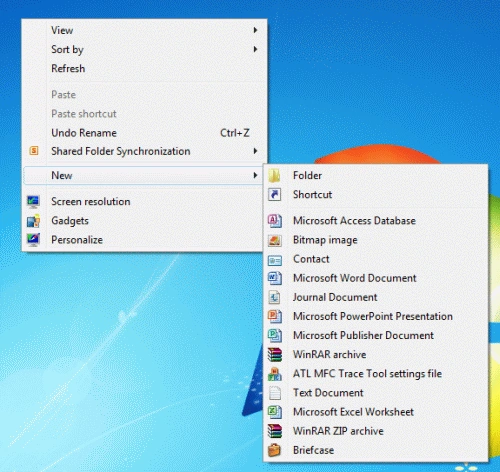
Create a folder.
- In any drive create a folder with the name of your choice.
- Here we create a folder in D drive with the name "Tom".
Step 3: Define the function removeColors under
the function we define properties onmouseover, onmouseout.
Code
- function showGrayImg() {
- this.previousSibling.style.display = "inline";
- this.style.display = "none";
- }
- function removeColors() {
- var aImages = document.getElementsByClassName("grayscale"), nImgsLen = aImages.length, oCanvas = document.createElement("canvas"), oCtx =
- oCanvas.getContext("2d");
- for (var nWidth, nHeight, oImgData, oGrayImg, nPixel, aPix, nPixLen, nImgId = 0; nImgId < nImgsLen; nImgId++) {
- oColorImg = aImages[nImgId];
- nWidth = oColorImg.offsetWidth;
- nHeight = oColorImg.offsetHeight;
- oCanvas.width = nWidth;
- oCanvas.height = nHeight;
- oCtx.drawImage(oColorImg, 0, 0);
- oImgData = oCtx.getImageData(0, 0, nWidth, nHeight);
- aPix = oImgData.data;
- nPixLen = aPix.length;
- for (nPixel = 0; nPixel < nPixLen; nPixel += 4) {
- aPix[nPixel + 2] = aPix[nPixel + 1] = aPix[nPixel] = (aPix[nPixel] + aPix[nPixel + 1] + aPix[nPixel + 2]) / 3;
- }
- oCtx.putImageData(oImgData, 0, 0);
- oGrayImg = new Image();
- oGrayImg.src = oCanvas.toDataURL();
- oGrayImg.onmouseover = showColorImg;
- oColorImg.onmouseout = showGrayImg;
- oCtx.clearRect(0, 0, nWidth, nHeight);
- oColorImg.style.display = "none";
- oColorImg.parentNode.insertBefore(oGrayImg, oColorImg);
- }
Step 4:
Set the style of the animated image.
Code
- <style>
- html {
- height: 100%;
- }
- body {
- font-family: Arial, sans-serif;
- font-size: 83%;
- padding: 0;
- margin: 0;
- height: 100%;
- }
- a {
- color: black;
- }
- #content {
- position: absolute;
- left: 50%;
- top: 50%;
- margin-left: -260px;
- width: 520px;
- margin-top: -300px;
- height: 600px;
- }
- #doodle {
- width: 520px;
- height: 600px;
- }
- #doodle-temp {
- position: relative;
- left: 110px;
- top: 205px;
- width: 304px;
- height: 135px;
- }
- #prm {
- padding: 1em 0;
- width: 100%;
- text-align: center;
- }
- </style>
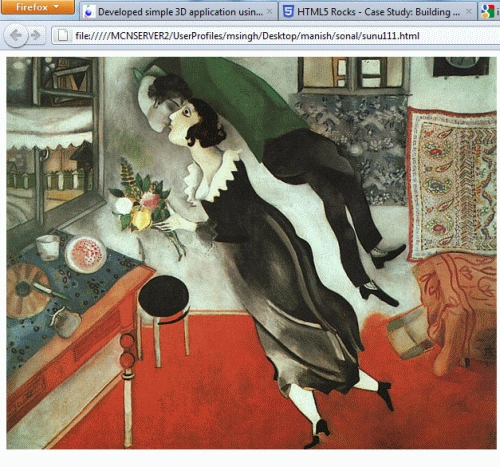
Step 5: Write the complete code to remove a color image
in the browser.
Code
- <html>
- <head>
- <meta http-equiv="Content-Type" content="text/html; charset=UTF-8" />
- <title>MDC Example</title>
- <script type="text/javascript">
- function showColorImg() {
- this.style.display = "none";
- this.nextSibling.style.display = "inline";
- }
- function showGrayImg() {
- this.previousSibling.style.display = "inline";
- this.style.display = "none";
- }
- function removeColors() {
- var aImages = document.getElementsByClassName("grayscale"), nImgsLen = aImages.length, oCanvas = document.createElement("canvas"), oCtx =
- oCanvas.getContext("2d");
- for (var nWidth, nHeight, oImgData, oGrayImg, nPixel, aPix, nPixLen, nImgId = 0; nImgId < nImgsLen; nImgId++) {
- oColorImg = aImages[nImgId];
- nWidth = oColorImg.offsetWidth;
- nHeight = oColorImg.offsetHeight;
- oCanvas.width = nWidth;
- oCanvas.height = nHeight;
- oCtx.drawImage(oColorImg, 0, 0);
- oImgData = oCtx.getImageData(0, 0, nWidth, nHeight);
- aPix = oImgData.data;
- nPixLen = aPix.length;
- for (nPixel = 0; nPixel < nPixLen; nPixel += 4) {
- aPix[nPixel + 2] = aPix[nPixel + 1] = aPix[nPixel] = (aPix[nPixel] + aPix[nPixel + 1] + aPix[nPixel + 2]) / 3;
- }
- oCtx.putImageData(oImgData, 0, 0);
- oGrayImg = new Image();
- oGrayImg.src = oCanvas.toDataURL();
- oGrayImg.onmouseover = showColorImg;
- oColorImg.onmouseout = showGrayImg;
- oCtx.clearRect(0, 0, nWidth, nHeight);
- oColorImg.style.display = "none";
- oColorImg.parentNode.insertBefore(oGrayImg, oColorImg);
- }
- }
- </script>
- </head>
- <body onload="removeColors();">
- <p>
- <img class="grayscale" src="chagall14.jpg" alt=""/>
- </p>
- </body>
- </html>
Step 6: Write the complete
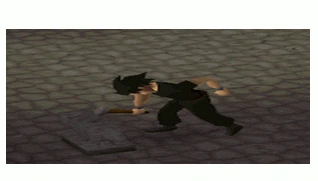
code to animate an image displayed in a browser.
Code:
- <html>
- <head>
- <meta charset='utf-8'>
- <title>Stanislaw Lem doodle</title>
- <style>
- html {
- height: 100%;
- }
- body {
- font-family: Arial, sans-serif;
- font-size: 83%;
- padding: 0;
- margin: 0;
- height: 100%;
- }
- a {
- color: black;
- }
- #content {
- position: absolute;
- left: 50%;
- top: 50%;
- margin-left: -260px;
- width: 520px;
- margin-top: -300px;
- height: 600px;
- }
- #doodle {
- width: 520px;
- height: 600px;
- }
- #doodle-temp {
- position: relative;
- left: 110px;
- top: 205px;
- width: 304px;
- height: 135px;
- }
- #prm {
- padding: 1em 0;
- width: 100%;
- text-align: center;
- }
- </style>
- </head>
- <body>
- <div id='content'>
- <div id='doodle'>
- <img id='doodle-temp' src='http://images2.wikia.nocookie.net/__cb20110808151136/runescape/images/2/2c/Smithing2.gif'
- alt='60th anniversary of Stanislaw Lem's first book publication. Art inspired by "The Cyberiad" illustrations by Daniel Mróz.'>
- </div>
- </div>
- <script src='engine-const.js'></script>
- <script src='engine-helpers.js'></script>
- <script src='engine-actions.js'></script>
- <script src='engine-rects.js'></script>
- <script src='engine-actors.js'></script>
- <script src='engine-main.js'></script>
- <script src='lem-const.js'></script>
- <script src='lem-actors.js'></script>
- <script src='lem-scenes.js'></script>
- <script src='lem-images.js'></script>
- <script src='lem-images-sprite.js'></script>
- <script>
- engine.init();
- </script>
Resources:
Join the conversation! Your thoughts help the community grow.