

In the previous articles of this series, we discussed why .NET Core was introduced by Microsoft and what are the main advantages of it. Also, in the previous articles, we learned how to develop basic console applications using .NET Core Architecture. Now, in this article, we will discuss how to handle static files in .NET Core Architecture.
If you want to look at the previous articles of this series, please visit the links given below.
Static files
One of the main features of ASP.NET Core is that it can be as lean as you like. This means, you are responsible for what you’re going to put into the application, but it also means that you can make the application very simple and fast.
In fact, if you start your project from an empty ASP.NET Core web application template, the application will not be able to serve static files. If you want to do it, you have to add and configure a specific package. A common question is “Why doesn't it support static files by default if all websites need static files?" The truth is that not all the websites need to serve static files, especially on high-traffic applications. In this case, the static files should be hosted by a content delivery network (CDN). Moreover, your web application could be an API application that usually serves data using JSON or XML format instead of images, stylesheets, and JavaScript.
Configure static files
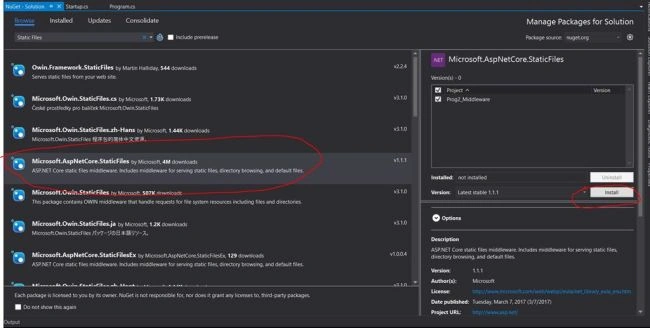
As you’ll see, most of the configurations are managed by middleware components available on NuGet. That’s also true in this case; you have to install a specific package and configure its middleware. The package to install is Microsoft.AspNetCore.StaticFiles. You can get it using the Package Manager. You are almost ready. The last but still important thing to know is that the wwwroot folder present in the root of your project will contain all the static files. So, if you want to serve a file called image1.jpg for the request http://localhost:5000/image1.jpg, you have to put it into the root of the wwwroot folder, not in the root of the project folder like you were doing with the previous version of ASP.NET.
Single page application
Another scenario where the static-file middleware components combined with ASP.NET Core application could be very useful is for a web app that is a single page application (SPA). The best way to describe the meaning of SPA is via Wikipedia's definition-
Basically, most of the business logic is present on the client. The server doesn't need to render different Views; it just exposes the data to the client. This is available thanks to JavaScript (combined with modern frameworks like Angular, React, Aurelia) and a set of APIs (in our case, developed with ASP.NET MVC Core).
If there is no server-side rendering, the web server must return a static file when the root domain is called by the browser (http://www.mysite.com). To do that, you have to configure the default documents into the Configure method of your Startup class.
For demonstrating this, we first need to create a blank or empty project of .NET Core applications. For this, just open the Microsoft Visual Studio 2017 as below.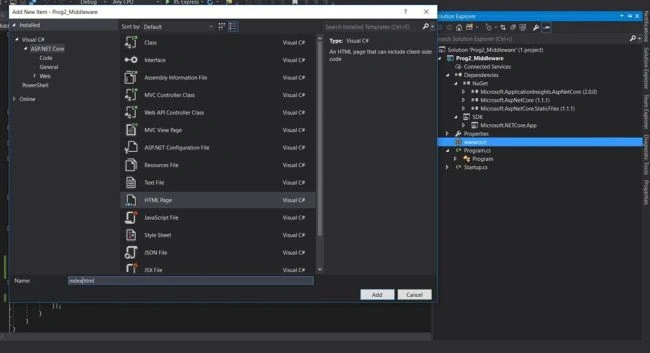
Now, select the available existing project template, like Empty Project, just like console application.
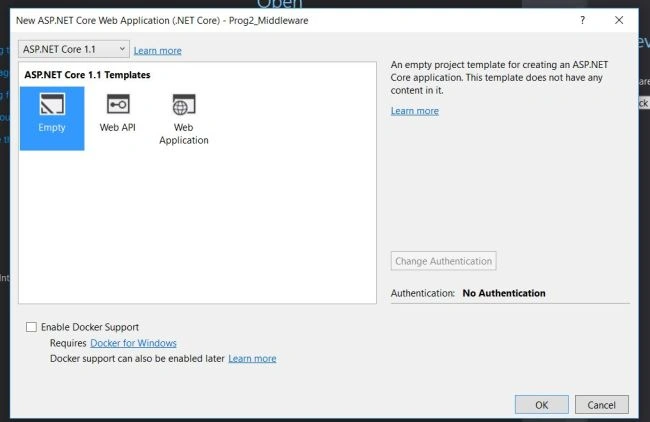
Now, it contains two files as mentioned below.
- using System;
- using System.Collections.Generic;
- using System.IO;
- using System.Linq;
- using System.Threading.Tasks;
- using Microsoft.AspNetCore.Hosting;
- namespace Prog2_Middleware
- {
- public class Program
- {
- public static void Main(string[] args)
- {
- var host = new WebHostBuilder()
- .UseKestrel()
- .UseContentRoot(Directory.GetCurrentDirectory())
- .UseIISIntegration()
- .UseStartup<Startup>()
- .UseApplicationInsights()
- .Build();
- host.Run();
- }
- }
- }
- using System;
- using System.Collections.Generic;
- using System.Linq;
- using System.Threading.Tasks;
- using Microsoft.AspNetCore.Builder;
- using Microsoft.AspNetCore.Hosting;
- using Microsoft.AspNetCore.Http;
- using Microsoft.Extensions.DependencyInjection;
- using Microsoft.Extensions.Logging;
- namespace Prog2_Middleware
- {
- public class Startup
- {
- // This method gets called by the runtime. Use this method to add services to the container.
- // For more information on how to configure your application, visit https://go.microsoft.com/fwlink/?LinkID=398940
- public void ConfigureServices(IServiceCollection services)
- {
- }
- // This method gets called by the runtime. Use this method to configure the HTTP request pipeline.
- public void Configure(IApplicationBuilder app, IHostingEnvironment env, ILoggerFactory loggerFactory)
- {
- loggerFactory.AddConsole();
- if (env.IsDevelopment())
- {
- app.UseDeveloperExceptionPage();
- }
- app.UseDefaultFiles();
- app.UseStaticFiles();
- app.Run(async (context) =>
- {
- await context.Response.WriteAsync("Hello World! Welcome to .Net Core World");
- });
- }
- }
- }
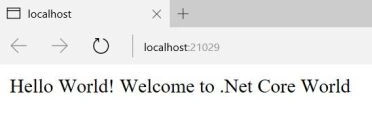
Now, for using static files, we need to add the Microsoft.AspNetCore.StaticFiles from NuGet Manager and install that extension within the projects.
Index.html
- <!DOCTYPE html>
- <html>
- <head>
- <meta charset="utf-8" />
- <title></title>
- </head>
- <body>
- <h1>Hello ASP.Net Core... </h1>
- </body>
- </html>
- using System;
- using System.Collections.Generic;
- using System.Linq;
- using System.Threading.Tasks;
- using Microsoft.AspNetCore.Builder;
- using Microsoft.AspNetCore.Hosting;
- using Microsoft.AspNetCore.Http;
- using Microsoft.Extensions.DependencyInjection;
- using Microsoft.Extensions.Logging;
- namespace Prog2_Middleware
- {
- public class Startup
- {
- // This method gets called by the runtime. Use this method to add services to the container.
- // For more information on how to configure your application, visit https://go.microsoft.com/fwlink/?LinkID=398940
- public void ConfigureServices(IServiceCollection services)
- {
- }
- // This method gets called by the runtime. Use this method to configure the HTTP request pipeline.
- public void Configure(IApplicationBuilder app, IHostingEnvironment env, ILoggerFactory loggerFactory)
- {
- loggerFactory.AddConsole();
- if (env.IsDevelopment())
- {
- app.UseDeveloperExceptionPage();
- }
- app.UseDefaultFiles();
- app.UseStaticFiles();
- app.Run(async (context) =>
- {
- await context.Response.WriteAsync("Hello World! Welcome to .Net Core World");
- });
- }
- }
- }

Former memberPosted May 12, 2017, 5:12 AM
One of my friend suthirtho used to work in gamut long time back then angular was not used in matrix. probably he may try to join matrix again. he know angular 1 but not angular 2. so my friend request me to get that info which version you guys are using for matrix erp now. if ng 2 is using then he will prepare for ng 2 before to face the interview. it is my request if you please tell me which version now matrix is using for erp. thanks
Former memberPosted May 11, 2017, 6:05 AM
One personal question that you are in gamut for long time. now angular v1 or v2 is using in gamut ? which asp.net mvc version they are using ? if possible answer. thanks
Former memberPosted May 11, 2017, 6:03 AM
Thanks for good article. still i guess no one address asp.net core life cycle because now http module and handler is not there and it means something has been change in pipe line. so would your write a article in details.....just a request. thanks
Saravanakumar SekaranPosted May 10, 2017, 2:34 AM
Wow really awesome article !!!!!!!!!!!!