

Table of Contents
Introduction: The Shift from Static Rules to Agentic Intelligence
The Business Problem: Why Traditional Pricing Fails in E-Commerce
High-Level Architecture: The Multi-Agent Orchestrator
Deep Dive: Where Reinforcement Learning (RL) Fits In
Real-Time Use Case: "Flash Sale" Scenario at ShopGlobal
Step-by-Step Implementation Guide
Step 1: Defining the State Schema
Step 2: The RAG Agent (Policy Compliance)
Step 3: The RL Agent (Price Optimization)
Step 4: The Supervisor Agent (Decision Maker)
Code Implementation: Python & LangGraph
Enterprise Considerations: Security, Observability, and Scale
Conclusion
Technology Tags
Introduction
In modern e-commerce, pricing is no longer just a number on a tag; it is a dynamic lever that balances profit margins, inventory turnover, and customer satisfaction. Traditional rule-based engines (e.g., "If stock < 10, increase price by 5%") are rigid and fail to account for complex market signals. This article demonstrates how to build a Dynamic Pricing Engine using LangGraph, a framework for building stateful, multi-agent applications. We will integrate Retrieval-Augmented Generation (RAG) to ensure pricing decisions comply with strict bank/enterprise policies and use Reinforcement Learning (RL) to optimize prices based on real-time market feedback.
The Business Problem
ShopGlobal, a large e-commerce retailer, faces three challenges:
Compliance Risk: Prices must adhere to strict internal policies (e.g., "Never discount luxury items below cost + 10%").
Market Volatility: Competitor prices change every minute.
Profit Maximization: The system needs to learn which price points convert best without human intervention.
A simple LLM cannot solve this because it hallucinates numbers and doesn't "learn" from past sales data. We need an Agentic System with Memory and Tools.
High-Level Architecture
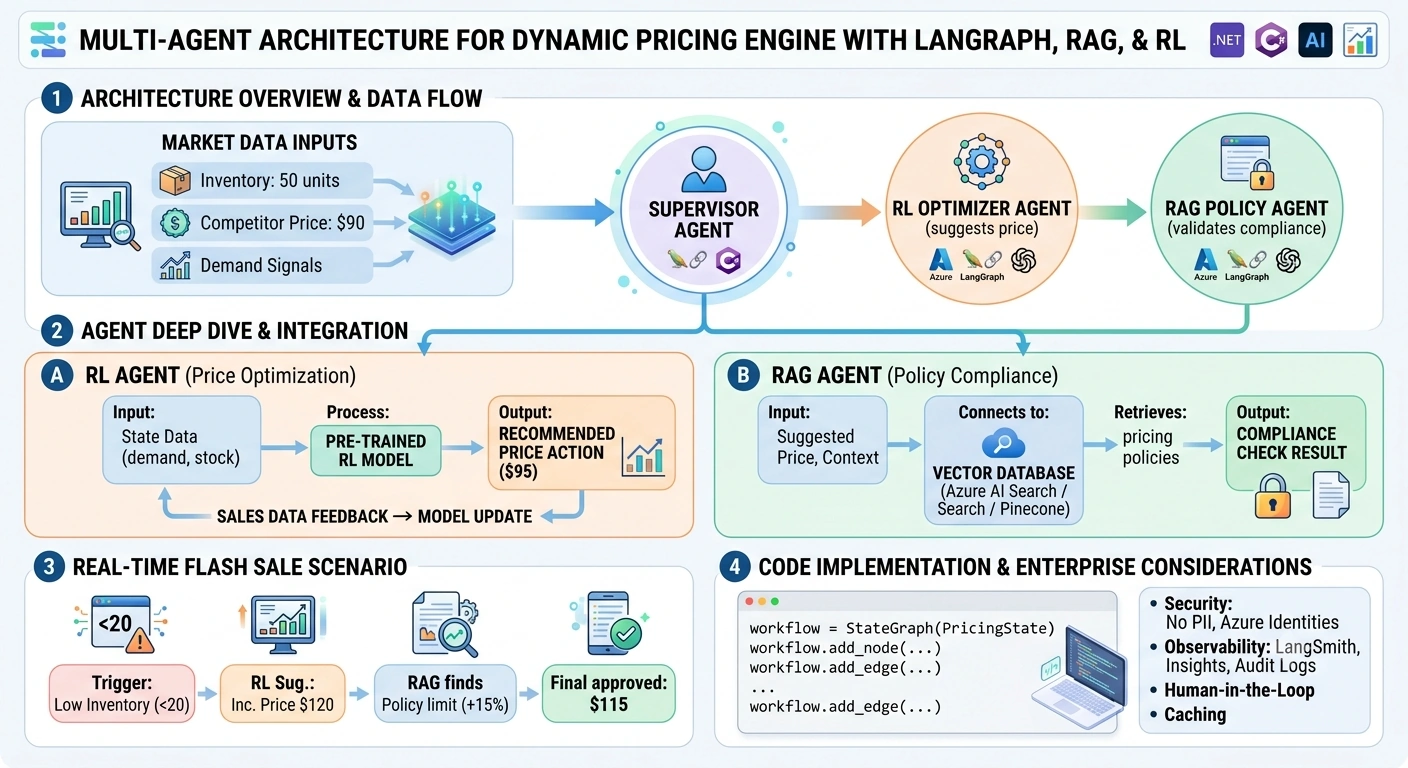
We will use a Supervisor-Worker pattern in LangGraph:
Supervisor Agent: The brain. It receives the request, delegates tasks, and makes the final decision.
RAG Agent (Policy Checker): Retrieves relevant pricing policies from a Vector Database (Azure AI Search/Pinecone) and validates if the proposed price is compliant.
RL Agent (Pricing Optimizer): Uses a pre-trained Reinforcement Learning model to suggest a price based on current demand, competitor data, and inventory levels.
State Manager: Maintains the context of the conversation and the history of pricing decisions for audit trails.
Deep Dive: Where Does Reinforcement Learning Fit?
This is the most critical architectural question. LLMs do not perform mathematical optimization well. They are probabilistic text generators.
The RL Component acts as a "Tool" within the Agent Graph.
Input: Current State (Inventory: 50 units, Competitor Price: $90, Time: 2 PM).
RL Model: A Q-Learning or PPO (Proximal Policy Optimization) model trained on historical sales data.
Output: A recommended price action (e.g., "Set Price to $95").
Feedback Loop: After 24 hours, the actual sales data is fed back into the RL model to update its Q-values. The LLM orchestrates the call to the RL model but does not calculate the price itself.
Real-Time Use Case: The "Flash Sale" Scenario
Scenario: It’s Black Friday. ShopGlobal has 100 units of a "Smart Watch."
Trigger: Inventory drops below 20 units.
Supervisor: Detects low stock. Calls RL Agent.
RL Agent: Analyzes real-time traffic. Suggests increasing price to $120 (from $100) due to high demand.
Supervisor: Sends $120 to RAG Agent.
RAG Agent: Queries Vector DB for "Black Friday Pricing Policy."
Retrieved Policy: "During Flash Sales, max price increase capped at 15% unless inventory < 10."
RAG Agent: Flags $120 (20% increase) as Non-Compliant. Suggests max $115.
Supervisor: Accepts $115. Updates State. Logs decision for Audit.
Step-by-Step Implementation Guide
Tech Stack
Orchestration: LangGraph
LLM: Azure OpenAI (GPT-4o)
Vector DB: Azure AI Search (for Policies)
RL Model: Scikit-Learn/Q-Learning (simulated for demo)
State Management: LangGraph StateGraph
Step 1: Defining the State Schema
The state holds all information passed between agents.
from typing import TypedDict, Annotated, List
import operator

class PricingState(TypedDict):
    product_id: str
    current_price: float
    inventory_level: int
    competitor_price: float
    rl_suggested_price: float
    policy_check_result: str
    final_price: float
    messages: Annotated[List[str], operator.add] # Memory of steps
Step 2: The RAG Agent (Policy Compliance)
This agent retrieves policies and checks compliance.
from langchain_core.prompts import ChatPromptTemplate
from langchain_openai import AzureChatOpenAI

# Simulated Vector Store Retrieval
def get_policies(query: str) -> str:
    # In production, this queries Azure AI Search
    if "luxury" in query.lower():
        return "Policy: Luxury items must maintain min 10% margin. Max discount 5%."
    return "Policy: Standard items can vary price by +/- 20% based on demand."

llm = AzureChatOpenAI(deployment_name="gpt-4o", temperature=0)

def policy_agent_node(state: PricingState):
    print("🔍 RAG Agent: Checking Policies...")

    # Retrieve relevant policy
    policy_context = get_policies(f"Product {state['product_id']} pricing")

    prompt = ChatPromptTemplate.from_template(
        "You are a Compliance Officer. \n"
        "Policy: {policy}\n"
        "Proposed Price: ${rl_price}\n"
        "Current Price: ${current_price}\n"
        "Is this compliant? If not, suggest the max allowed price."
    )

    chain = prompt | llm
    response = chain.invoke({
        "policy": policy_context,
        "rl_price": state['rl_suggested_price'],
        "current_price": state['current_price']
    })

    return {
        "policy_check_result": response.content,
        "messages": [f"Policy Check: {response.content}"]
    }
Step 3: The RL Agent (Price Optimization)
This agent simulates calling an RL model.
def rl_agent_node(state: PricingState):
    print("🤖 RL Agent: Calculating Optimal Price...")

    # In production, this calls a deployed ML Endpoint (e.g., Azure ML)
    # Simple Q-Learning Simulation:
    base_price = state['current_price']
    demand_factor = 1.2 if state['inventory_level'] < 20 else 1.0

    # RL Model suggests a price based on demand
    suggested = base_price * demand_factor

    return {
        "rl_suggested_price": round(suggested, 2),
        "messages": [f"RL Suggestion: ${round(suggested, 2)}"]
    }
Step 4: The Supervisor Agent (Decision Maker)
The supervisor orchestrates the flow and makes the final call.
def supervisor_agent_node(state: PricingState):
    print("🧠 Supervisor: Making Final Decision...")

    # Logic to parse policy result and decide
    if "Non-Compliant" in state['policy_check_result']:
        # Extract suggested max price from LLM response (simplified)
        final_price = state['current_price'] * 1.15 # Fallback safe logic
        reason = "Adjusted for Compliance"
    else:
        final_price = state['rl_suggested_price']
        reason = "Approved by Policy"

    return {
        "final_price": round(final_price, 2),
        "messages": [f"Final Decision: ${round(final_price, 2)} - {reason}"]
    }
Building the Graph
from langgraph.graph import StateGraph, END

workflow = StateGraph(PricingState)

# Add Nodes
workflow.add_node("rl_agent", rl_agent_node)
workflow.add_node("policy_agent", policy_agent_node)
workflow.add_node("supervisor", supervisor_agent_node)

# Define Edges (Flow)
# Start -> RL Agent -> Policy Agent -> Supervisor -> End
workflow.set_entry_point("rl_agent")
workflow.add_edge("rl_agent", "policy_agent")
workflow.add_edge("policy_agent", "supervisor")
workflow.add_edge("supervisor", END)

app = workflow.compile()
Running the Engine
initial_state = {
    "product_id": "WATCH-001",
    "current_price": 100.0,
    "inventory_level": 15, # Low stock
    "competitor_price": 95.0,
    "rl_suggested_price": 0.0,
    "policy_check_result": "",
    "final_price": 0.0,
    "messages": []
}

result = app.invoke(initial_state)

print("\n--- FINAL OUTPUT ---")
print(f"Final Price: ${result['final_price']}")
print("Audit Trail:")
for msg in result['messages']:
    print(f"- {msg}")
Enterprise Considerations
Security: Never send PII (Customer Data) to the LLM. Use Azure Managed Identities for accessing Vector DBs.
Observability: Use LangSmith or Application Insights to trace every step. Log the
rl_suggested_pricevsfinal_priceto measure how often policies override AI.Human-in-the-Loop: For high-value items, add a conditional edge in LangGraph to pause and wait for human approval if the price change > 20%.
Caching: Cache policy retrieval results. Policies don’t change every second.
Conclusion
By combining Reinforcement Learning for mathematical optimization, RAG for regulatory compliance, and LangGraph for orchestration, we create a pricing engine that is not only smart but also safe and auditable. This architecture moves beyond simple automation to true Agentic AI, where systems can reason, check constraints, and act autonomously within defined boundaries. For .NET developers, this logic can be exposed via FastAPI or ASP.NET Core Minimal APIs, allowing your existing enterprise frontends to consume these intelligent pricing decisions seamlessly.
Join the conversation! Your thoughts help the community grow.