

Code reviews are one of the most important parts of modern software development. They help teams catch bugs early, improve maintainability, enforce coding standards, and improve overall software quality.
However, traditional code reviews also consume significant developer time. Reviewing every pull request manually becomes difficult in large repositories or fast-moving teams.
With the rise of Large Language Models (LLMs), we can now automate a large portion of the review process by building an AI-powered code review agent.
In this article, we’ll explore how to build a lightweight AI code reviewer in C# that:
Reads Git diffs
Extracts changed code
Sends changes to an LLM
Receives structured review feedback
Displays suggestions to developers
The goal is not to replace developers, but to provide faster and smarter review assistance before human review begins.
Why Git Diff Is the Right Approach
One common mistake when integrating AI into code review systems is sending the entire repository to the LLM.
This causes several problems:
High token usage
Increased latency
Poor context relevance
Expensive API usage
Lower review quality
Instead, modern AI review systems focus primarily on Git diffs.
A Git diff contains:
Modified lines
Added code
Removed code
File-level context
This keeps the review focused only on recent changes.
Example:
git diff main...HEADOr:
git diff HEAD~1 HEADThis approach is scalable, faster, and far more cost-effective.
High-Level Architecture
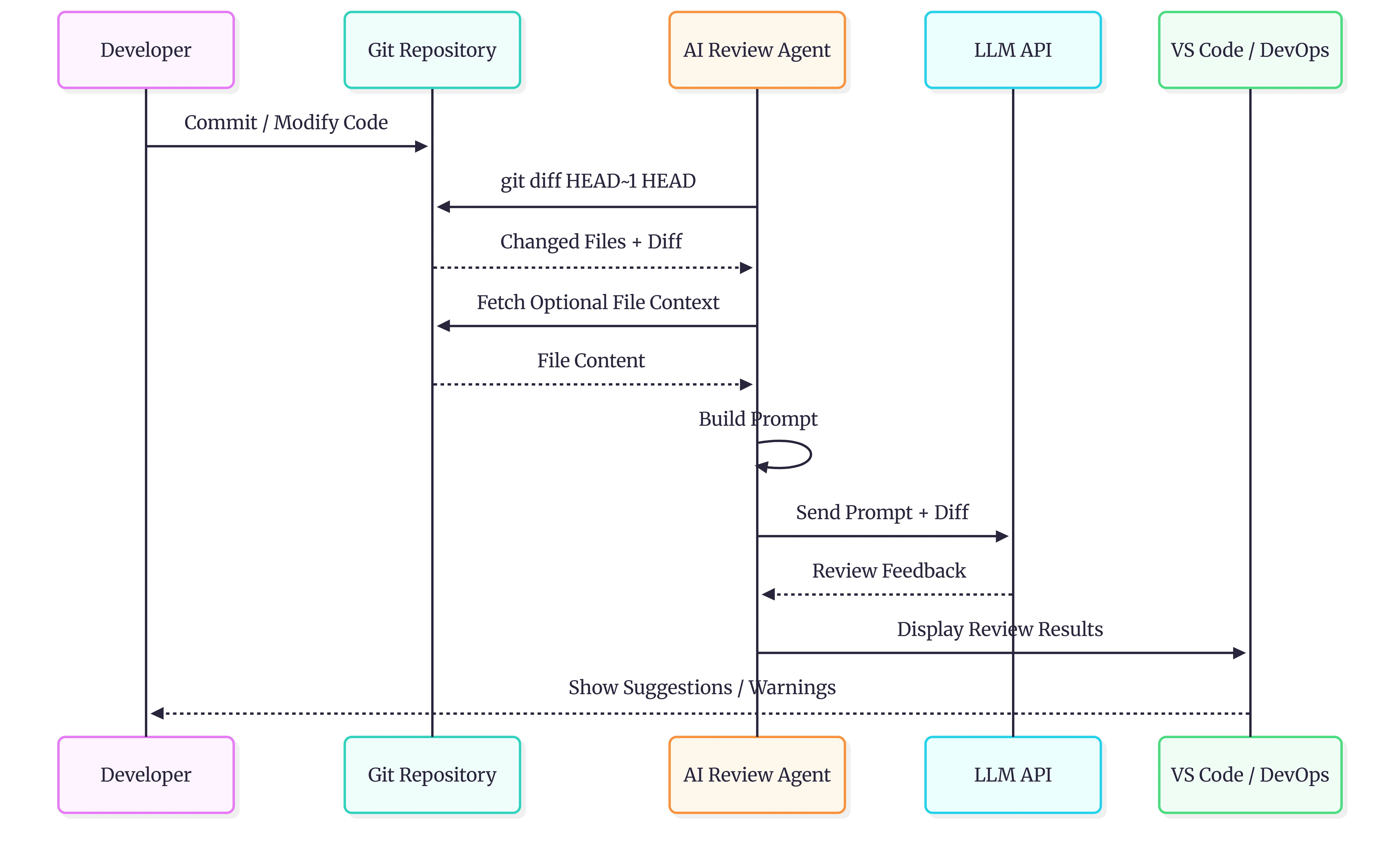
The architecture of the AI review agent is straightforward.
Developer Changes Code
        ↓
Git Diff Extraction
        ↓
Prompt Builder
        ↓
LLM API
        ↓
AI Review Response
        ↓
VS Code / PR Comments / CLI
The system can be integrated into:
VS Code extensions
GitHub Actions
Azure DevOps pipelines
Pull request automation
Internal developer tools
Solution Flow
Here’s the typical workflow:
Developer modifies code
System extracts Git diff
Optional context files are collected
Prompt is generated
Diff is sent to the LLM
AI analyzes the changes
Review suggestions are returned
Feedback is shown to the developer
Step 1 - Extract Git Diff in C#
The first step is to retrieve changed code from Git.
Example:
using System.Diagnostics;

public static class GitHelper
{
    public static string GetGitDiff()
    {
        var process = new Process
        {
            StartInfo = new ProcessStartInfo
            {
                FileName = "git",
                Arguments = "diff HEAD~1 HEAD",
                RedirectStandardOutput = true,
                UseShellExecute = false,
                CreateNoWindow = true
            }
        };

        process.Start();

        string diff = process.StandardOutput.ReadToEnd();

        process.WaitForExit();

        return diff;
    }
}
This captures the latest commit changes.
You can also compare against:
Main branch
Pull request branch
Specific commit ranges
Step 2 - Build the AI Prompt
Once the diff is collected, we build a prompt for the LLM.
A good prompt is critical for high-quality reviews.
Example:
public static string BuildPrompt(string diff)
{
    return $@"
You are a senior C# code reviewer.

Review ONLY the changed code.

Focus on:
- Bugs
- Security vulnerabilities
- Performance issues
- Null reference risks
- Maintainability
- Best practices

Return concise actionable feedback.

Git Diff:
{diff}
";
}
The most important rule:
Keep the prompt focused on changed code only.
Step 3 - Send Request to LLM
You can use:
OpenAI
Azure OpenAI
Ollama
Claude
Gemini
Below is a simplified OpenAI example using HttpClient.
using System.Net.Http.Headers;
using System.Text;
using System.Text.Json;

public class AiReviewService
{
    private readonly HttpClient _httpClient;

    public AiReviewService(HttpClient httpClient)
    {
        _httpClient = httpClient;
    }

    public async Task<string> ReviewCodeAsync(string prompt)
    {
        var request = new
        {
            model = "gpt-4.1",
            messages = new[]
            {
                new
                {
                    role = "user",
                    content = prompt
                }
            }
        };

        var json = JsonSerializer.Serialize(request);

        var content = new StringContent(json, Encoding.UTF8, "application/json");

        _httpClient.DefaultRequestHeaders.Authorization =
            new AuthenticationHeaderValue("Bearer", "YOUR_API_KEY");

        var response = await _httpClient.PostAsync(
            "https://api.openai.com/v1/chat/completions",
            content);

        response.EnsureSuccessStatusCode();

        return await response.Content.ReadAsStringAsync();
    }
}
Step 4 - Parse AI Response
The LLM can return:
Markdown
JSON
Structured review data
Structured JSON is preferred for automation.
Example response:
{
  "severity": "High",
  "file": "AuthService.cs",
  "line": 42,
  "issue": "Possible null reference exception",
  "suggestion": "Add null validation before accessing User object"
}
This enables:
PR annotations
IDE diagnostics
DevOps dashboards
Automated warnings
Step 5 - Show Feedback to Developers
The final output can be displayed in multiple ways:
| Integration | Example |
|---|---|
| VS Code Extension | Inline review comments |
| CLI Tool | Console warnings |
| GitHub PR | Automated review comments |
| Azure DevOps | Pull request feedback |
| Web Dashboard | Review summaries |
Adding Smart Context
Diff-only reviews work well, but adding limited context improves accuracy.
Good context examples:
Related interfaces
Base classes
Dependency injection registrations
Referenced DTOs
Configuration files
Avoid sending:
Entire repositories
Large binaries
Generated files
Vendor libraries
Best Practices for AI Code Review
1. Keep Reviews Incremental
Review only changed code.
Avoid full-repository scans unless absolutely necessary.
2. Limit Token Usage
Large prompts reduce quality and increase cost.
Smaller focused prompts perform better.
3. Use Structured Responses
JSON output is easier to integrate into developer tools.
4. Add Severity Levels
Categorize issues:
Critical
High
Medium
Low
Suggestion
This improves developer experience.
5. Cache Repeated Reviews
Avoid re-reviewing unchanged diffs.
This reduces API costs significantly.
Advanced Enhancements
Once the basic version works, you can expand the platform with advanced capabilities.
Semantic Code Context
Retrieve related files automatically using embeddings or vector search.
Multi-Agent Reviews
Use specialized reviewers:
Security Reviewer
Performance Reviewer
Architecture Reviewer
Testing Reviewer
Local LLM Support
Use Ollama or local models for:
Better privacy
Lower costs
Offline review systems
Pull Request Automation
Automatically trigger reviews during CI/CD pipelines.
Example platforms:
GitHub Actions
Azure DevOps
GitLab CI
Common Challenges
Hallucinated Issues
LLMs sometimes report incorrect issues.
Solution:
Keep prompts focused
Add surrounding context
Use deterministic prompts
Large Pull Requests
Huge diffs reduce review quality.
Solution:
Chunk large diffs
Review file-by-file
Prioritize critical files
Sensitive Code Exposure
Sending source code to external APIs may violate compliance requirements.
Solution:
Use Azure OpenAI
Use self-hosted models
Mask secrets before sending
Final Thoughts
AI-assisted code review is rapidly becoming a standard part of modern development workflows.
The most effective systems are surprisingly simple:
Extract Git diff
Build focused prompts
Send to LLM
Show actionable feedback
The key insight is:
Review the change, not the entire repository.
By combining Git diffs with LLMs, developers can build fast, scalable, and intelligent review systems directly inside existing development workflows.
Whether integrated into VS Code, Azure DevOps, or GitHub pull requests, AI code review agents can significantly improve developer productivity while reducing manual review effort.
The future of code review will likely be collaborative:
AI performs the first-pass review
Developers handle architecture and business logic
Teams ship faster with higher confidence
And C# provides an excellent ecosystem for building these tools.
Join the conversation! Your thoughts help the community grow.