

This step by step tutorial guides you towards how to create a setp for a Windows Forms application using Visual Studio 2005.
Step 1: First of all, create a Windows Forms application.
Step 2: Next add a setup project by clicking on File-> Add-> New Project.
By clicking here the window will open like this:
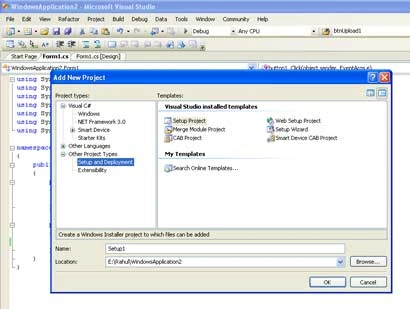
Figure 1:
Step 3: Select here Setup and Deployment in the left side bar in project types.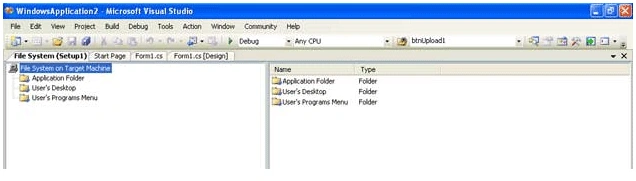
Figure 2:
Here we find three options as following:
-
Application Folder
-
User's Desktop
-
User's Program Menu
Step 4: These three options are the three places where we want to copy our setup fules during the installation process. From here we have to select one option. Suppose I select User's Desktop. Then Right click on User's Desktop option and select Add-> Project Output. The window will look like as.
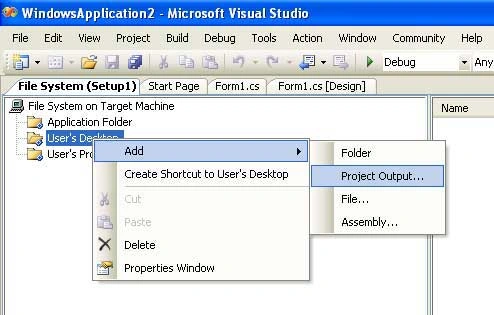
Figure 3:
Step 5: After clicking on Project Output, a new window will open. Here we select first four options. Now click on OK.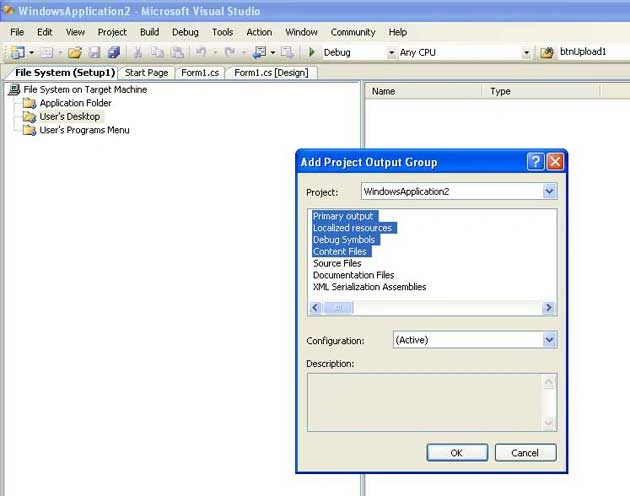
Figure 4:
Step 6: After clicking on OK, Rebuild the Setup from Build option in Menu bar like as.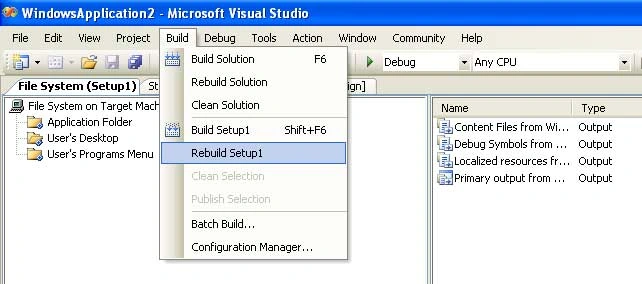
Figure 5:
Step 7: After this, let's test our setup by going right clicing on the setup project in Solution Explorer and click on Install menu item.
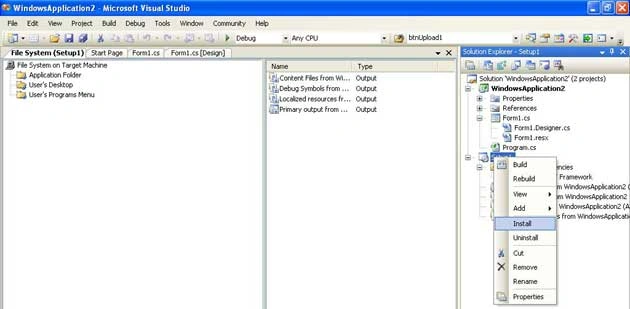
Figure 6:
The setup process will start, which looks like this:
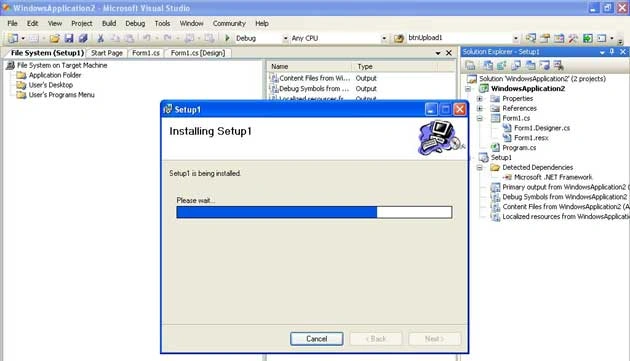
Figure 7:
Step 8: After copmpleting the installation go on desktop there you will find all files you have included in the setup on the desktop.
girish parganihaPosted Jun 16, 2016, 3:03 AM
Hello sir, I created a windows application in c# and created a setup for this application.The setup runs on my computer but when i run the setup in client pc it shows error.In client pc there is no sql server install. Thanks
Gowtham RajamanickamPosted Apr 26, 2016, 8:41 AM
nice article....
Khawar IslamPosted Apr 7, 2016, 2:52 PM
Nice Article
kumar manjayPosted Aug 19, 2015, 7:57 AM
Hello Sir i made a windows application in vb.net and database is m s access after making exe it is not working so please give some idea how to add database when creating exe file
Rahul Kumar SaxenaPosted Jul 30, 2015, 11:34 PM
Thanks 2 All
Rahul Kumar SaxenaPosted Jul 30, 2015, 11:34 PM
Thank you Neeraj Kumar
Neeraj KumarPosted Jul 30, 2015, 6:22 PM
Nice Article
Rahul Kumar SaxenaPosted Mar 1, 2015, 11:53 PM
Set up file .... Renuka Padwal
Renuka PadwalPosted Mar 1, 2015, 3:21 AM
I have created c# windows application and deploy it. Now i want to install it on client machin so what i have to install on client machin?? .exe file or setup file or both?
priya balaPosted Mar 11, 2013, 4:11 PM
Can you please tell how to add a logo to the program? I have the .ico file and tried to add it but no luck :-( I am using VS 2010
prashant polPosted Apr 1, 2012, 7:45 AM
I have created a c# windows project and now company wants to upload installation files on server for people to download and use it.But problem is i dont know how to create or install sql server at there end where i can create database programmatically if there is not sql server engine how projects is going to work.. Please help
Jaydeepsinh JadejaPosted Jan 13, 2012, 2:49 AM
This will make setup of my project but i have image on my button and when i run my software exefile it generate error."Unhandled exception has occurred in your application ..\image\btn_stop.red.jpg".But other function work properly. Can you solve this.
krishan kumar singhPosted Aug 10, 2011, 4:08 AM
Thank you
ritu mahajanPosted Aug 1, 2011, 4:54 AM
Great article. Thank you!
bipin shresthaPosted Jul 11, 2011, 1:22 AM
This resource is really helpful. Now I want to know, if its easy to add a font to the system while installing windows application. Thanx in advance
Lucky JauraPosted Jul 1, 2011, 9:33 AM
Sir, Is the possible that,which database we use in our project,that database install automatically,during installation of setup in another machine::::Means if we not attached to sql then during Installation It can attach automatically or not plz help me
YaminiPosted Mar 8, 2011, 10:34 AM
I want to install the EXE on the client machines [Windows XP], so do I have to install .NET Framework on that machines too ? My requirement is that without install .NET framework on client's machines ,Clients can run my setup file or exe file and my windows applications in .NET Framework 3.5--VB.NET [Microsoft Visual Studio 2008] with SQL Server database 2008 R2. So does client machine requires the .NET Framework Package to be installed on the computer where the application or setup-exe file runs ? If yes then which version do I have to install on Windows XP client machine to solve any compatible issues for running my setup file??? In your article :"Building a Setup for a Windows Forms Application" does this exe setup contain installation of .NET framework?
anthony rajaPosted Jan 9, 2011, 12:29 PM
hi dude how to open pdf file in wins form with application.startup please guide me
ShwetaPosted Jul 28, 2010, 2:27 AM
i have understod this article ,but may i know which software is being used for set up creation,i'm devloping a window appication in Microsoft visual C# 2008 Experss Edition
Tarun KumarPosted May 8, 2010, 5:09 PM
Dear Rahul, Thanks alot for you valuable post, I have followed up with your instrctions n created an exe, Actually I want to install the exe on several client system so that they can access and use the a centralized database resided on the windows server [SQL server], but after installing the exe it is showing the error, even it is not loading the app, it is showing login page_load null reference error....please help to solve this problem, early response will be appreciated ..... Thanks in advance, Tarun
Felipe CorreaPosted Sep 16, 2009, 10:59 AM
Hi, thanks for publishing this! I need help with two things: 1. My app is conected to a SQL Server 2005 Data Base, but I built the setup project and installed it in my pc, then I ran the .exe and it doesn't connect to the data base, what do I have to do to correct this? 2. How can I generate an uninstall project?
Santosh KumarPosted Mar 13, 2009, 7:13 AM
Rahul you rock!!!
harsha mounikaPosted Sep 22, 2008, 5:26 AM
thank u, nice perfomance and ur article hepled me
Rahul Kumar SaxenaPosted Aug 29, 2007, 3:05 AM
Step required to make the setup of WebBased Application