

Bootstrap's Default Settings
- The global font-size in bootstrap is 14px and line-height is 1.428.
- All paragraphs are included in <body>
- All <p> elements have bottom margin equal to half of their computer line-height (10px default).
What is Typography
- All the elements are below HTML elements that are styled a little differently in Bootstrap than browser defaults.
- There are number of classes using the typography.
Typography classes and sample program and output
<h1>-<h6> or .h1-.h6
- There are 6 types of headings used in HTML
- Each tag is different from the another in font size
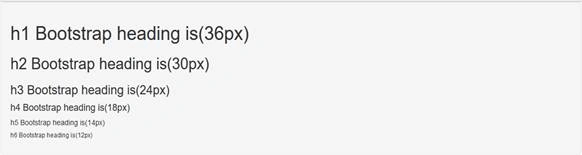
- h1: font-size is=36px
- h2: font-size is=30px
- h3: font-size is=24px
- h4: font-size is=18px
- h5: font-size is=14px
- h6: font-size is=12px
Program for heading tag
- <!DOCTYPE html>
- <html >
- <head>
- <meta charset="utf-8">
- <meta name="viewport" content="width=device-width, initial scale=1">
- <link rel="stylesheet" type="text/css" href="css/bootstrap.min.css">
- </head>
- <body>
- <div class="container">
- <div class="row">
- <div class="col-ls-12 well">
- <h1>h1 Bootstrap heading is(36px)</h1>
- <h2>h2 Bootstrap heading is(30px)</h2>
- <h3>h3 Bootstrap heading is(24px)</h3>
- <h4>h4 Bootstrap heading is(18px)</h4>
- <h5>h5 Bootstrap heading is(14px)</h5>
- <h6>h6 Bootstrap heading is(12px)</h6>
- </div>
- </div>
- </div>
- <script type="text/javascript" src="js/bootstrap.min.js"></script>
- <script type="text/css" src="js/jquery"></script>
- </body>
- </html>
Output
<Small>
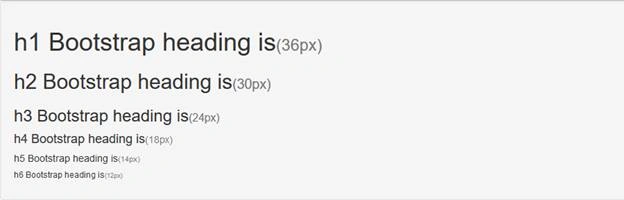
- In the small tag, element is used to create a lighter and secondary text in any heading.
- This small element is used to display the text in light shade in a particular heading tag.
Program for <small>
- <!DOCTYPE html>
- <html >
- <head>
- <meta charset="utf-8">
- <meta name="viewport" content="width=device-width, initial scale=1">
- <link rel="stylesheet" type="text/css" href="css/bootstrap.min.css">
- </head>
- <body>
- <div class="container">
- <div class="row">
- <div class="col-ls-12 well">
- <h1>h1 Bootstrap heading is<small>(36px)<small></h1>
- <h2>h2 Bootstrap heading is<small>(30px)<small></h2>
- <h3>h3 Bootstrap heading is<small>(24px)<small></h3>
- <h4>h4 Bootstrap heading is<small>(18px)<small></h4>
- <h5>h5 Bootstrap heading is<small>(14px)<small></h5>
- <h6>h6 Bootstrap heading is<small>(12px)<small></h6>
- </div>
- </div>
- </div>
- <script type="text/javascript" src="js/bootstrap.min.js"></script>
- <script type="text/css" src="js/jquery"></script>
- </body>
- </html>
Output
<mark>
- Mark tag is used to highlight the particular word in a given paragraph.
- The color of the highlight is light yellow by default.
Sample program for <mark>
- <!DOCTYPE html>
- <html >
- <head>
- <meta charset="utf-8">
- <meta name="viewport" content="width=device-width, initial scale=1">
- <link rel="stylesheet" type="text/css" href="css/bootstrap.min.css">
- </head>
- <body>
- <div class="container">
- <div class="row">
- <div class="col-ls-12 well">
- <p>
- On the Insert tab, the galleries include items that are<mark> designed</mark> to coordinate with the overall look of your document. You can use these galleries to insert tables, headers, footers, lists, cover pages, and other document building blocks. When you create pictures, charts, or diagrams, they also coordinate with your current document look.
- On the Insert tab, the galleries include items that are designed to coordinate with the overall look of your document. You can use these galleries to insert tables, headers, footers, lists, cover pages, and other document building blocks. When you create pictures, charts, or diagrams, they also coordinate with your current document look.
- </p>
- </div>
- </div>
- <script type="text/javascript" src="js/bootstrap.min.js"></script>
- <script type="text/css" src="js/jquery"></script>
- </body>
- </html>
Output

<abbr>
- The <abbr> element indicates an abbreviation or acronym.
- Abbreviations with a title attribute have a dotted bottom border and a help cursor on hover, providing additional context on hover.
- Inside the <abbr> tag, we should create the title that is used to expand that particular element.
Sample program for <abbr>
- <!DOCTYPE html>
- <html >
- <head>
- <meta charset="utf-8">
- <meta name="viewport" content="width=device-width, initial scale=1">
- <link rel="stylesheet" type="text/css" href="css/bootstrap.min.css">
- </head>
- <body>
- <div class="container">
- <div class="row">
- <div class="col-ls-12 well">
- <h3> <abbr title="Bootstrap">BT</abbr> Typography</h3>
- </div>
- </div>
- <script type="text/javascript" src="js/bootstrap.min.js"></script>
- <script type="text/css" src="js/jquery"></script>
- </body>
- </html>
Output

<blockquote>
- It is used to highlight the quotes.
- The <blockquote> tag has <footer> tag also. It is used, for example, highlighting the author name.
Sample program for <blockquote>
- <!DOCTYPE html>
- <html >
- <head>
- <meta charset="utf-8">
- <meta name="viewport" content="width=device-width, initial scale=1">
- <link rel="stylesheet" type="text/css" href="css/bootstrap.min.css">
- </head>
- <body>
- <div class="container">
- <div class="row">
- <div class="col-ls-12 well">
- <blockquote>
- "Learn More Be Smart"
- <footer>C# Corner</footer>
- </blockquote>
- </div>
- </div>
- <script type="text/javascript" src="js/bootstrap.min.js"></script>
- <script type="text/css" src="js/jquery"></script>
- </body>
- </html>
Output

<kbd>
If you are creating some lines of content that line will have some Shortcut keys, means that key will be highlighted in the different style.
Sample program for <kbd>
- <!DOCTYPE html>
- <html >
- <head>
- <meta charset="utf-8">
- <meta name="viewport" content="width=device-width, initial scale=1">
- <link rel="stylesheet" type="text/css" href="css/bootstrap.min.css">
- </head>
- <body>
- <div class="container">
- <div class="row">
- <div class="col-ls-12 well">
- <h5>please press <kbd>CTRL+C</kbd>to copy...</h5>
- </div>
- </div>
- <script type="text/javascript" src="js/bootstrap.min.js"></script>
- <script type="text/css" src="js/jquery"></script>
- </body>
- </html>
Output

<code>
- Bootstrap will style the HTML <code> element in the following way.
- The following HTML elements:span, section, and div define a section in a document.
<pre>
- The pre tag is used to print the text the same way it is typed.
- That is displayed in a fixed width, font, space, line break.
Sample program for <pre>
- <!DOCTYPE html>
- <html >
- <head>
- <meta charset="utf-8">
- <meta name="viewport" content="width=device-width, initial scale=1">
- <link rel="stylesheet" type="text/css" href="css/bootstrap.min.css">
- </head>
- <body>
- <div class="container">
- <pre>
- This is
- C#corner
- Contribution
- </pre>
- <script type="text/javascript" src="js/bootstrap.min.js"></script>
- <script type="text/css" src="js/jquery"></script>
- </body>
- </html>
Output

<dl>
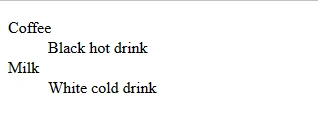
- A description list with terms and description.
- <dl>tag is used in conjuction with <dt>(terms/name) <dd>(describes each terms//names).
- The <dl> tag also supports the global attributes in HTML tags.
Sample program for <dl>
- <!DOCTYPE html>
- <html >
- <head>
- <meta charset="utf-8">
- <meta name="viewport" content="width=device-width, initial scale=1">
- <link rel="stylesheet" type="text/css" href="css/bootstrap.min.css"
- </head>
- <body>
- <div class="container">
- <div class="row well">
- <dl>
- <dt>Coffee</dt>
- <dd>Black hot drink</dd>
- <dt>Milk</dt>
- <dd>White cold drink</dd>
- </dl>
- </div>
- </div>
- <script type="text/javascript" src="js/bootstrap.min.js"></script>
- <script type="text/css" src="js/jquery"></script>
- </body>
- </html>
Output
Colors and Backgrounds
Bootstrap also has some contextual classes that can be used to provide meaning through colors.
The classes for text colors are
- .text-muted
- .text-primary
- .text-success
- .text-info
- .text-warning
- .text-danger
The classes for background colors are
- .bg-primary
- .bg-success
- .bg-info
- .bg-warning
- .bg-danger:
These classes are used to change the font color and background color
More Typography Classes
| Class | Description | |
| .lead | Makes a paragraph stand out | |
| .small | smaller text (set to 85% of the size of the parent) | |
| .text-left | left-aligned text | |
| .text-center | center-aligned text | |
| .text-right | right-aligned text | |
| .text-justify | justified text | |
| .text-nowrap | no wrap text | |
| .text-lowercase | lowercased text | |
| .text-uppercase | uppercased text | |
| .text-capitalize | capitalized text | |
| .initialism | Displays the text inside an <abbr> element in a slightly smaller font size | |
| .list-unstyled | works on both <ul> and <ol>to remove the default list-style from any nested lists, apply this class to any nested lists as well | |
| .list-inline | Places all list items on a single line | |
| .dl-horizontal | Lines up the terms (<dt>) and descriptions (<dd>) in <dl> elements side-by-side. Starts off like default <dl>s, but when the browser window expands, it will line up side-by-side | |
| .pre-scrollable | Makes a <pre> element scrollable | |
| <del> | deleted text | |
| <s> | Indicates no longer relevant text: No longer relevant text | |
| <ins> | Inserted text | |
| <u> | Underlined text | |
| <strong> | Bold text | |
| <em> | Italic text | |
| <ul> | unordered list | |
| <ol> | ordered list |
Conclusion
I hope, now you understand how to use bootstrap typography in HTML webpages. In the future, we will learn about more bootstrap techniques step by step. Stay tuned!
Join the conversation! Your thoughts help the community grow.