

Introduction
C'mon, we all know we're here to push forward component-based architecture. Modern frameworks like React and Blazor do this effortlessly. But HOW do they do it?
At least I know the secret for Blazor, and I’m pretty sure I’m 95% right on this one. It all comes down to interactivity. Let me take you behind the scenes. We'll explore how SignalR and Render Trees drive the whole process.
If you’re new to Blazor, I’ve previously covered the basics of Blazor as a Single Page Application (SPA) and its server-side rendering in my article What makes Blazor SPA and how does Server-Side Rendering work with Blazor's new Web App.
The architecture
I've scribbled something down, and while I'm pretty sure this is how it's supposed to work, am I 100% certain? What am I, know it all?
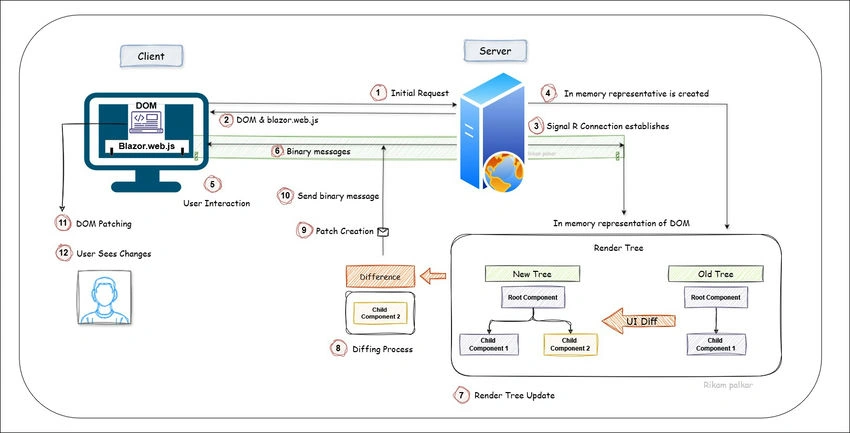
Image 1. The architecture of Blazor Server Interactivity
This architecture is broken down into what I like to call the 12 Steps of Interactivity.
- Initial Request: The user initiates a request to load the Blazor app in the browser.
- Response and Setup: The server responds with the initial HTML, CSS, and blazor.web.js, rendering the DOM in the browser.
- SignalR Connection: blazor.web.js establishes a WebSocket connection with the server using SignalR.
- In-Memory Representation: The server creates an in-memory render tree representing the initial state of the webpage.
- User Interaction: The user interacts with the page (e.g., clicks a button or inputs text).
- Capture Interaction: blazor.web.js captures the interaction and sends it as a binary message through SignalR to the server.
- Render Tree Update: The server processes the interaction and updates the in-memory representation, creating a new render tree.
- Diffing Process: The server compares the "new render tree" with the "old render tree" to identify the differences.
- Patch Creation: Differences between the old and new render trees are packaged into a binary message.
- DOM Update: The server sends this binary message back to the client through SignalR.
- DOM Patching: blazor.web.js applies the changes to the existing DOM, updating only the modified parts.
- User Sees Changes: The user experiences updated UI elements without a full-page refresh, and the user is happy with the interactivity and quick responsiveness of the application.
The explanation
In a traditional web application, the browser handles user interactions by sending requests to the server, which then processes these requests and sends back updated HTML. Blazor Server, however, uses a different approach.
The Role of blazor.web.js
Blazor Server interactivity starts with a special JavaScript file called "blazor.web.js". This file is responsible for setting up a real-time communication channel between the browser and the server.
- DOM Manipulation: Though Blazor Server relies on .NET for application logic, JavaScript still manages the Document Object Model (DOM) directly. blazor.web.js ensures updates are reflected in the browser without the need to reload the entire page.
Establishing the SignalR Channel
When you first load a Blazor Server app, the browser sends an initial HTTP request to the server, which responds with the HTML needed to render the page. This also includes the blazor.web.js file. Here’s what happens next,
- Initial Setup: blazor.web.js file initializes and establishes a "SignalR" connection between the browser and the server. This is a WebSocket connection (_blazor?id), and it is essential for real-time updates.
- In-Memory Representation: The server maintains an in-memory representation of the webpage, which includes the entire component hierarchy. This server-side representation allows Blazor to manage the state and logic of the application without reloading the page.
At the Heart of Blazor Server, lie Render Trees
To efficiently manage updates, Blazor Server uses a concept known as render trees. A render tree is a lightweight, abstract representation of the DOM that represents the layout and state of your component. Blazor uses this to keep track of changes.
Old Tree vs. New Tree
- Old Tree: This is the initial render tree created when the page first loads. It captures the state of all components and their DOM structure.
- New Tree: Whenever a user interacts with the UI (e.g., clicking a button), Blazor generates a New Tree that reflects the updated state after the interaction.
Diffing Process
- Blazor performs a diffing operation, comparing the Old Tree with the New Tree to identify changes. This diffing is highly efficient, as it only looks for differences between the two trees rather than re-rendering everything.
Patching the DOM
- Once the differences are identified, Blazor packages these changes into "binary messages" and sends them back to the browser through the SignalR channel.
- blazor.web.js receives these updates and patches the existing DOM accordingly, ensuring only the modified parts are updated. For instance, if a new component is added, only that component is rendered rather than the entire page.
How Does SignalR Help?
In traditional web apps, each user interaction requires a round-trip to the server, resulting in new objects being created and disposed of for every request. Blazor Server, however, keeps everything in memory and uses SignalR to maintain a persistent connection.
- Persistent State: The in-memory representation on the server maintains the state of the application, allowing for quicker updates without the need to recreate objects from scratch.
- Faster Communication: SignalR keeps the connection alive, meaning messages between the server and client are nearly instantaneous.
It is called Render-Free Differences, as Blazor only sends the differences between the old tree and the new tree, avoiding unnecessary re-renders.
Visualizing the Process in Action
Start your Blazor Server app and open it in your browser. Visit any page you like; here, I have the "Counter" page open.
Inspect the SignalR Connection
Use the Developer Tools (Ctrl + Shift + I) and navigate to the "Network tab". What you're seeing here is the full page load. This is your initial request, "Step 1" from the architecture.
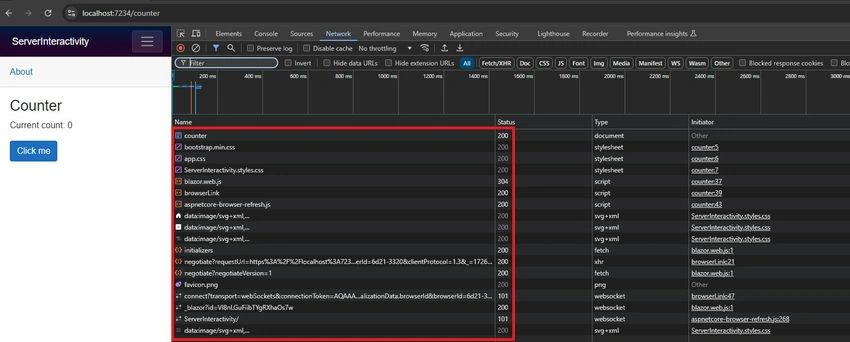
Image 2. Initial Request to Counter Page
Filter by WS (WebSocket) to see the SignalR connection.
You'll notice there are three entries. The highlighted one that says (_blazor?id) is the one we're interested in, it includes the "blazor.web.js" file that I keep talking about.
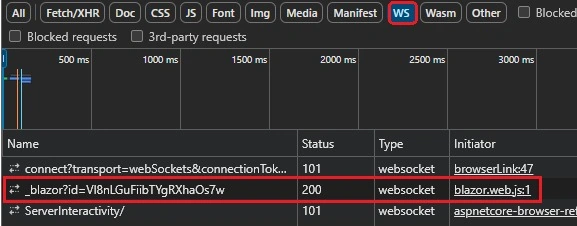
Image 3. SignalR Socket
Monitor Messages
Click on the WebSocket connection (_blazor?id) to view the real-time messages exchanged between the server and browser. These messages are the binary representations of render tree changes.
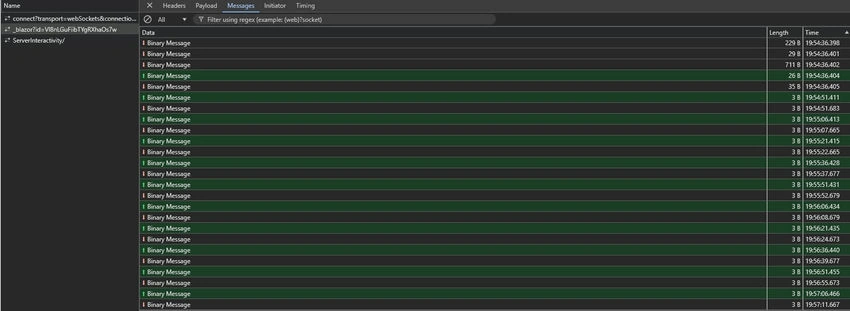
Image 4. Diff Patches in the Form of Binary Messages
Observe Message Flow
In the following GIF, you can see how messages arrive in small portions of bytes each time I click the Count button. These messages send the updated DOM back to the browser.

GIF 1. Diff Messages Sent from Server to Browser on Each User Interaction
Conclusion
Blazor Server’s interactivity model really shakes things up for web development in .NET. It enables real-time, responsive web applications to work without the need for complex JavaScript frameworks. I hope you now understand how SignalR and the render tree diffing mechanism work together to ensure that only the necessary parts of the UI are updated. Understanding how blazor.web.js and SignalR work behind the scenes will give you a deeper appreciation for designing component-based web apps.
I’m honored to have recently become a Microsoft MVP (Contribution ID:b5021ca6-c3e6-4e38-bf50-8a4e1520ebc1), and I’d like to thank C# Corner and Microsoft for their support in this journey.
And as always, I'll see you in the next one.
Mohamed RedaPosted Mar 14, 2026, 1:14 PM
Cool, but hybrid approach ( CSR & SSR at initial request) is good enough. I mean, browser keeps the DOM and diffing mechanism in next.js updates the actual DOM without full re-rendering of the DOM and this is even faster cuz it happens in the browser's memory not over the network (or change detection mechanism in Angular Universal) !I do not see an advantage to that model over next.js, it even makes it costly cuz the server do all the work of the browsers of all clients do !If we want to use Blazor then Blazor Webapp is the way !