

The project entitled "Birthday Notification" is basically to provide notification of an upcoming birthday. It has a very user friendly interface.
The application includes the following features:
- To provide notification of one or more upcoming birthdays a form comes up from the right bottom of the desktop. You can set the number of hours for the next popup.
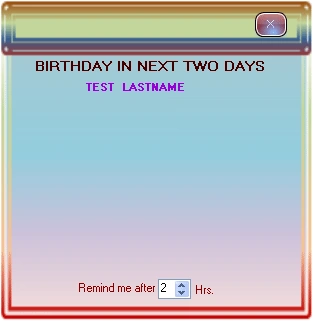
- Application starts once as system boots, search for date from database if, there is no any birthday in next 2 days it becomes inactive untill the next boot.
- User friendly interface for entering, updating and deleting records.
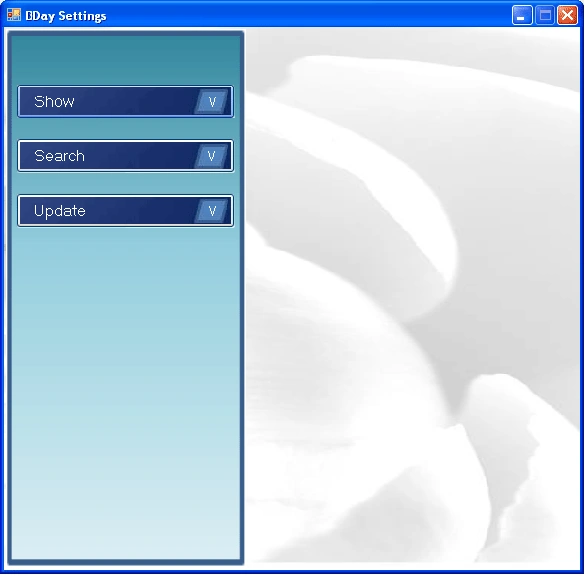
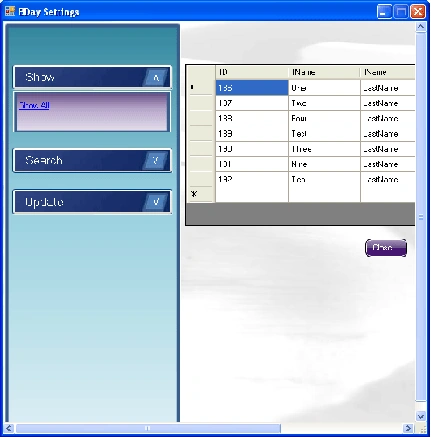
- To show all the records just click on the Show button.
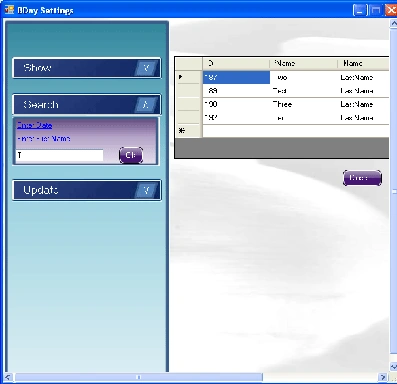
- You can search for a birthday by Date or Name; if you select by name then you just have to give only the initial of any name (eg if name is John just type 'j' or 'jh').
- There are options in the update menu to update/enter/delete birthdays. Just click on the Add New menu item to add a new record.
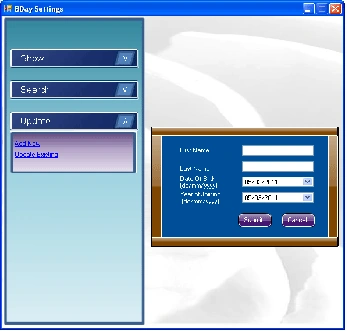
- You can update or delete a record. Click on Update Existing, enter initial of name then click ok, you will have records below; now select one and just click the Update or Delete button.
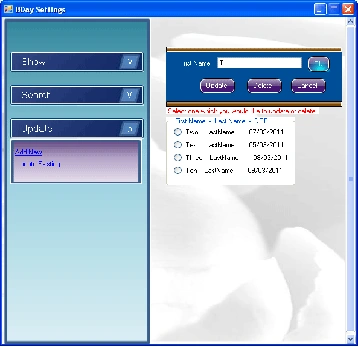
- To show all the records just click on the Show button.
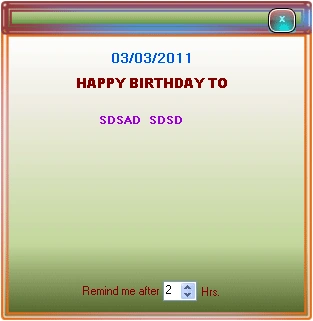
- There is a form that appears in the center to show today's Birthday.
How to use
You just have to change your system date format to dd/MM/yyyy, eg. 02/02/2011.
Start Visual Studio, open this project and run.
As you run this project an icon appears on system tray (lower right corner of your desktop).
Right click on icon for further action.

Form comes from lower right corner.
There is a form in this Project named Popup which comes from Lower Right corner of your desktop.
x = int.Parse(Screen.PrimaryScreen.Bounds.Right.ToString()) - int.Parse(this.Size.Width.ToString());
y = int.Parse(Screen.PrimaryScreen.Bounds.Bottom.ToString()) - int.Parse(this.Size.Height.ToString());
y1 = int.Parse(Screen.PrimaryScreen.Bounds.Bottom.ToString());
this.Location = new System.Drawing.Point(x, y1);
private void timer1_Tick (object sender, EventArgs e)
{
y1 = y1 - 5;
this.Location = new System.Drawing.Point(x, y1);
if (y1 <= y)
{
timer1.Enabled = false;
this.Location = new System.Drawing.Point(x, y - 30);
}
}
NEHA CHOUDHARYPosted Sep 28, 2021, 9:13 AM
Hello sir, can u share birthdate notification code in asp.net webApihow also to send reminder mail to my outlook using this Application , please guide me
Shalu ShaliniPosted Jun 28, 2017, 4:44 AM
Hi sir can you pls share the bday alert code in c# windows application
vikas pagarePosted Jun 1, 2017, 6:04 AM
Hello sir, can u share birthdate notification code using FCM in asp.net webApi
Kajal MahatoPosted Dec 1, 2016, 10:40 AM
What should i do sir ??
Kajal MahatoPosted Dec 1, 2016, 10:07 AM
File is not Working .......error comes ......
Saikat DuttaPosted Jan 31, 2016, 8:10 AM
hello sir , i'm using C# in visual studio 2010 so i want the back hand code for the birthday reminder , because i want to create a student database software. please help me sir its very urgent for me. Saikat Dutta GNIIT BARANAGAR ( SOFTWARE ENGINEERING , 3rd Year) [email protected]
Krishan SachdevaPosted Feb 11, 2015, 3:04 AM
i need to use this application in wpf please suggest me how to do that
Micheal MeshoPosted Dec 31, 2014, 6:14 AM
the application not run ,appear message when run the application ...... program has time out
muslim boyPosted Sep 14, 2013, 1:51 PM
thanks i downloaded it, i hope its usefull
Dhana singhPosted Jul 14, 2013, 10:02 PM
hi...how to send reminder mail to my outlook using this Application , please guide me
Brijesh KumareditedPosted May 2, 2013, 1:54 AMEdited May 2, 2013, 1:58 AM
Hello, darshit you can download this application from here 'BIRTHDAY REMINDER.zip'with full source code. Thanks
darshit kansaraeditedPosted May 1, 2013, 8:56 AMEdited May 1, 2013, 9:00 AM
i am work with windows application and i want to put a reminder and i have no idea about that so can you help me for that and give me code for that?any one know the ans then please tell me. if you want to help then please send me code on my Email Id [email protected]. Thank you
abhijit shrivasPosted Feb 7, 2013, 3:16 AM
thx
Brijesh KumarPosted Feb 2, 2013, 3:26 AM
@ abhijit shrivas You should change DateTime format of your system to dd/MM/yyyy, eg. 02/02/2011.
Rajeev KumarPosted Jan 30, 2013, 4:11 AM
thank you
abhijit shrivasPosted Aug 8, 2012, 5:27 AM
if (DtMain.ToString().Substring(0, 5) == drNameShow.GetString(3).Substring(0, 5)) { lblPname.Location = new Point(32, 2 + iLblSme); objMain.panNameMain.Controls.Add(this.lblPname); objMain.lblDate.Text = DtMain.ToString().Substring(0, 10); iLblSme = iLblSme + 20; boolSmeDay = true; } it gives error as "Specified cast is not valid".
satPosted Jun 19, 2012, 9:00 AM
Hi friend..your coding is nice..its match to the software i need to create for the event remainder..but i cant understand the coding.i want to some details and it is not automaticaly displaying the date..plz help me [email protected] for your reply..
SuhailPosted Jan 18, 2012, 6:14 AM
I tried to execute you source code, It runs successfully, But it is not automatically popping up on system reboot, Please guide me, I need this module to be successfully install on my company ASAP. Reply me on [email protected] thanks in advnc
genisis ExogenPosted Oct 23, 2011, 8:48 AM
nice i like it what you done in you notification
meenal vermaPosted Jun 4, 2011, 5:30 PM
Hi brijesh, I want to know how am able to check database value at the time of booting of system .pls do reply at [email protected]. I want to implement it it is very urgebnt for me
Mayur GujrathiPosted May 13, 2011, 5:17 AM
when i am starting this project in solution explorer no project file found is coming I am using vs 2008
Karthikeyan AnbarasanPosted Mar 31, 2011, 9:58 PM
Nice article
Dinesh BeniwalPosted Mar 17, 2011, 11:31 PM
Nice article welcome to the C# Corner Community.