

Creating a user-defined data type
Now press F8 to open the Object Browser in SQL Server Management Studio and expend it.
Database -> Programmability -> types-> Right click-> New-> User-Defined Data Types..
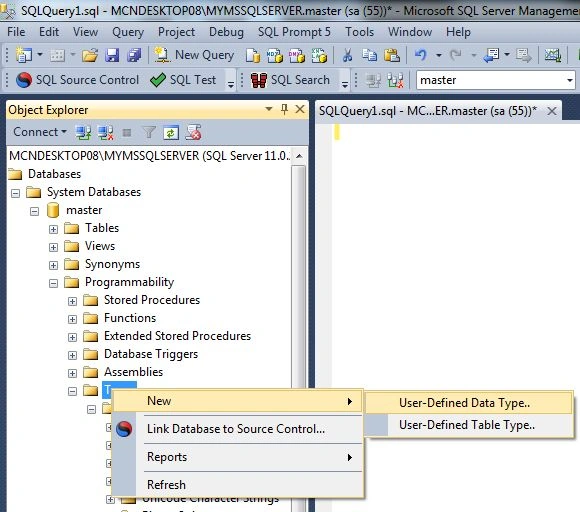
This would open the new user-defined data type window:
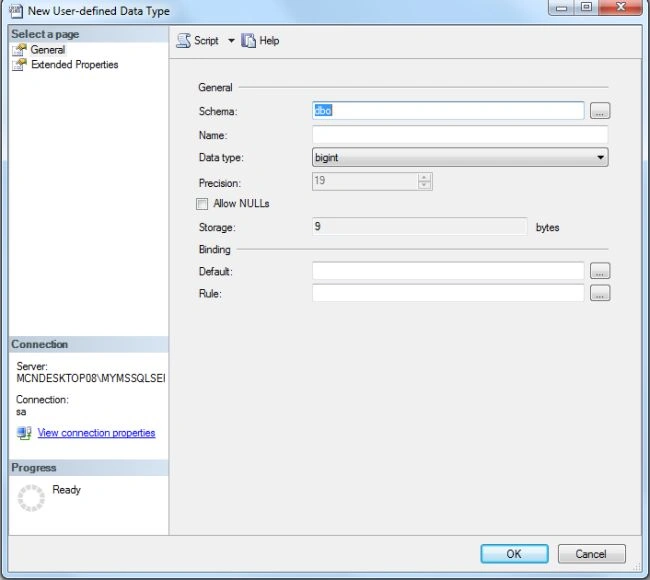
Now in the Name text box, enter a name of your choice. The name must follow the rules of names in Transact-SQL. In the Data Type combo box, select the data type of your choice. Of course, you must know what type you want to use and click OK Button. Now refresh the Object Browser to see the user-defined data type; click on the user-defined data types under the types folder.
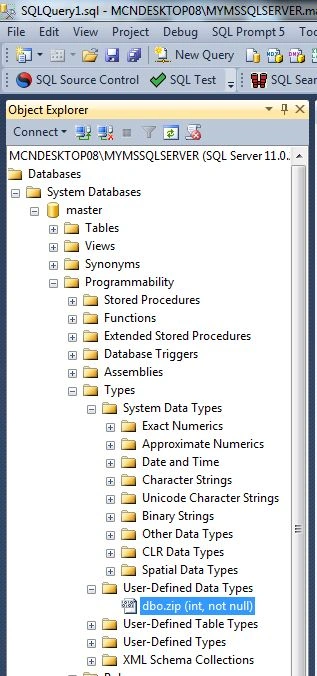
How to test a newly created data type
Create a new table to use a user-defined data type (zip).
Create table Address
(
city varchar(20),
zipcode zip,
street char(27)
)
Creating a rule on user defined data types
Create rule zip_rule
as @zipcode >00501 and @zipcode<89950
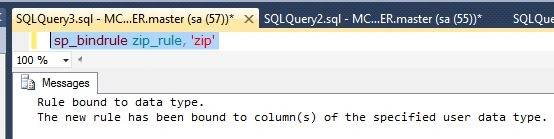
Bind this column to the above range use the following statement:
sp_bindrule zip_rule, 'zip'
Here zip is the User Defined Data Type.
If we want to insert an integer value that is less than or greater than the range then it will not permit it and instead shows an error.
Insert into Address (zipcode) values (00450)
This range is less than the above range so it will not be accepted and it will show an error, such as:

Now take an another example which has the range between 00501 and 89950.
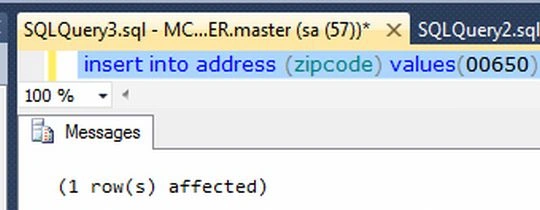
Insert into address (zipcode) values (00650)
The above statement will work fine with the condition.
Join the conversation! Your thoughts help the community grow.