

Introduction
I would like to share how to bind the checkbox list in MVC. I will use a Model (a class file) to define various attributes for checkboxes.
For a basic understanding of MVC kindly use the following link:
ASP.NET MVC Overview
The following is the procedure.
1. Creating Model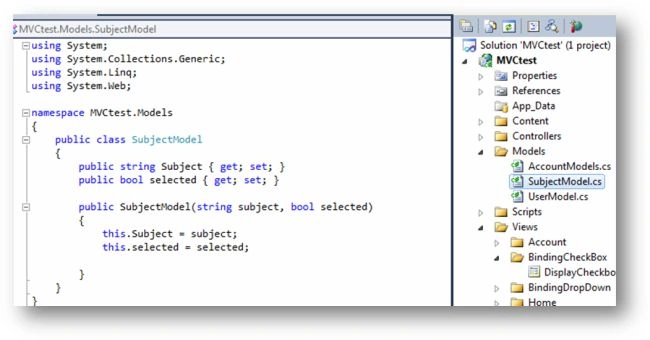
We created a "SubjectModel" class under the Models folder and defined the following two properties:
- Subject: to display text
- Selected: to display check/uncheck
2. Creating the controller
- We created a Controller "BindingCheckBoxController" under the controllers folder
- We created an Action having the name = "DisplaycheckBoxes"
- We created a list of Subjects (Subject model class)
- Returning a list of subjects to the View.
- public ActionResult DisplayCheckboxes()
- {
- List<SubjectModel> listsubject = new List<SubjectModel>();
- listsubject.Add(new SubjectModel("Physics",true));
- listsubject.Add(new SubjectModel("Chemistry",true));
- listsubject.Add(new SubjectModel("History",false));
- listsubject.Add(new SubjectModel("Maths",false));
- listsubject.Add(new SubjectModel("Boilogy",false));
- listsubject.Add(new SubjectModel("Hindi",true));
- ViewData["Checkboxlist"]=listsubject;
- return View();
- }
3. Creating View
Right-click on "Action" and click on "Create view". The following screen will be displayed.
- Click on the "Add" button and the View will be created. Here we are not creating a strongly typed view.
4. Code at view
Here we have a view and we are trying to bind a Checkbox using Model properties.
- At the highlighted code we are parsing the list of "SubjectModel" from ViewData["Checkboxlist"]) as in the following:
<% foreach (var info in (IEnumerable<MVCtest.Models.SubjectModel>)ViewData["Checkboxlist"])
We have passed Viewdata["Checkboxlist"] from the Controller (from the above, point 2.d).
- We have used a foreach loop on the list of subjects.
- We are using a HTML helper class to bind the Checkboxlist
5. Output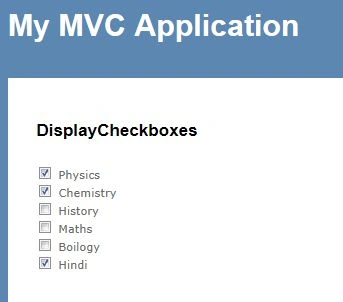
6. Binding checkboxes through strongly typed view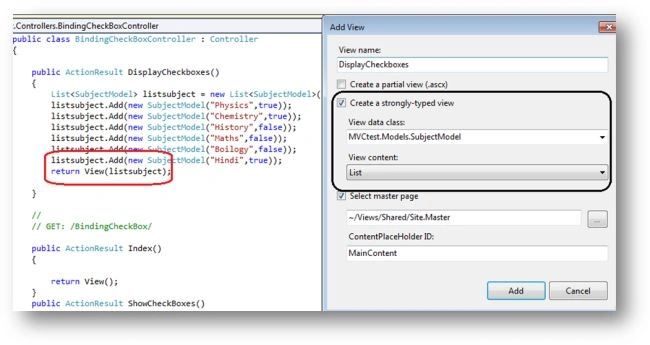
- We have created a strongly typed view.
- We have selected the "SubjectModel" class from the view data class dropdown.
- We have made small changes while passing an object of the list to the view.
The following would be the updated code for the Action:
- public ActionResult DisplayCheckboxes ()
- {
- List<SubjectModel> listsubject = new List<SubjectModel>();
- listsubject.Add(new SubjectModel("Physics", true));
- listsubject.Add(new SubjectModel("Chemistry", true));
- listsubject.Add(new SubjectModel("History", false));
- listsubject.Add(new SubjectModel("Maths", false));
- listsubject.Add(new SubjectModel("Boilogy", false));
- listsubject.Add(new SubjectModel("Hindi", true));
- return View(listsubject);
- }
7. Code at view
For a strongly typed view we have the following code.
The preceding line inherits "SubjectModel", which implies that the view is coupled with the Model.
Using a foreach loop as per the following, we can display a list of checkboxes using the DOM.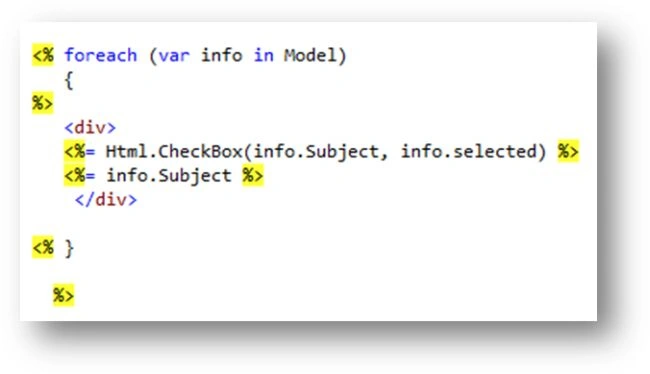
8. Output
We will get the same output as from point 5.
Conclusion
In this article, we have learned how to bind a checkbox list using MVC2. We have learned two ways to bind checkboxes; using a strongly typed view and without using a strongly typed view.
References
I had posted another article for binding a Dropdown list using MVC2:
Devesh OmarPosted Mar 19, 2017, 6:46 AM
Binding CheckBoxList in ASP.Net MVC link :- Http://compilefactory.blogspot.in/2017_03_11_archive.html
Devesh OmarPosted Mar 19, 2017, 6:45 AM
Http://compilefactory.blogspot.in/2017_03_11_archive.html