

Open a SharePoint team site.
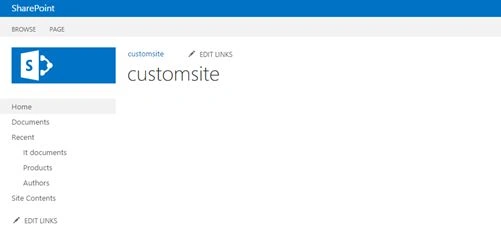
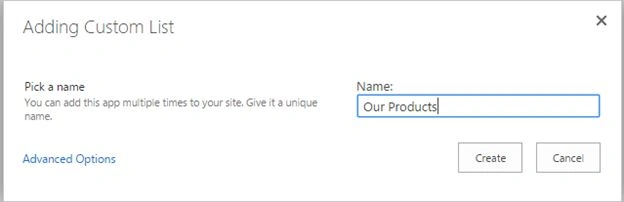
Create a Custom list for binding a data into repeater control.
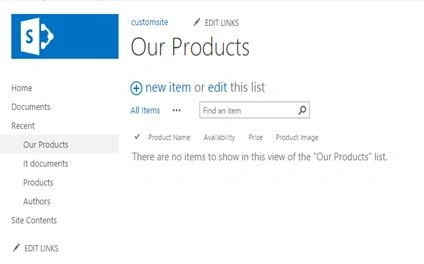
So now the list has been created successfully. Create some custom columns into the list.
Create a document library for storing ‘Product’ Images and insert some images into the library.

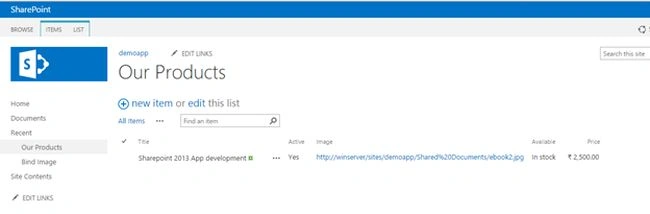
Now open our product list and insert some products into it.
Provide the product image URL from Products images library.
Open Visual studio, create a new SharePoint 2013 empty project and Add a visual webpart into it.
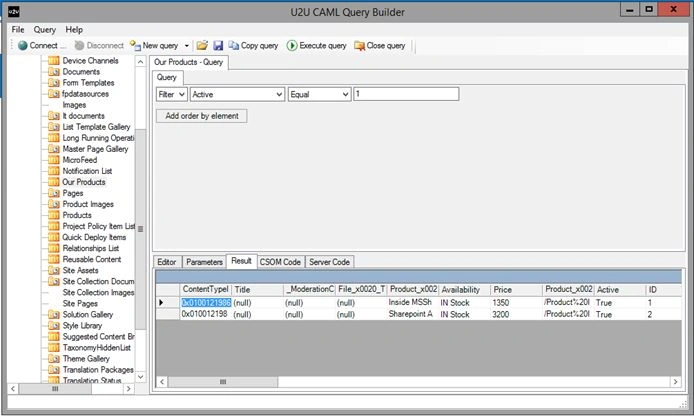
Use CAML Query to retrieve the server code.
Code
ASPX Code
- <div style="height:300px; width:400px">
- <table style="width:100%">
- <tr>
- <td style="width:10%"></td>
- <td style="width:80%">
- <div class="rptprods" style="padding-right: 20px; height:150px; width:200px;">
- <asp:Repeater ID="rptprod" runat="server">
- <ItemTemplate>
- <img src="<%#DataBinder.Eval(Container.DataItem," Image ") %>" width="200" height="200" />
- <br />
- <h2 style="padding-top: 5px; font-weight: bold; font-size: 10px;"><%#DataBinder.Eval(Container.DataItem,"Title") %></h2>
- <br />
- <b> Availablity:</b>
- <p style="color:green;">
- <%#DataBinder.Eval(Container.DataItem,"Available") %>
- </p>
- <br />
- <b> Price:</b>
- <p style="color:green;">
- <%#DataBinder.Eval(Container.DataItem,"Price") %>
- </p>
- <hr />
- </ItemTemplate>
- </asp:Repeater>
- </div>
- </td>
- <td style="width:10%"></td>
- </tr>
- </table>
- </div>
- using Microsoft.SharePoint;
- using System;
- using System.ComponentModel;
- using System.Web.UI;
- using System.Web.UI.WebControls.WebParts;
- namespace Rollup_announcement.annao2
- {
- [ToolboxItemAttribute(false)]
- public partial class annao2 : WebPart
- {
- public annao2()
- {
- }
- protected override void OnInit(EventArgs e)
- {
- base.OnInit(e);
- InitializeControl();
- }
- protected void Page_Load(object sender, EventArgs e)
- {
- if (!Page.IsPostBack)
- {
- Bindspeaker();
- }
- }
- private void Bindspeaker()
- {
- using (SPSite site = new SPSite(SPContext.Current.Site.Url))
- {
- using (SPWeb web = site.OpenWeb())
- {
- SPList list = web.Lists["Our Products"];
- if (list != null)
- {
- SPQuery query = new SPQuery();
- query.Query = "<Where><Eq><FieldRef Name='Active' /><Value Type='Boolean'>1</Value></Eq></Where>";
- SPListItemCollection collitem = list.GetItems(query);
- if (collitem != null)
- {
- rptprod.DataSource = collitem.GetDataTable();
- rptprod.DataBind();
- }
- }
- }
- }
- }
- }
- }

Happy SharePoint!
ruthvik deekondaPosted Jun 24, 2016, 7:26 PM
good one :)
Vinodh NarayananPosted Oct 20, 2015, 12:33 AM
Rupali Shinde Thanks a lot
Rupali ShindePosted Oct 20, 2015, 12:13 AM
good one
Vinodh NarayananPosted Oct 19, 2015, 10:44 PM
Thanks a lot Mohammed
Mohammed IbrahimPosted Oct 19, 2015, 10:05 PM
nice
Vinodh NarayananPosted Oct 19, 2015, 12:53 PM
Thanks a lot Priyaranjan K S
Priyaranjan K SPosted Oct 19, 2015, 12:44 PM
Good One
Vinodh NarayananPosted Oct 19, 2015, 9:19 AM
Sibeesh Venu Thanks a ;lot
Sibeesh VenuPosted Oct 19, 2015, 8:52 AM
Nice Share
Vinodh NarayananPosted Oct 19, 2015, 8:30 AM
Nilesh Jadav thanks a lot
Vinodh NarayananPosted Oct 19, 2015, 8:30 AM
Mukesh Kumar Thanks a lot
Mukesh KumarPosted Oct 19, 2015, 8:16 AM
Good Job
Nilesh JadavPosted Oct 19, 2015, 8:07 AM
Great Work !!