

We will bind some data from the database and we are using SQLDataSource.
Initial chamber
Step 1: Open Visual Studio 2010 and create an empty website. Give a suitable name Listview_demo.
Step 2: In Solution Explorer you will get your empty website. Add a web form, SQL Database. By going like the following:
For Web Form:
Listview_demo (Your Empty Website) - Right Click, Add New Item, then Web Form. Name it Listview_demo.aspx.
For SQL Server Database:
Listview_demo (Your Empty Website) - Right Click, Add New Item, then SQL Server Database. Add Database inside the App_Data_folder.
Database chamber
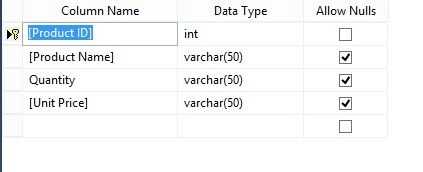
Step 3: Go to your database Database.mdf, we will create a table - tbl_Data. Go to database.mdf - Table and add New table. Design your table like the following:
Table - tbl_data (Don’t forget to make ID, Identity Specification - Yes)
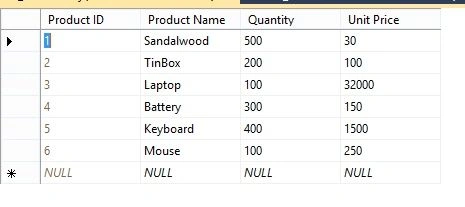
Show Table Data
Design chamber
Step 5: Now open your Listview_demo.aspx file, where we create our design for BINDING ListView using SQLDataSource.
ListView_demo.aspx
- <%@ Page Language="C#" AutoEventWireup="true" CodeFile="Default.aspx.cs" Inherits="_Default" %>
- <!DOCTYPE html PUBLIC "-//W3C//DTD XHTML 1.0 Transitional//EN" "http://www.w3.org/TR/xhtml1/DTD/xhtml1-transitional.dtd">
- <html xmlns="http://www.w3.org/1999/xhtml">
- <head runat="server">
- <title></title>
- </head>
- <body>
- <form id="form1" runat="server">
- <div>
- <asp:ListView ID="ListView1" runat="server" DataKeyNames="Product ID"
- DataSourceID="SqlDataSource1">
- <AlternatingItemTemplate>
- <li style="">Product ID:
- <asp:Label ID="Product_IDLabel" runat="server"
- Text='<%# Eval("[Product ID]") %>' />
- <br />
- Product Name:
- <asp:Label ID="Product_NameLabel" runat="server"
- Text='<%# Eval("[Product Name]") %>' />
- <br />
- Quantity:
- <asp:Label ID="QuantityLabel" runat="server" Text='<%# Eval("Quantity") %>' />
- <br />
- Unit Price:
- <asp:Label ID="Unit_PriceLabel" runat="server"
- Text='<%# Eval("[Unit Price]") %>' />
- <br />
- </li>
- </AlternatingItemTemplate>
- <EditItemTemplate>
- <li style="">Product ID:
- <asp:Label ID="Product_IDLabel1" runat="server"
- Text='<%# Eval("[Product ID]") %>' />
- <br />
- Product Name:
- <asp:TextBox ID="Product_NameTextBox" runat="server"
- Text='<%# Bind("[Product Name]") %>' />
- <br />
- Quantity:
- <asp:TextBox ID="QuantityTextBox" runat="server"
- Text='<%# Bind("Quantity") %>' />
- <br />
- Unit Price:
- <asp:TextBox ID="Unit_PriceTextBox" runat="server"
- Text='<%# Bind("[Unit Price]") %>' />
- <br />
- <asp:Button ID="UpdateButton" runat="server" CommandName="Update"
- Text="Update" />
- <asp:Button ID="CancelButton" runat="server" CommandName="Cancel"
- Text="Cancel" />
- </li>
- </EditItemTemplate>
- <EmptyDataTemplate>
- No data was returned.
- </EmptyDataTemplate>
- <InsertItemTemplate>
- <li style="">Product Name:
- <asp:TextBox ID="Product_NameTextBox" runat="server"
- Text='<%# Bind("[Product Name]") %>' />
- <br />
- Quantity:
- <asp:TextBox ID="QuantityTextBox" runat="server"
- Text='<%# Bind("Quantity") %>' />
- <br />
- Unit Price:
- <asp:TextBox ID="Unit_PriceTextBox" runat="server"
- Text='<%# Bind("[Unit Price]") %>' />
- <br />
- <asp:Button ID="InsertButton" runat="server" CommandName="Insert"
- Text="Insert" />
- <asp:Button ID="CancelButton" runat="server" CommandName="Cancel"
- Text="Clear" />
- </li>
- </InsertItemTemplate>
- <ItemSeparatorTemplate>
- <br />
- </ItemSeparatorTemplate>
- <ItemTemplate>
- <li style="">Product ID:
- <asp:Label ID="Product_IDLabel" runat="server"
- Text='<%# Eval("[Product ID]") %>' />
- <br />
- Product Name:
- <asp:Label ID="Product_NameLabel" runat="server"
- Text='<%# Eval("[Product Name]") %>' />
- <br />
- Quantity:
- <asp:Label ID="QuantityLabel" runat="server" Text='<%# Eval("Quantity") %>' />
- <br />
- Unit Price:
- <asp:Label ID="Unit_PriceLabel" runat="server"
- Text='<%# Eval("[Unit Price]") %>' />
- <br />
- </li>
- </ItemTemplate>
- <LayoutTemplate>
- <ul ID="itemPlaceholderContainer" runat="server" style="">
- <li runat="server" id="itemPlaceholder" />
- </ul>
- <div style="">
- </div>
- </LayoutTemplate>
- <SelectedItemTemplate>
- <li style="">Product ID:
- <asp:Label ID="Product_IDLabel" runat="server"
- Text='<%# Eval("[Product ID]") %>' />
- <br />
- Product Name:
- <asp:Label ID="Product_NameLabel" runat="server"
- Text='<%# Eval("[Product Name]") %>' />
- <br />
- Quantity:
- <asp:Label ID="QuantityLabel" runat="server" Text='<%# Eval("Quantity") %>' />
- <br />
- Unit Price:
- <asp:Label ID="Unit_PriceLabel" runat="server"
- Text='<%# Eval("[Unit Price]") %>' />
- <br />
- </li>
- </SelectedItemTemplate>
- </asp:ListView>
- <asp:SqlDataSource ID="SqlDataSource1" runat="server"
- ConnectionString="<%$ ConnectionStrings:ConnectionString %>"
- SelectCommand="SELECT * FROM [tbl_data]"></asp:SqlDataSource>
- </div>
- </form>
- </body>
- </html>
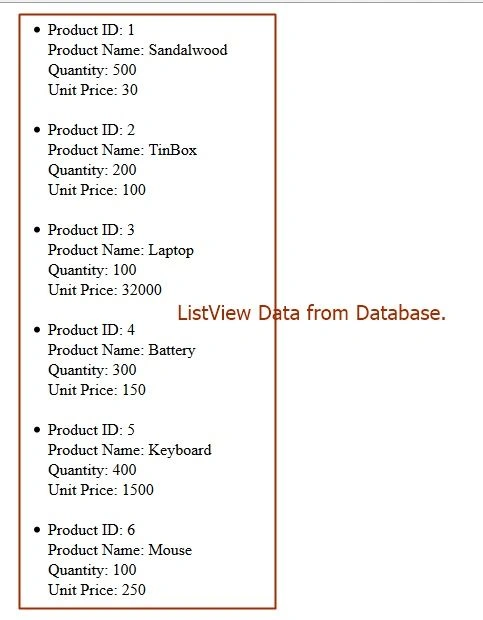
Hope you liked this. Thank you for reading.
Sonu ChaudharyPosted Mar 17, 2016, 7:35 AM
thanks for artical
Christopher AndrewsPosted Nov 18, 2015, 5:58 AM
The article was extremely helpful, thank you. I found this .net error tracking tool amazingly simple and nice www.redfly.io
Ekrem TapanPosted Oct 29, 2015, 3:33 AM
good article
Arul RPosted Oct 28, 2015, 5:24 AM
Good one !!!
Sibeesh VenuPosted Oct 27, 2015, 8:34 AM
Nice Share
Mukesh KumarPosted Oct 27, 2015, 7:34 AM
Good One
Upendra Pratap ShahiPosted Oct 27, 2015, 6:36 AM
nice one sir..