

Create Project
Open Visual Studio 2015 and create a new web project. Give it a proper name “EmployeeDemo”.

Click OK. It will open new ASP.NET Project dialog box where you can choose variety of projects like MVC, Web API etc. You need to choose Web Forms and click OK.
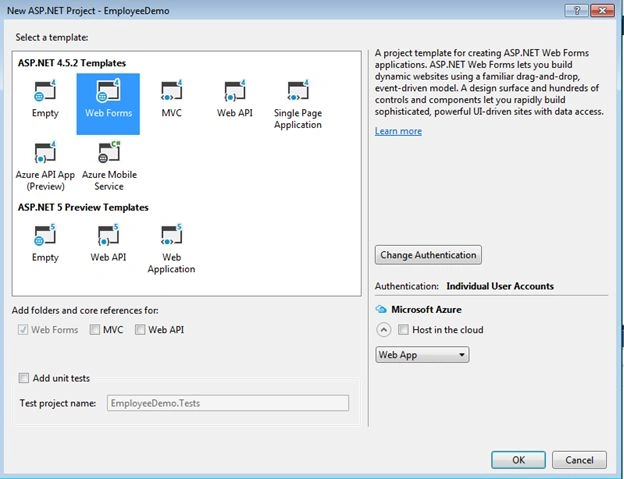
It will create an ASP.NET application for you.
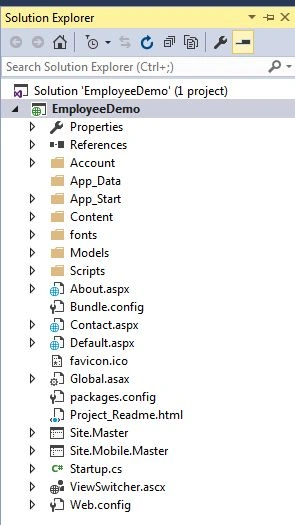
There is already some web page added in the project. But I am going to create a new page. To add new web form, Right click on project, choose and Add.
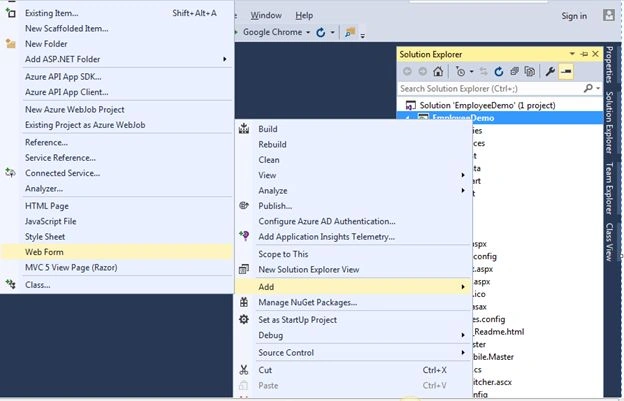
Give the proper name “Employee” and click OK.
It will create an Employee.aspx page. Open this and add a gridview as in the following code.
Employee.aspx
- <%@ Page Language="C#" AutoEventWireup="true" CodeBehind="Emploee.aspx.cs" Inherits="EmployeeDemo.Emploee" %>
- <!DOCTYPE html>
- <html xmlns="http://www.w3.org/1999/xhtml">
- <head runat="server">
- <title></title>
- </head>
- <body>
- <form id="form1" runat="server">
- <div>
- <asp:GridView ID="grvEmployee" runat="server">
- </asp:GridView>
- </div>
- </form>
- </body>
- </html>
Employee.aspx.cs
- using System;
- using System.Collections.Generic;
- using System.Linq;
- using System.Web;
- using System.Web.UI;
- using System.Web.UI.WebControls;
- using System.Configuration;
- using System.Data.SqlClient;
- using System.Data;
- namespace EmployeeDemo
- {
- public partial class Emploee : System.Web.UI.Page
- {
- protected void Page_Load(object sender, EventArgs e)
- {
- if (!this.IsPostBack)
- {
- string connectionString = ConfigurationManager.ConnectionStrings["DefaultConnection"].ConnectionString;
- string selectSQL = "SELECT * from Employee";
- SqlConnection con = new SqlConnection(connectionString);
- SqlCommand cmd = new SqlCommand(selectSQL, con);
- SqlDataAdapter adapter = new SqlDataAdapter(cmd);
- DataSet ds = new DataSet();
- adapter.Fill(ds, "Employee");
- grvEmployee.DataSource = ds;
- grvEmployee.DataBind();
- }
- }
- }
- }
Web.config
- <connectionStrings>
- <add name="DefaultConnection" connectionString="Data Source=Mukesh-Pc;Initial Catalog=Test; User Id=sa; Password=adminadmin;" providerName="System.Data.SqlClient" />
- </connectionStrings>
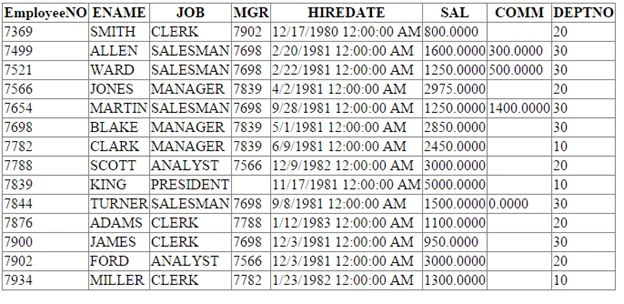
Hope you liked this article. Enjoy!
Firoz KhanPosted Nov 10, 2017, 4:48 PM
http://www.c-sharpcorner.com/UploadFile/009464/bind-gridview-using-dataset-in-Asp-Net/
Mukesh KumarPosted Oct 18, 2015, 5:39 AM
Thanks Sir
Santhakumar MunuswamyPosted Oct 18, 2015, 5:20 AM
Good one
Serkan CamurPosted Oct 8, 2015, 10:03 AM
as windows form, one difference is databind() method...http://www.serkancamur.com
Mukesh KumarPosted Oct 7, 2015, 11:44 PM
Thanks Aqib
Muhammad Aqib ShehzadPosted Oct 7, 2015, 3:20 PM
good one
Mukesh KumarPosted Oct 7, 2015, 7:39 AM
Thanks
Harshad PansuriyaPosted Oct 7, 2015, 7:22 AM
Nice one
Mukesh KumarPosted Oct 7, 2015, 5:52 AM
Thanks Sir
Nilesh JadavPosted Oct 7, 2015, 5:48 AM
Great !!