

Bind a given DataGrid data source to a given XML file
DataGrid could also be bound to a another persisted kind of datasoures, such as XML ressources or something spectial such as RSS feeds. To bind a given DataGrid to a given xml file data source, the following example is provided to illustrate that.
Create a new Silverlight application
Figure 1
First, In the XAML code editor add the following code
<Grid x:Name="LayoutRoot" Background="White">
<data:DataGrid x:Name="myDataGrid"
AutoGenerateColumns="True"
>
</data:DataGrid>
</Grid>
As you can remark, the DataGrid should be named so that it could be refered later in the C# code behind. Now, let consider this xml file as a main data source for our DataGrid.
<?xml version="1.0" encoding="utf-8" ?>
<myFamily>
<item>
<FirstName>Bejaoui</FirstName>
<LastName>Habib</LastName>
<Age>66</Age>
<IsMale>true</IsMale>
</item>
<item>
<FirstName>Ben Garga</FirstName>
<LastName>Kadija</LastName>
<Age>63</Age>
<IsMale>false</IsMale>
</item>
<item>
<FirstName>Bejaoui</FirstName>
<LastName>Bechir</LastName>
<Age>30</Age>
<IsMale>true</IsMale>
</item>
<item>
<FirstName>Bejaoui</FirstName>
<LastName>Arbia</LastName>
<Age>25</Age>
<IsMale>false</IsMale>
</item>
<item>
<FirstName>Bejaoui</FirstName>
<LastName>Rim</LastName>
<Age>20</Age>
<IsMale>false</IsMale>
</item>
</myFamily>
Second, a class that fits the xml structure should be developed. It could be represented as under
public class Person
{
public string FirstName { get; set; }
public string LastName { get; set; }
public string Age { get; set; }
public string IsMale { get; set; }
}
Third, a reference to the System.Xml.Linq namespace should be added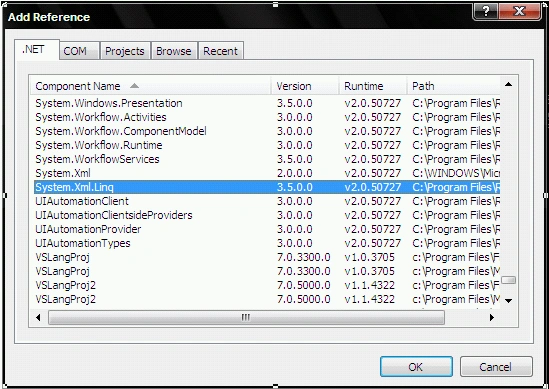
Figure 2
In the code behind, a DataGrid object should be declared and the under code should be implemented
public partial class Page : UserControl
{
DataGrid oGrid;
public Page()
{
InitializeComponent();
InitializeGrid();
}
public void InitializeGrid()
{
XDocument oDoc = XDocument.Load("File.xml");
var myData = from info in oDoc.Descendants("item")
select new Person
{
FirstName = Convert.ToString(info.Element("FirstName").Value),
LastName = Convert.ToString(info.Element("LastName").Value),
Age = Convert.ToString(info.Element("Age").Value),
IsMale = Convert.ToString(info.Element("IsMale").Value)
};
oGrid = this.FindName("myDataGrid") as DataGrid;
oGrid.ItemsSource = myData;
}
}
This leads to the following result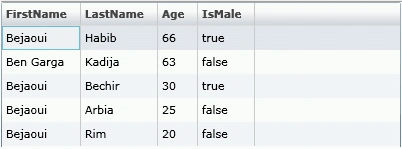
Figure 3
Muhammad OvaisPosted Feb 7, 2012, 3:43 AM
Great job
Maria JohnsonPosted Jan 16, 2012, 11:13 PM
Its a nice and useful article for those who wants to learn things in Silverlight.
Maria JohnsoneditedPosted Jan 16, 2012, 11:13 PMEdited Jan 16, 2012, 11:14 PM
Thanks for sharing.
Jimmy UnderwoodPosted Jan 16, 2012, 5:30 PM
Thanks
Vineet Kumar SainiPosted Jan 16, 2012, 11:24 AM
Good article...
Arjun PanwarPosted Jan 16, 2012, 11:22 AM
Thanks for sharing
Jonathan BurchelPosted Jan 20, 2011, 11:20 PM
Does this approach work to support TwoWay binding back to the source? If not, can that be supported?
Sergei DumnovPosted Dec 21, 2010, 11:15 PM
This is one of good features of the Adobe Flex controls not only the grid. Did you try to experiment this way with the SL controls? Thanks, Sergei.
Ian HolmesPosted Nov 2, 2010, 5:50 AM
I have same question as scott. The data I have coming back in XML is unknow (interms of columns) so can't be mapped to a predefined class I am using Silverlight V4 Cheers Ian
Scott NeufeldPosted Jan 14, 2010, 2:22 PM
Is it possible to bind XML directly to the control without using a nominal class? I've seen a technique that uses a ValueConverter, but it just seems strange to me that I need to build a class and create an array of those classes based on iterating through the XML. I also know you can't use an anonymous class in Silverlight. What if I don't know the columns coming back and need to build my DataGrid dynamically?
Srividhya GopalakrishnanPosted Jul 28, 2009, 5:26 PM
Thanks a lot.. Nice Article. Article is clear and explanatory.
Mahesh ChandPosted Dec 11, 2008, 11:26 AM
Good work Bechir. Cheers!