

There are several ways to bind partial views and display them on views. But what is the best way? When I was working on one of my projects, I was concerned about which techniques I would need to use to make my website faster, and also if we are binding multiple partial views on the same page, which are getting the data from the database. So, those things are very complicated and in this scenario we need to choose the way which will load every partial view independently.
So, today I will discuss that. Whenever we talk about the partial view data to bind with it, we find several ways to bind the partial view. The following are a few examples.
We can bind some static data with partial view as following
@Html.Partial("SideBar")
We can also direct bind the partial view with Model.
@Html.Partial("RecentPost", Model.RecentPostl)
Partial view can be bind with ViewBag as well.
@Html.Partial("_MyPartial", (double)@ViewBag.piValue)
Now I am going to show different ways to bind the partial views.
First Way [Bad Way, Don’t Use]
I have seen many developers bind all the partial views on a single request. Actually they try to get all the partial views data as entity on action result and return view with model data. As inthe following example, you can see that I need Recent Post and Popular Post.
- public class SideBarPostViewModel
- {
- public List < RecentPost > RecentPost
- {
- get;
- set;
- };
- public List < PopularPost > PopularPost
- {
- get;
- set;
- };
- }
- public ActionResult GetAllPost()
- {
- var model = new SideBarPostViewModel();
- model.RecentPost = _db.getRecentPostList();
- model.PopularPost = _db.getPopularPostList();
- return View(model);
- }
- @model AspNetDemo.ViewModels.SideBarPostViewModel
- <b>
- </b>
- @Html.RenderPartial("RecentPostPartialView", model.RecentPost);
- @Html.RenderPartial("PopularPostPartialView", model.PopularPost);
Second Way [So-So Good]
We can also return the partial view fromthe action result. So, basically in this scenario we return a partial view as a div.
- @ { Html.RenderAction("GetMyAddress", "User");
- }
- [ChildActionOnly]
- public PartialViewResult GetMyAddress()
- {
- return PartialView("_myAddress");
- }
Third Way [Best Way, Always Use]
As per my knowledge the best way is to bind multiple partial views on one view to use ajax call and render all the partial view separately. Every partial view will make their own request for getting the data from database and bind with partial view.
If we process the separate request for the individual partial view then it will not affect the performance of the site. It is because this will not affect loading the page. The page will be load and partial view will be trying to get the data asynchronously.
On the following example, I am going to show how to create multiple partial view and make separate request for getting the data from database. Basically I am getting Recent Post and Popular Post on the view,
View with Partial Views
- <div>
- <div class="panel panel-default text-left">
- <div class="panelheaderRed">
- Recent Articles
- </div>
- <div class="panel-body">
- <div id="dvHomeRecentPostBind">
- <div class="loaderCenter">
- <span class="loadingText">Recent Articles Loading....</span>
- </div>
- </div>
- </div>
- </div>
- </div>
- <div>
- <div class="panel panel-default text-left">
- <div class="panelheaderGreen">
- Popular Articles
- </div>
- <div class="panel-body">
- <div id="dvHomePopularPostBind">
- <div class="loaderCenter">
- <span class="loadingText">Popular Articles Loading....</span>
- </div>
- </div>
- </div>
- </div>
- </div>
- public class RecentsController: BaseController
- {
- private readonly IPostRepository _postRepository;
- private readonly ICategoryRepository _categoryRepository;
- public RecentsController(IPostRepository postRepository, ICategoryRepository categoryRepository)
- {
- _postRepository = postRepository;
- _categoryRepository = categoryRepository;
- }
- //
- // GET: /Recents/
- [HttpGet]
- public ActionResult RecentPosts()
- {
- var postEntity = _postRepository.GetPosts().OrderByDescending(x => x.PostUpdatedDate).Take(5).Select(x => new PostViewModel()
- {
- PostTitle = x.PostTitle,
- PostAddedDate = x.PostAddedDate,
- PostUrl = x.PostUrl,
- postCategory = _categoryRepository.GetSingleCategoryInfo(x.CategoryId)
- });
- return PartialView("RecentPosts", postEntity);
- }
- [HttpGet]
- public ActionResult PopularPosts()
- {
- var postEntity = _postRepository.GetPosts().OrderByDescending(x => x.NumberOfViews).Take(5).Select(x => new PostViewModel()
- a{
- PostTitle = x.PostTitle,
- PostAddedDate = x.PostAddedDate,
- PostUrl = x.PostUrl,
- postCategory = _categoryRepository.GetSingleCategoryInfo(x.CategoryId),
- NumberOfViews = x.NumberOfViews
- });
- return PartialView("PopularPosts", postEntity);
- }
- }
- function LoadHomeRecentPost()
- {
- $.ajax
- ({
- url: "/Recents/RecentPosts",
- contentType: "application/html; charset=utf-8",
- type: "GET",
- cache: !0,
- datatype: "html",
- success: function(t)
- {
- $("#dvHomeRecentPostBind").html(t)
- },
- error: function()
- {
- $("#dvHomeRecentPostBind").html("Post Not Found")
- }
- })
- }
- function LoadHomePopularPost()
- {
- $.ajax
- ({
- url: "/Recents/PopularPosts",
- contentType: "application/html; charset=utf-8",
- type: "GET",
- cache: !0,
- datatype: "html",
- success: function(t)
- {
- $("#dvHomePopularPostBind").html(t)
- },
- error: function()
- {
- $("#dvHomePopularPostBind").html("Post Not Found")
- }
- })
- }
- $(document).ready(function()
- {
- LoadHomeRecentPost(), LoadHomePopularPost()
- });
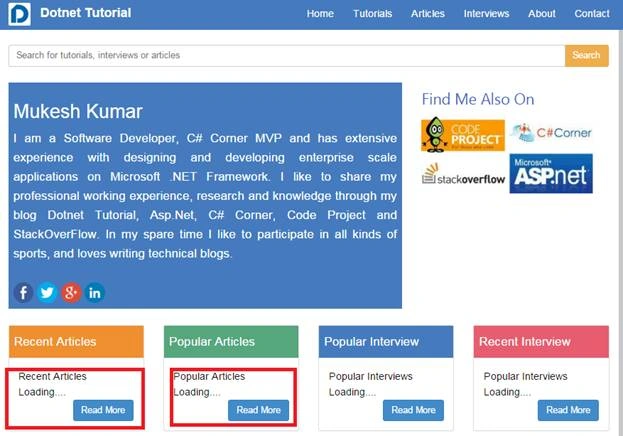
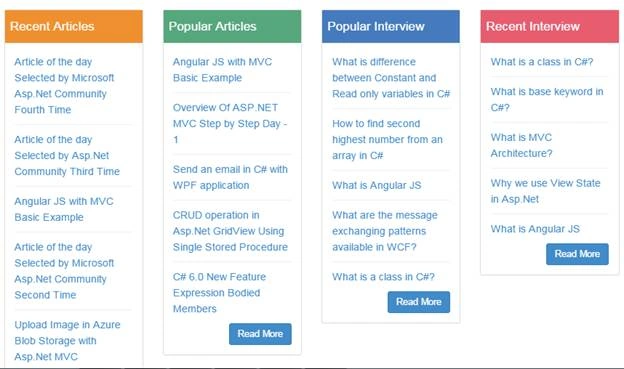
The part which is going to load, you can show the loading content message, if the request will get the response from the server than the data will be bound with partial view. So, using this you can make your asp.net mvc website faster. When your site will load properly then it will look like the following image with whole data.
muhannad hajPosted Oct 20, 2021, 12:05 PM
Thanks , but when i try to download tThanks , but when i try to download the code it gave me an error "This site can’t be reached"he code it gave me an error "This site can’t be reached"
Rajesh KumarPosted Sep 25, 2018, 1:12 AM
Nice one sir, Thanks for sharing..................
Sahil SharmaPosted Jul 19, 2017, 6:18 AM
Great Article. Thanks for sharing.
Rajeev PunhaniPosted Feb 26, 2016, 1:25 AM
Thanks for sharing. Quiet Helpfull.
Shubham KumarPosted Feb 25, 2016, 1:39 AM
nice share
Sibeesh VenuPosted Feb 25, 2016, 12:43 AM
Nice Share
Raja TPosted Feb 24, 2016, 11:04 PM
Good.Thanks for sharing
Humayun Kabir MamunPosted Feb 24, 2016, 11:00 PM
Nice...
Mohammed IbrahimPosted Feb 24, 2016, 3:56 PM
nice
sreenivasa kPosted Feb 24, 2016, 2:24 PM
nice one
kaushal mani raikwarPosted Feb 24, 2016, 1:40 PM
Very nice. Keep it up.
Sthitaprajnya Debasis NayakPosted Feb 24, 2016, 1:10 PM
Nice Article !!!