

This article will demonstrate the best practices which should be used while working with ASP.NET MVC application. We always try to build MVC applications, using best practices but we usually don't know where we can implement the best things. So, in this demonstration, you will learn about the best practices which should be implemented when creating MVC application.

Isolate Components
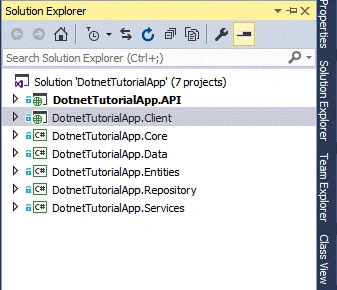
ASP.NET MVC application contains several components, like Model, Controller, View, Data Access Logic, Repository Logic, Service Layer etc. So, the best practice is to always isolate with different solutions. It makes life easy when working with different components.
Use View Model
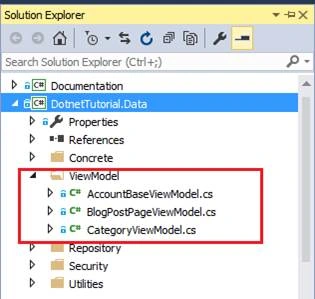
When working with enterprise level applications in ASP.NET MVC, don't work with Entity [Model] directly. We should create ViewModels which strongly binds with Views. ViewModel is a class just like Model class but it contains some extra properties required only for business process.
Note- ViewModel should always be in different folder.
Always Dispose Context Object
Generally in ASP.NET MVC, we prefer to work with Custom DataContext class which inherits DbContext. But when we perform database operations like Create, Read, Update and Delete through this context object, it is necessary to dispose the context object after process.
To do this, create a class which implements IDisposable interface.
- public abstract class DefaultDisposable : IDisposable
- {
- protected readonly NextProgrammingDataContext context;
- private bool _disposed;
- private readonly object _disposeLock = new object();
- protected DefaultDisposable()
- {
- context = new NextProgrammingDataContext();
- }
- public void Dispose()
- {
- Dispose(true);
- }
- protected virtual void Dispose(bool disposing)
- {
- lock (_disposeLock)
- {
- if (!_disposed)
- {
- if (disposing)
- {
- context.Dispose();
- }
- _disposed = true;
- }
- }
- }
- }
- public class CategoryRepository: DefaultDisposable, ICategoryRepository
- {
- public int AddNewCategory(Category categoryEntity)
- {
- int categoryId = 0;
- if (categoryEntity != null)
- {
- if (CheckCategoryExists(categoryEntity.CategoryName) > 0)
- {
- categoryId = CheckCategoryExists(categoryEntity.CategoryName);
- }
- else
- {
- context.Categories.Add(categoryEntity);
- context.SaveChanges();
- categoryId = categoryEntity.CategoryId;
- }
- }
- return categoryId;
- }
- }
Caching is an important feature when working with Web development. It reduces the load time when our website uses Caching feature. We can implement Caching in ASP.NET MVC using OutputCache attribute. It is part of Action Filter. OutputCacheAttribute class inherits ActionFilterAttribute class.
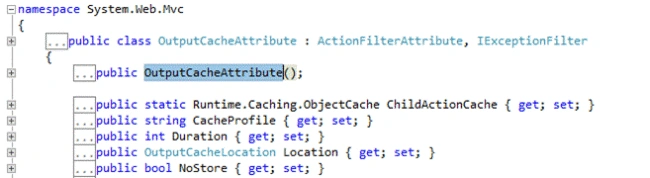
To implement the Output Cache, just put the OutputCache attribute on Controller or Action level as following line of code showing.
- OutputCache(CacheProfile = "MyCache")]
- public ActionResult Index(int? pageNumber)
- {
- int page = pageNumber ?? 1;
- return View();
- }
- <system.web>
- <caching>
- <outputCacheSettings>
- <outputCacheProfiles>
- <add name="MyCache" duration="100000" varyByParam="none" location="Server"/>
- </outputCacheProfiles>
- </outputCacheSettings>
- </caching>
- </system.web>
It is recommended to use Base Controller with our Controller and this Base Controller will inherit Controller class directly. It provides isolation space between our Controller [InterviewController] and Controller. Using Base Controller, we can write common logic which could be shared by all Controllers.
- public class BaseController : Controller
- {
- protected virtual LoginPrincipal LoggedUser
- {
- get { return HttpContext.User as LoginPrincipal; }
- }
- protected int GetUserId()
- {
- int userId = -1;
- if (Request.IsAuthenticated)
- {
- userId = LoggedUser.UserId;
- }
- return userId;
- }
- }
- public class InterviewController : BaseController
It is always recommended to use Dependency Injection with MVC application. And on the runtime, inject class dependencies. For more information, refer to my article How to use Dependency Injection with Asp.Net MVC application.
- public class InterviewController : BaseController
- {
- private const int pageSize = 10;
- private readonly IInterviewPostRepository _interviewPostRepository;
- private readonly IInterviewCategoryRepository _interviewCategoryRepository;
- private readonly ICommentsRepository _commentsRepository;
- private readonly IUserRepository _userRepository;
- public InterviewController(IInterviewPostRepository interviewPostRepository, IInterviewCategoryRepository interviewCategoryRepository, ICommentsRepository commentsRepository, IUserRepository userRepository)
- {
- _interviewPostRepository = interviewPostRepository;
- _interviewCategoryRepository = interviewCategoryRepository;
- _commentsRepository = commentsRepository;
- _userRepository=userRepository;
- }
- public ActionResult Index(int? pageNumber)
- {
- return View();
- }
- }
- public class NinjectBindings : NinjectModule
- {
- public override void Load()
- {
- Bind<IUserRepository>().To<UserRepository>();
- Bind<ICommentsRepository>().To<CommentsRepository>();
- Bind<IInterviewCategoryRepository>().To<InterviewCategoryRepository>();
- Bind<IInterviewPostRepository>().To<InterviewPostRepository>();
- }
- }
Best practice, when working with View and passing data from Controller, is using data access logic to use Strongly Typed View and which with map with a ViewModel directly.
- @model DotnetTutorial.Data.ViewModel.ContactUsViewModel
- @{
- ViewBag.Title = "Contact Us - DotNet Tutorial";
- Layout = "~/Views/Shared/_LayoutBase.cshtml";
- }
- <div class="col-md-8">
- <div>
- <h1 itemprop="name">CONTACT US</h1>
- </div>
- <hr />
- <h3>Send us a Message</h3>
- <br />
- @if (ViewBag.ContactUsSuccess != null)
- {
- <b style="color: green;">
- <p class="alert alert-success" style="text-align: center">@ViewBag.ContactUsSuccess</p>
- </b>
- }
- @if (ViewBag.ContactUsFailed != null)
- {
- <b style="color: red;">
- <p class="alert" style="text-align: center">@ViewBag.ContactUsFailed </p>
- </b>
- }
- @using (Html.BeginForm("ContactUs", "Home", FormMethod.Post, new { enctype = "multipart/form-data" }))
- {
- <div class="control-group form-group">
- <div class="controls">
- @Html.LabelFor(m => m.QueryType)
- @Html.DropDownListFor(m => m.SelectValue, new SelectList(Model.QueryTypeList, "value", "text"), "Select Query Type", new { @class = "form-control" })
- @Html.ValidationMessageFor(m => m.SelectValue, "", new { @style = "color:red" })
- </div>
- </div>
- <div class="control-group form-group">
- <div class="controls">
- @Html.LabelFor(m => m.Name)
- @Html.TextBoxFor(m => m.Name, new { @class = "form-control" })
- @Html.ValidationMessageFor(m => m.Name, "", new { @style = "color:red" })
- </div>
- </div>
- <div class="control-group form-group">
- <div class="controls">
- @Html.LabelFor(m => m.EmailId)
- @Html.TextBoxFor(m => m.EmailId, new { @class = "form-control" })
- @Html.ValidationMessageFor(m => m.EmailId, "", new { @class = "", @style = "color:red" })
- </div>
- </div>
- <div class="control-group form-group">
- <div class="controls">
- @Html.LabelFor(m => m.ContactNumber)
- @Html.TextBoxFor(m => m.ContactNumber, new { @class = "form-control" })
- </div>
- </div>
- <div class="control-group form-group">
- <div class="controls">
- @Html.LabelFor(m => m.QueryContent)
- @Html.TextAreaFor(m => m.QueryContent, new { @class = "form-control", rows = "3" })
- @Html.ValidationMessageFor(m => m.QueryContent, "", new { @class = "", @style = "color:red" })
- </div>
- </div>
- <input type="submit" value="Send Message" id="btnSubmitQuery" class="btn btn-primary" />
- }
- </div>
Always use HTTP verbs suitable to action method such as HttpPut or HttpGet. If you don't define it, it will work as HttpGet, by default.
But when adding something in database using insert operation, we need to use HttpPut.
- [HttpPost]
- public ActionResult AddNewPost(MyViewModel model, string hdnTagList)
As per ASP.NET MVC application performance, we should always use Bundling and Minification. Using Bundling and Minification, we can make fewer requests on server and decrease the file size, which will download faster. Minification is achieved to use .min file. We can do Bundling in BundleConfig class, as shown in the following.
- public class BundleConfig
- {
- // For more information on bundling, visit http://go.microsoft.com/fwlink/?LinkId=301862
- public static void RegisterBundles(BundleCollection bundles)
- {
- bundles.Add(new ScriptBundle("~/bundles/jquery").Include(
- "~/Scripts/jquery-{version}.js"));
- // Use the development version of Modernizr to develop with and learn from. Then, when you're
- // ready for production, use the build tool at http://modernizr.com to pick only the tests you need.
- bundles.Add(new ScriptBundle("~/bundles/modernizr").Include(
- "~/Scripts/modernizr-*"));
- bundles.Add(new ScriptBundle("~/bundles/bootstrap").Include(
- "~/Scripts/bootstrap.js",
- "~/Scripts/respond.js"));
- bundles.Add(new StyleBundle("~/Content/css").Include(
- "~/Content/bootstrap.css",
- "~/Content/site.css"));
- }
- }
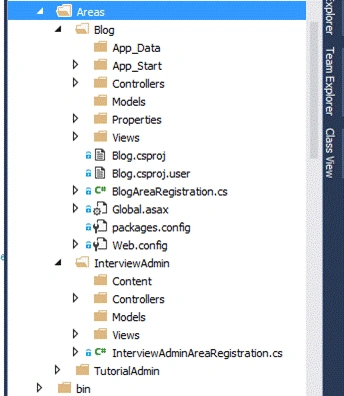
If we are interested in creating pluggable applications in MVC, then Area is the best option. Area provides separation of components. Using Area, we can create multiple modules in the same application where every module is working individually without affecting the other functionality.
Mostly, Area is used to create Back-end modules, like Admin part in application. With the following image, we can see that we have created three areas - Blog, InterviewAdmin, TutorialAdmin. Every Area component [blog] will contain its own Controller folder, View folder, and Models folder.
Use Request Validation
Always use Request Validation as false [ValidateInput(false)]. By default, it is true and this can cause security issues because if it is true, then using HTML control, we can pass the HTML content to server. So, best practice is to use Request Validation as false.
Enabling request validation in View pages would cause validation to occur after the input has already been processed by the Controller. By default, MVC performs request validation before a Controller processes the input. To change this behavior, apply the ValidateInputAttribute to a Controller or Action.
- [ValidateInput(false)]
- [OutputCache(CacheProfile = "MyCache")]
- public ActionResult Index(string url)
Validation is the important part when working with any application. In ASP.NET MVC, we can implement validation on server side using DataAnnotation which is found in usingSystem.ComponentModel.DataAnnotations namespace.
After using this, we don't need to do extra work. Just pass validation as per requirements, like for checking if the control is not empty use [Required] attribute, for max length validation just use [MaxLength] attribute with properties.
- public class PostViewModel
- {
- public int PostId { get; set; }
- [Display(Name="Post Title")]
- [Required(ErrorMessage="Post Title is required")]
- [RegularExpression(@"^.{5,}$", ErrorMessage = "Minimum 3 characters required")]
- [StringLength(500,MinimumLength=3, ErrorMessage="Invalid Title Lenght")]
- public string PostTitle { get; set; }
- [MaxLength(Int32.MaxValue, ErrorMessage = "More than max value")]
- [AllowHtml]
- [Display(Name = "Short Content")]
- [Required(ErrorMessage = "Short Content is required")]
- public string ShortPostContent { get; set; }
- [AllowHtml]
- [MaxLength(Int32.MaxValue, ErrorMessage = "More than max value")]
- [Display(Name = "Full Content")]
- [Required(ErrorMessage = "Full Content is required")]
- public string FullPostContent { get; set; }
- [Display(Name = "Meta keywords")]
- [Required(ErrorMessage = "Meta Keywords is required")]
- public string MetaKeywords { get; set; }
- [Display(Name = "Meta Description")]
- public string MetaDescription { get; set; }
- }
In MVC, by default there are two engines available - ASPX engine and Razor engine. But, it prefers to use only one engine for increasing the performance of the application. So, first we need to clear ViewEngines when initializing the application, and then bind our preferable engine with the application.
- ViewEngines.Engines.Clear();
- ViewEngines.Engines.Add(new RazorViewEngine());
So, today we have learned the best practices while working with ASP.NET MVC applications.
I hope this post will help you. Please put your feedback using comment which helps me improve myself for the next post. Please put your doubts and queries in the comment section.
Niranjan PradhanPosted Feb 16, 2022, 12:26 PM
Can i get above solution source code?
Mairaj MinhasPosted Apr 4, 2019, 1:25 AM
Hi . How is ValidateInput(false) a best practice ? I guess this will not validate the request even when not required, and will allow html to be posted. Please correct if i am wrong ?
Ali KahaeiPosted Jun 7, 2018, 10:41 AM
When you said "the best practice is to always isolate with different solutions" did you mean "the best practice is to always isolate with different projects"?
raef daoodPosted Nov 30, 2017, 4:34 PM
Hi It possible to get the source code ???? please answer me
raef daoodPosted Nov 22, 2017, 1:52 AM
Great article from where can i download the source code
Cvo PortPosted Nov 15, 2017, 1:04 PM
Great article. Any chance we can get a link to download the source/sample code for the article? (DotnetTutorialApp solution)
Anil Kumar MurmuPosted Oct 20, 2016, 3:22 AM
Thank you for sharing the details
Kmiilo MontoyaPosted Oct 18, 2016, 11:13 AM
I would like! a place where people speak more of the software architecture and perhaps provide a base model for enterprise web applications, maybe 3 or 4 models to understand the architecture as such, and porder apply good practices and make robust applications thanks to your help.
Anu VPosted Sep 28, 2016, 8:09 AM
Nice..
Upendra Pratap ShahiPosted Sep 27, 2016, 1:34 PM
Nice one...
Sinraj VPosted Sep 26, 2016, 3:52 AM
Excellent artical....
Hanif HefazPosted Sep 21, 2016, 5:34 PM
Great Job...
SubashPosted Sep 21, 2016, 6:05 AM
Thank you sir very nice tips
Manav PandyaPosted Sep 21, 2016, 5:05 AM
Exceptional ...
Bhushan GawalePosted Sep 21, 2016, 3:44 AM
Excellent post, thanks for sharing valuable tips.
Ravi PatelPosted Sep 21, 2016, 1:29 AM
Nice one
Humayun Kabir MamunPosted Sep 21, 2016, 12:39 AM
Nice...
Pradeep SahooPosted Sep 20, 2016, 9:32 PM
Good
Prasanna MuraliPosted Sep 20, 2016, 9:32 PM
Nice share
Vignesh ManiPosted Sep 20, 2016, 6:09 PM
Good One