


Python Logo
- Python is strongly high-level language
- Python is interpreted
- Python is reflective
- Dynamically type
- Open-source
- Multiparadigm
Note: Sometimes we can say Python is a scripting language and very easy to write a program in python
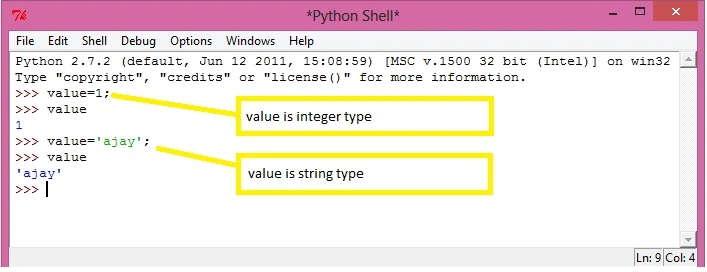
Python is dynamically typed, which means the data types can be defined at the time of execution of the program.
Example
Value=2;
And value=’Ajay’;
(Show in the picture below)
 Interactive Execution of Expression
Python programming language allows users to do words just like a calculator, you type an expression and python executes the expression immediately (within seconds).
Let’s go and check how it works.
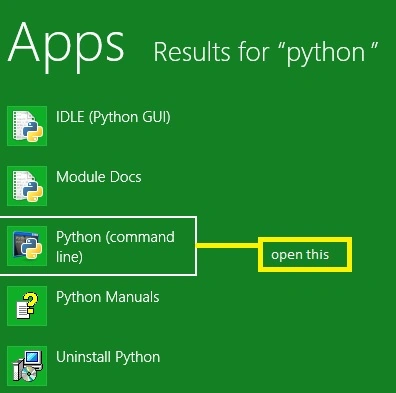
Open python(command line) application shown in the picture below,
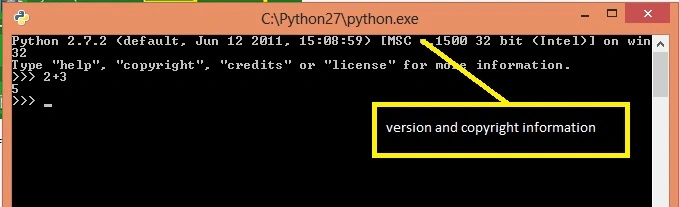
After launching application type expression for execution
>>>2+3
5 // this is the result of expression 2+3
(Shown in picture)
Interactive Execution of Expression
Python programming language allows users to do words just like a calculator, you type an expression and python executes the expression immediately (within seconds).
Let’s go and check how it works.
Open python(command line) application shown in the picture below,
After launching application type expression for execution
>>>2+3
5 // this is the result of expression 2+3
(Shown in picture)
 Key: Three right arrows (>>>) are the expression prompt telling python system is waiting for your expression
You can see the result of your expression, after pressing enter/return.
We can perform all arithmetic operations (shown in the figure).
Comments
Key: Three right arrows (>>>) are the expression prompt telling python system is waiting for your expression
You can see the result of your expression, after pressing enter/return.
We can perform all arithmetic operations (shown in the figure).
Comments
- Like other languages, python also has the facility to comment on our statement and function, etc so the reader can understand functionality more easily.
- We give comments in python using a hash mark (#)
- Comments are ignored by python and used as information for the reader
Example: shown in the picture below.>>>3+2 #sum of two number.
Data Types in Python
- Integer
- Floating (float)
- String
- Boolean
Integer
- Integer stores any non-fractional number counting.
- Python does not upper boundary on the size of integer
- Size is also dependant on the number
- Example: the size of 5 is 12 bytes on the 32-bit operating system.
Size of 9999999 is 20 bytes on the 32-bit operating system. - An integer can be positive and negative both
- Float stores any fractional number.
- Python does not upper bound on the size of the float.
- Size of the float also depends on the number
- Python used scientific notation for float numbers.
1.2e3 means 1200.0
- String stores characters or sentence
- Python does not upper bound on the size of the string
- Size of string also depends on the length of string
- Boolean type represents a true or false value
True
>>> 2 > 5
False
Variables
Variables are just the name of a data type but reserved memory locations to store values for the different data types. This means that when you create a variable you reserve some space in memory.
Size of reserve memory depends on the data type of variable
Python allows you to assign a more than one variable at a time
Example: A=b=c=d=10;
Operators
Operators are the constructs which can manipulate the value of operands
Types of Operator
Python supports the following type of operator lists below,
- Arithmetic Operators
- Comparison Operators
- Logical Operators
- Bitwise Operators
- Assignment Operators
Arithmetic Operators
they are the following listed table.
b % a = 0
| Operator | Description | Example |
| + (Addition) | Performing addition of number | a + b = 30 |
| - (Subtraction) | Performing Subtraction of number | a – b = -10 |
| * (Multiplication) | Performing multiplication of number | a * b = 200 |
| / (Division) | Performing division of number | b / a = 2 |
| % (Modulus) | returns remainder | b % a = 0 |
| ** (Exponent) | Performs exponential (power) calculation on operators | a**b =10 to the power 20 |
Comparison Operators
assume a=10 and b=20
| Operator | Description | Example |
| == | If the values of two operands are equal, then the condition becomes true. | (a == b) is not true. |
| != | If the values of the two operands are not equal, then the condition becomes true. | |
| > | If the value of the left operand is greater than the value of the right operand, then the condition becomes true. | (a > b) is not true. |
| < | If the value of the left operand is less than the value of the right operand, then the condition becomes true. | (a < b) is true. |
| >= | If the value of the left operand is greater than or equal to the value of the right operand, then the condition becomes true. | (a >= b) is not true. |
| <= | If the value of the left operand is less than or equal to the value of right operand, then condition becomes true | (a <= b) is true. |
Logical operator
assume a=10 and b=20
| Operator | Description | Example |
| and (Logical AND) | If both the operands are true then the condition becomes true. | (a and b) is true. |
| or (Logical OR) | If any of the two operands are non-zero then condition becomes true | (a or b) is true. |
| not Logical NOT | Used to reverse the logical state of its operand. | Not(a and b) is false. |
Bitwise Operators
bitwise operator work on bits.
assume a=60 and b=13
binary of a and b are
a=0011 1100
b=0000 1101
| Operator | Description | Example |
|
& (Binary AND)
|
Operator copies a bit to the result if it exists in both operands | a&b = 0000 1100 |
| | (Binary OR) | It copies a bit if it exists in either operand. | a|b = 0011 1101 |
| ^ (Binary XOR) | It copies the bit if it is set in one operand but not both | a^b = 0011 0001 |
| ~ (Binary One's Complement) | It is unary and has the effect of 'flipping' bits. | ~a = 1100 0011 |
| << (Binary Left Shift) | The left operands value is moved left by the number of bits specified by the right operand | a << = 240 (means 1111 0000) |
| >> (Binary Right Shift) | The left operands value is moved right by the number of bits specified by the right operand | a >> = 15 (means 0000 1111) |
Assignment Operators
| Operator | Description | Example |
| = | Assigns values from right side operands to left side operand | c = a + b assigns value of a + b into c |
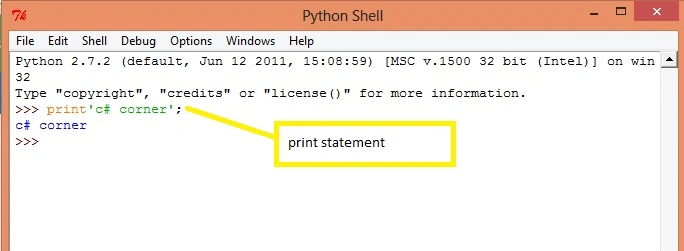
Print statement
print something on the screen in python we use.
print function
example(shown in picture)
print'c# corner'.
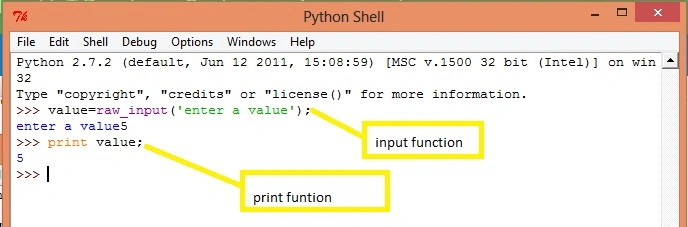
 Input from the user.
(shown in picture)
Input from the user.
(shown in picture)
Read more articles on Python:
Ajay MalikPosted Jun 20, 2016, 1:58 PM
tq
Kuppurasu NagarajPosted Apr 30, 2016, 2:53 PM
Nice Sharing..
Ajay MalikPosted Apr 28, 2016, 12:24 PM
tq..Mohammed Ibrahim
Mohammed IbrahimPosted Apr 28, 2016, 12:21 PM
nice