

Basics of Kubernetes
This article gives a walkthrough of the fundamentals of the Kubernetes cluster orchestration system. Every module contains some foundation data on major Kubernetes elements and ideas and incorporates an intuitive web-based instructional exercise. These intuitive instructional exercises let you deal with a basic cluster and its containerized applications for yourself.
Utilizing the intelligent Article exercises, you can figure out how to:
- Deploy a containerized application on a cluster.
- Scale the deployment.
- Update the containerized application with a new software version.
- Troubleshoot the containerized application.
Basics Modules of Kubernetes
- Create a Kubernetes cluster
- Deploy an app
- Explore your app
- Expose your app publicly
- Scale up your app
- Update your app
Kubernetes Clusters
"Kubernetes coordinates a highly available cluster of computers that are connected to work as a single unit." The abstractions in Kubernetes allow you to deploy containerized applications to a cluster without tying them explicitly to individual machines. To utilize this new model of deployment, applications should be packaged in a way that decouples them from individual hosts: they should be containerized. Containerized applications are more adaptable and accessible than in past deployment models, where applications were installed directly onto explicit machines as packages deeply integrated into the host. Kubernetes automates the distribution, scheduling, and planning of application containers across a group in a more proficient manner. Kubernetes is an open-source platform and production-ready.
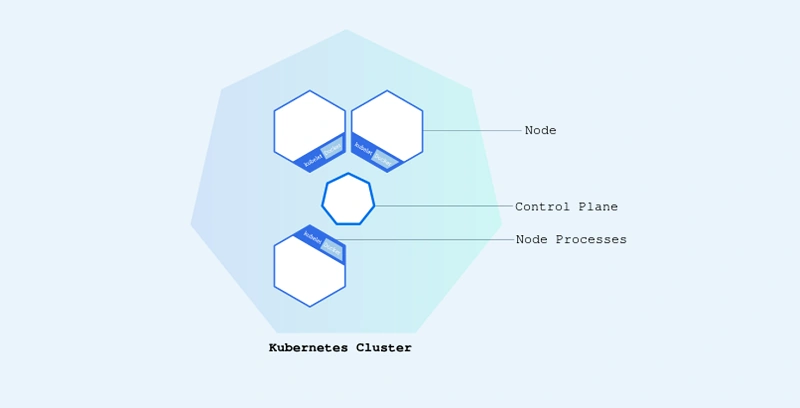
A Kubernetes cluster consists of two types of resources:
- The Control Plane coordinates the cluster
- Nodes are the workers that run applications
Cluster Diagram
[P1.kubernetes-basics/public/images/module_01_cluster.svg]
- The Control Plane is responsible for managing the cluster. The Control Plane arranges all activities in the cluster, like planning scheduling applications, maintaining applications' desired state, scaling applications, and rolling out new updates.
- A node is a VM or a physical computer that serves as a worker machine in a Kubernetes cluster Every node has a Kubelet, which is a specialist for dealing with the node and communicat with the Kubernetes control plane The node should also have tools for handling container operations, for example, containers or Docker. A Kubernetes cluster that handles all production traffic ought to have at least three nodes since, supposing that one node goes down, both an etcd part and a control plane occurrence are lost, and overt repetitiveness is compromised. You can alleviate this gamble by adding more control plane nodes.
Deploy an App
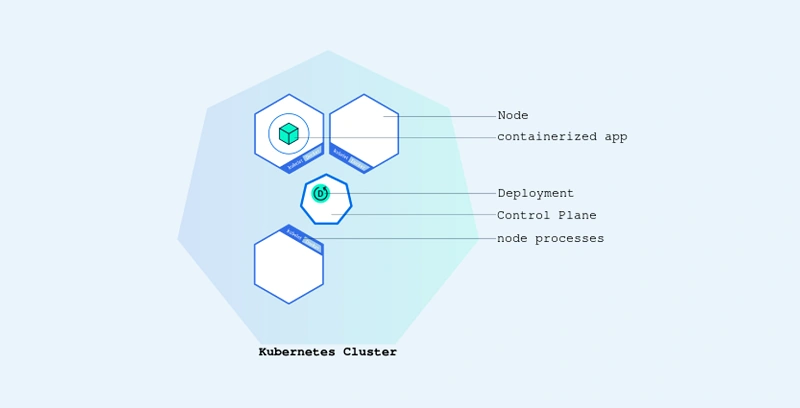
When you have a running Kubernetes cluster, you can deploy your containerized applications on top of it. To do as such, you make a Kubernetes Deployment setup. The Deployment Kubernetes how to make and refresh examples of your application. Whenever you've created a Deployment, the Kubernetes control plane timetables the application examples remembered for that Organization to run on individual Nodes in the cluster.
Deploying your first app on Kubernetes
[P2.kubernetes-basics/public/images/module_02_first_app.svg]
Explore your app
Kubernetes Pods
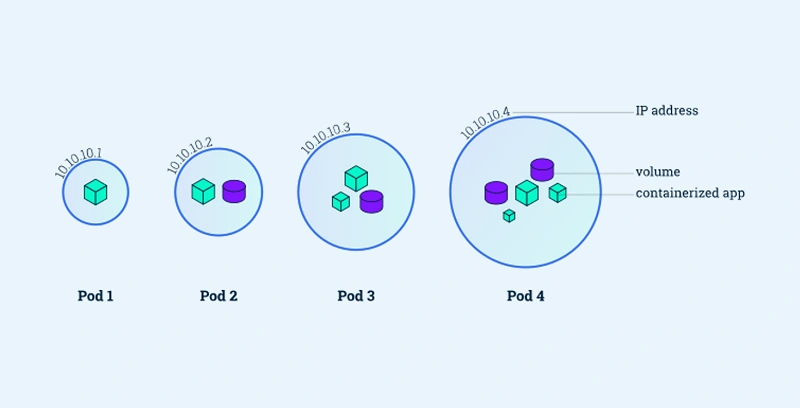
At the point when you created a Deployment in Module 2, Kubernetes made a Unit to have your application example.A Pod is a Kubernetes reflection that addresses a gathering of at least one application container (like Docker), and a few common assets for those compartments. Those assets include:
- Shared storage, as Volumes
- Networking, as a unique cluster IP address
- Information about how to run each container, such as the container image version or specific ports to use
Pods overview
[P3.kubernetes-basics/public/images/module_03_pods.svg]
Nodes
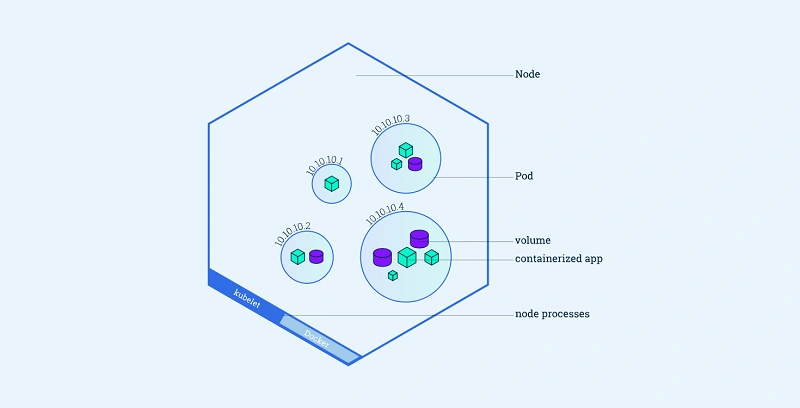
A Pod generally runs on a Node. A Node is a specialist machine in Kubernetes and might be either a virtual or a physical machine, depending upon the cluster. Every Node is overseen by the control plane. A Node can have different pods, and the Kubernetes control plane consequently handles scheduling the pods across the Nodes in the cluster. The control plane's automatic scheduling takes into account the available resources on every Node.
Each Kubernetes Node runs in any event:
- Kubelet, a process responsible for communication between the Kubernetes control plane and the Node; it deals with the Pods and the compartments running on a machine.
- A compartment runtime (like Docker) answerable for pulling the holder picture from a library, unloading the holder, and running the application.
Node overview
[P4.kubernetes-basics/public/images/module_03_pods.svg]
Expose your app publicly
Using a service to expose your App
Kubernetes Services
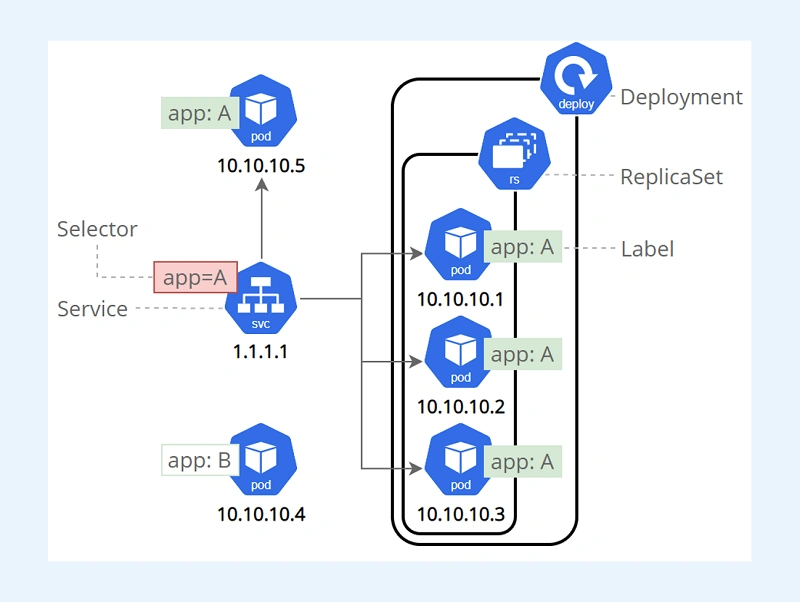
Kubernetes Pods are mortal. Pods as a matter of fact have a lifecycle. At the point when a laborer node passes on, the Pods running on the Node are likewise lost. A ReplicaSet could then powerfully drive the cluster back to the wanted state by means of the creation of new Pods to keep your application running. As another model, consider a picture handling backend with 3 replicas. Those replicas are replaceable; the front-end framework shouldn't think often about backend replicas even if a Pod is lost and recreated. All things considered, each Pod in a Kubernetes cluster has a remarkable IP address, even Pods on a similar Node, so there should be an approach to naturally accommodating changes among Pods with the goal that your applications keep on working.
A Help in Kubernetes is a reflection that defines a logical set of Pods and a strategy by which to access them. Services enable a loose coupling between subordinate Pods. A Service is defined using YAMLL (liked) or JSON, similar to all Kubernetes objects. The arrangement of Pods targeted by a Help is not set in stone by a LabelSelector.
Although each Case has a unique IP address, those IPs are not exposed outside the cluster without a Service. Administrations permit your applications to get traffic.
Services can be exposed in different ways by specifying a type in the ServiceSpec:
- ClusterIP (default) - Exposes the Service on an internal IP in the cluster. This type makes the Service only reachable from inside the cluster.
- NodePort - Exposes the Service on the same port of each selected Node in the cluster using NAT. Makes a Service accessible from outside the cluster utilizing <NodeIP>:<NodePort>. Superset of ClusterIP.
- LoadBalancer - Creates an external load balancer in the current cloud (if supported) and assigns a fixed, external IP to the Service. Superset of NodePort.
- ExternalName - Maps the Service to the contents of the externalName field (for example foo.bar.example.com), by returning a CNAME record with its value. No proxying of any kind is set up. This type requires v1.7 or higher of kube-dns, or CoreDNS version 0.0.8 or higher.
[P5.kubernetes-basics/public/images/module_04_labels.svg]
Scale Your App
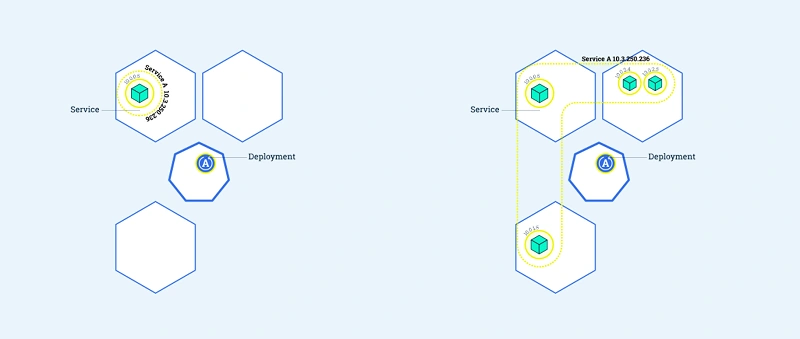
In the past modules we made a Deployment and hen exposed it publicly via a Service. The Deployment made just a single Pod for running our application. At the point when traffic expands, we should scale the application to keep up with user demand.
Scaling overview
[P6. kubernetes-basics/public/images/module_05_scaling1.svg]
Update your app
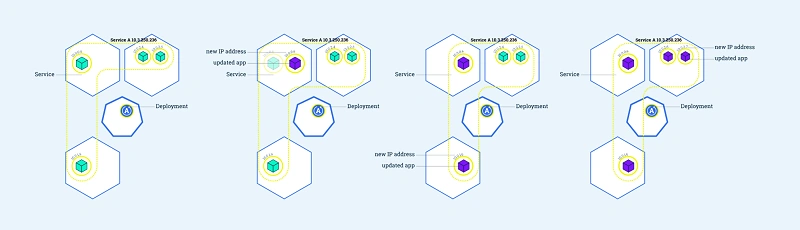
Clients anticipate that applications should be available all the time and developers are expected to deploy new versions of them several times a day. In Kubernetes, this is finished with rolling updates. Rolling updates allow Deployment updates to happen with zero downtime by incrementally updating Pods cases with new ones. The new Pods will be scheduled on Nodes with accessible resources.
Rolling updates overview
[P7.kubernetes-basics/public/images/module_05_scaling2.svg]
References
Miguel TeheranPosted Oct 27, 2022, 10:35 PM
Thanks!! very useful article!