

The world is a better place when we all are connected with each other through a connection that is available, reliable, and secure. In the technical world, more importantly in the computer world, devices need a communication path by which they can connect and communicate with each other. There are 8.4 billion devices all over the world and 20.4 billion will be set up in the next few years. Well, that’s a huge number and each device needs a constant connection to communicate and make service available to all mankind. This article provides a simple explanation of the basics of networking by which you can correlate devices and their connection using some cables, services, and several configurations needed to implant any software or hardware in the system.
The first question that arises in our mind while working or studying is what exactly is a computer network? So, to simply define that – It is a network of computers that are connected with each other using a physical medium, such as cables, and each computer has a physical as well as a logical address to communicate with each other and outside the network.
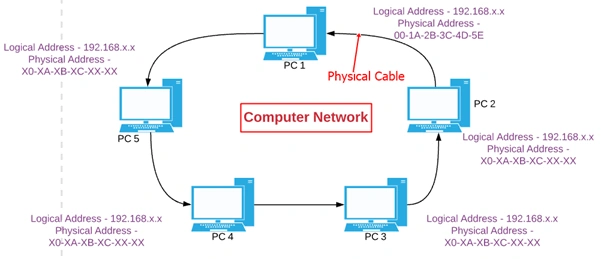
Two computers can be said to be interconnected when they interchange or exchange information via a cable, such as copper cable, fiber optic, or wireless communication. At a granular level, let’s understand network a bit more in an elaborate manner. A network is termed as a connection or interconnection of devices that can communicate with each other. In a network, three components are needed –
- Device
A device could be any end system or host who is in demand for communication with other devices. For example – Laptops, Desktop, Cellular Phone, and workstation.
- Transmission Media
A medium by which we can exchange the information with devices. It is the connection line that enables us to interchange the information. They are of two types – Wired medium and Wireless medium. For the sake of this article, we are very much grounded to a wired connection and we will see the wireless connection in our later articles.
- Addressing
An address in the network is similar to our home address. Take an example of a letter handed over by a postman to our home. He can find our home with the help of an address noted on the letter. In the same way, devices have an addressing mechanism where each device has one physical address which is unique and permanent throughout your networking. he other is a logical address and it is static as well as dynamic in nature and can be modified with malicious intent.
Apart from that, we have something called as – “connecting device” that also sits in the networking system, that resembles the intermediate devices that help in regaining the network or assist in connecting the network, for example – Router, Switches, Repeater, and Hub.
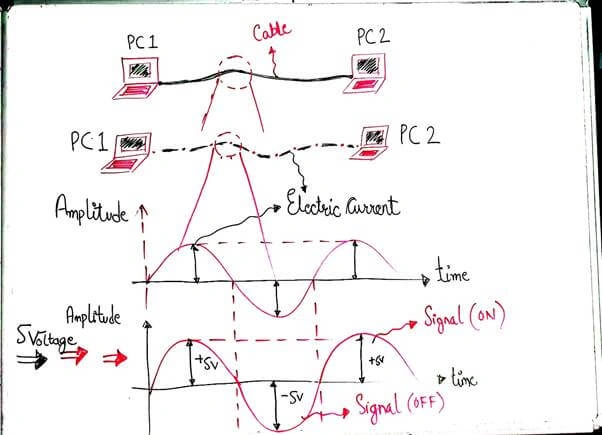
This electric current wave is elongated if PCs are kept at a distance. So, the wave is going to behave according to the computers' distance, . If the computers are very near to each other, i.e., shorter distance, it takes less time to exchange information. Otherwise, the larger the distance, the longer the time to exchange information. The next thing we need to understand are different types of “interconnecting devices” that help in the proliferation of networks.
Repeater


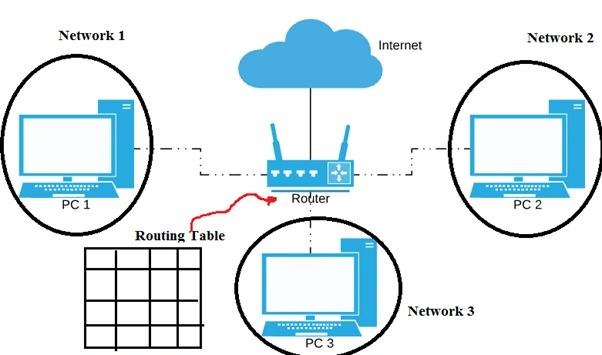
Router
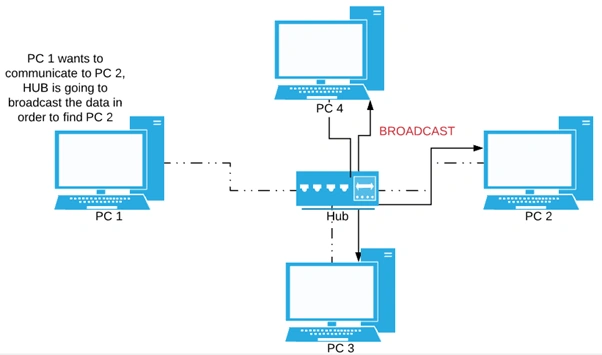
Hub
Switch
From the above definition, I understand there is a need to explain “Flooding”. As I told you about the HUB, it is a dumb device because it forwards any data that it receives to each computer it connects to. Flooding is a term that says an incoming data/packet is sent through every other computer except the one who sends the incoming packet. Hub possibly doesn’t recognize the devices and broadcasts the data to every computer even though that computer doesn’t have any relation with that data and therefore, the Flooding in Hub leads to higher bandwidth consumption. In contrast to Hub, Switch is intelligent as it learns from its switching table who and who not to broadcast to.
Onkar SharmaPosted Dec 19, 2019, 7:37 AM
Great stuff for beginners...
Tolu LopePosted Jun 5, 2019, 6:38 AM
Hi nitesh, it's quite urgent.I pls contact @+32471831807 or [email protected]