

Java Concept
Sun Microsystems created the Java language. Java is a case-sensitive programming language, like C++. Java is an Object-Oriented Programming (OOP) structure. Java is a class-based programming language.
- Java technology is used for developing both, applets and applications.
- Provides an easy to use:
- Avoids many of the pitfalls of other languages
- Bing object-oriented
- Enables code streamlining
- Provides an interpreted environment:
- Improved speed of development.
- Code portability.
- Loads classes dynamically, in other words when they are actually needed.
- Supports changing programs dynamically, during runtime, by loading classes from a distinct source.
- Furnishes better security.
- Enables use of more than one thread of activity.
- The Java Virtual Machine (JVM).
- Garbage collection.
- The Java Runtime Environment (JRE).
- JVM tool interface.
- JVM provides definitions for the:
- Instruction Set (Central Processing Unit (CPU))
- Register set
- Class file format
- Runtime stack
- Garbage–collected head
- Memory area
- Fatal error reporting mechanism
- High –precision timing support
- Garbage collection has the following characteristics:
- Check for and frees memory no longer needed, automatically.
- Provides a system-level thread to track memory allocation.
- The JVM does the following three main tasks:
- Loads code: performed by the class loader.
- Verifies code: performed by the byte code verifies.
- Executes code: performed by the runtime interface.
- There are the following five primary workflows of a software developing project:
- Requirement capturing, analysis, design, implementation, and testing.
- Abstraction, means ignoring the non-essential details of an object and concentrating on its essential details.
- Encapsulation provides data representation flexibility, by hiding the implementation details of a class. It loads all the classes necessary, for the execution of the program.
- Maintains classes of the local file system, in a separate namespace.
- Avoids execution of the program whose byte code has been changed illegally.
Example with a simple Java program
Open Notepad and type in this program, maintaining the upper and lower case, because Java is a case-sensitive programming language.
- class Krishna {
- public static void main(String[] args) {
- System.out.println(“("Welcome to Basic concept of Java");
- }
- }
- After writing this code, save the program. When you save it, you need to save the program with only the class name like:Krishna.java //.java is extension of Java file
- After saving, compile and run the program, so you need to open a “cmd”. Click the Window button and type “cmd” then hit Enter and open a “cmd”. Then type the cmd command, for going to the location where your Java program is. For example, mine is at “desktop” so I need to type: cd desktop.
- Then show desktop, on your cmd, then type the following to compile:
javac Krishna.java
//javac for Java compile - When your Java program isl compiled successfully, with no error, then you have an auto-created .class file.
- If the compile was successful, then to run type:
Java Krishna - The following is the output.
Welcome to the Basic concept of Java
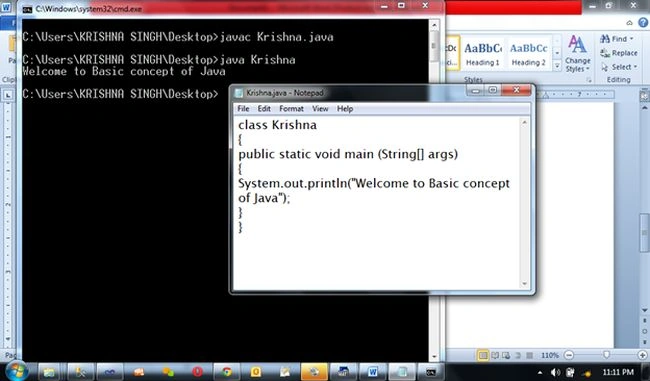
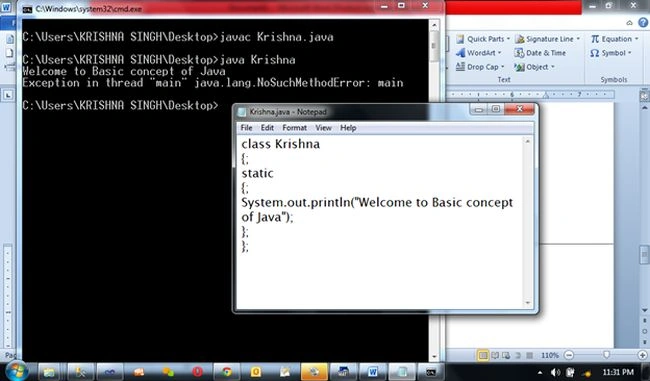
Now we can create a program in Java, without a main() and terminate the curly bracket, with a semicolon ({;};)
The following is an example:
- class Krishna {
- ;
- static {
- ;
- System.out.println("Welcome to Basic concept Of Java");
- };
- };
See that this program that has no errors, when compiled and run.
See the following output here:
Java has more packages like.
- import java.util.Scanner;
- import java.awt.*;
- import java.applet.*;
AWT is the Abstract Window Toolkit.
The following is an example of a packages program:
- import java.util.Scanner;
- class Oddeven {
- public static void main(String[] args) {
- int a;
- System.out.println("Please enter the number ");
- Scanner in = new Scanner(System.in);
- a = in .nextInt();
- if (a % 2 == 0) {
- System.out.println("this number is even num");
- } else {
- System.out.println("this number is odd num");
- }
- }
- }
When you compile the same with the same class name load the .class name file. Then you can run using the command only.
See the following image with the program and output in “cmd”:
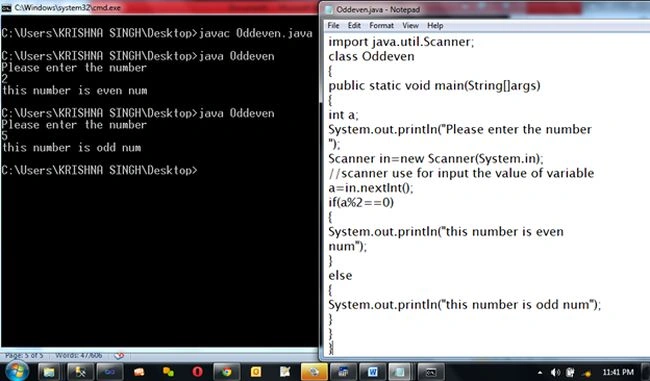
- After run show message
- Please enter the number
- User enter number like 2
- Show message like
- this number is even num
- And again run show message
- Please enter the number
- user enter like 5
- Show message below
- this number is odd num
Thanks in advance.
Krishna Rajput SinghPosted Aug 10, 2015, 12:26 PM
thanks so much for your valuable comments Kelvin OBrien i hope helpful for u..:). happy programming
Kevin OBrienPosted May 28, 2015, 6:15 AM
I am familiar with some points but some of them are new for me. Informative article for me. Thanks for sharing this article with us. I like it very much.
Krishna Rajput SinghPosted Oct 1, 2014, 5:41 AM
thanks Gopi Chand
Gopi ChandPosted Sep 30, 2014, 12:06 PM
Good start up....keep it up..