

Integrate the OpenAI library, set up your environment, and then execute the code.
Step 1. Set up your environment.
- Install Node.js: If you don't have it, download and install Node.js from the official website.
- Create a project folder: Create a new folder for your project and open it in VS Code.
- Initialize a Node.js project: Open the terminal in VS Code and run npm init -y to create a package.json file.
If Error: Follow these steps, highlighted or skip these steps
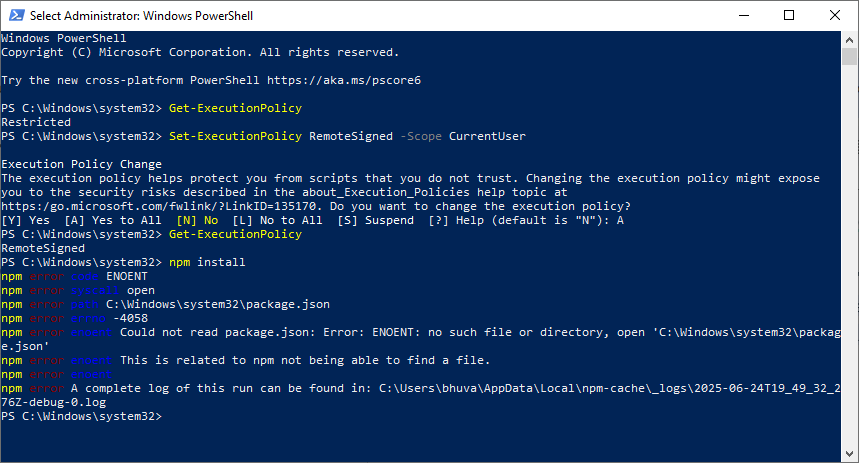
The error "File C:\Program Files\nodejs\npm.ps1 cannot be loaded because running scripts is disabled on this system" means your PowerShell execution policy is set to restrict script execution. To fix this, you need to temporarily change the execution policy to allow scripts to run, then change it back to a more restrictive setting for security.
Here's how to resolve it.
- Open PowerShell as Administrator: Right-click the PowerShell icon and select "Run as administrator".
- Check the current execution policy: Type Get-ExecutionPolicy and press Enter. If the result is Restricted, you need to change it.
- Change the execution policy: Type Set-ExecutionPolicy RemoteSigned -Scope CurrentUser and press Enter. This allows you to run scripts signed by a trusted publisher or scripts created locally.
- Verify the change: Type Get-ExecutionPolicy again and confirm that the execution policy is now RemoteSigned.
- Run the npm command: Try running your npm command again (e.g., npm install).
- (Optional) Revert the execution policy: Once you're done, it's a good practice to revert to a more restrictive policy like Restricted or AllSigned. You can do this by typing Set-ExecutionPolicy Restricted -Scope CurrentUser and pressing Enter, according to Stack Overflow.
If No Error, continue these steps.
- Install the OpenAI library: Run npm install openai in the terminal to install the necessary library.
- Install dotenv (optional but recommended): Install the dotenv package to manage your API key securely: npm install dotenv.
- Create an API key: Get your OpenAI API key from the OpenAI platform.
Step 2. Write your JavaScript code.
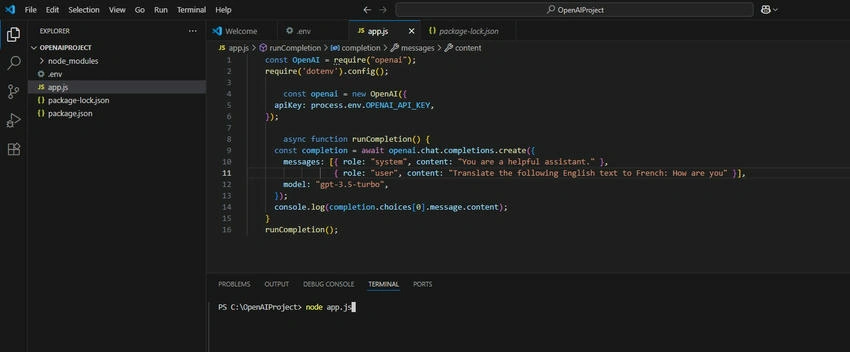
- Create a JavaScript file: Create a file (e.g., app.js) in your project folder.
- Import the OpenAI library and dotenv.
JavaScript
const OpenAI = require("openai");

require("dotenv").config();
Create an OpenAI client.
JavaScript
const openai = new OpenAI({
  apiKey: process.env.OPENAI_API_KEY,
});
Interact with the OpenAI API.
JavaScript
async function runCompletion() {
  const completion = await openai.chat.completions.create({
    messages: [
      { role: "system", content: "You are a helpful assistant." },
      {
        role: "user",
        content: "Translate the following English text to French: {your text here}",
      },
    ],
    model: "gpt-3.5-turbo",
  });

  console.log(completion.choices[0].message.content);
}
runCompletion();
- Replace {your text here} with the text you want to translate.
- Set up environment variables: If you are using dotenv, create a .env file in the root of your project and add your API key: OPENAI_API_KEY=YOUR_API_KEY.
Step 3. Run your code.
- Open the VS Code terminal: Go to Terminal > New Terminal.
- Run the JavaScript file: Type node app.js and press Enter to execute the code.
How to get the API Keys?
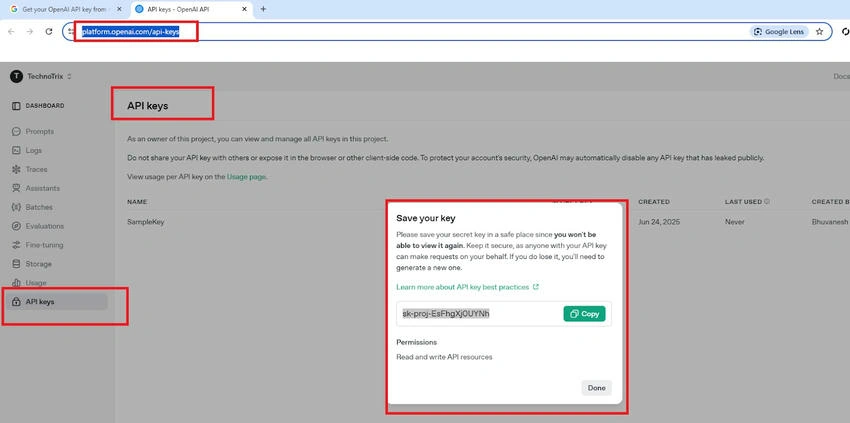
https://platform.openai.com/api-keys
Log in to Chat GPT.
Here's a more detailed breakdown.
- Log in to the OpenAI Platform: Go to OpenAI's platform and log in with your OpenAI account.
- Navigate to API Keys: Find the API keys section. This is often accessible through your account settings or a dedicated "API" section on the dashboard.
- Create a new key (if needed): If you don't have a key, click on "Create new secret key" or a similar option.
- Name your key: You may be prompted to name your key. This is for your reference and organization.
- Store your key securely: After creating the key, it will be displayed. Copy and securely store it. OpenAI will not display it again after you leave the page.
- (Optional) Set permissions: Some platforms allow you to set permissions for the key, controlling its access to different features or models.
Join the conversation! Your thoughts help the community grow.