

Introduction
In modern enterprise AI applications, we often face a hybrid data landscape: structured tabular data (customer demographics, transaction amounts, timestamps) coexists with unstructured text (support tickets, product descriptions, user reviews). The challenge isn't choosing between embedding-based features and classical tabular features—it's integrating both effectively to build robust, production-grade systems.
This article explores how to balance these two feature types within an enterprise multi-agent LangGraph RAG system with memory and state management, using a real-world customer support automation scenario.
Real-Time Use Case: Intelligent Customer Support Triage System
Business Problem
A large e-commerce platform receives 10,000+ customer support tickets daily. Each ticket contains:
Tabular features: Customer tier (Gold/Silver/Bronze), order value, days since last purchase, product category ID, region code
Text features: Customer complaint description, product review excerpts, chat history transcripts
The business needs an intelligent triage system that:
Routes tickets to the right department (Billing, Shipping, Product Quality, Account Management)
Predicts escalation risk (Low/Medium/High)
Recommends resolution actions based on similar historical cases
Why Both Feature Types Matter
| Feature Type | Strengths | Limitations |
|---|---|---|
| Classical Tabular | Interpretable, handles numerical relationships well, efficient for structured patterns | Cannot capture semantic meaning, struggles with free-text nuances |
| Embedding-Based | Captures semantic similarity, understands context and intent, works with unstructured data | Black-box nature, computationally expensive, requires careful dimensionality management |
The Solution: Combine both in a unified pipeline where embeddings enrich tabular features, and tabular features provide grounding and interpretability.
Architecture Overview: Multi-Agent LangGraph RAG System
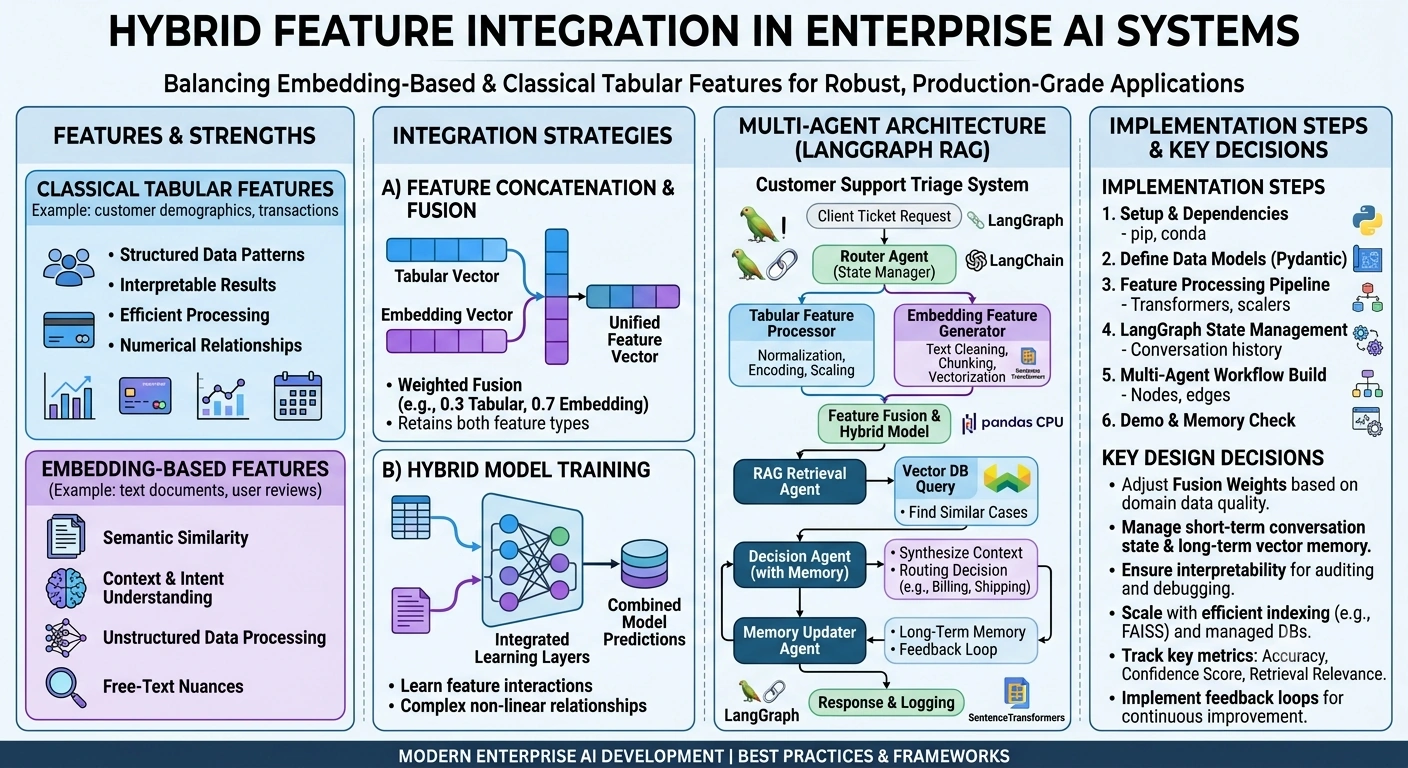
Implementation: End-to-End Code
Step 1: Setup and Dependencies
# requirements.txt"""
langgraph==0.2.0
langchain==0.3.0
langchain-openai==0.2.0
faiss-cpu==1.7.4
pydantic==2.5.0
scikit-learn==1.3.0
pandas==2.1.0
numpy==1.24.0
sentence-transformers==2.2.2
"""
import os
import json
import numpy as np
import pandas as pd
from typing import List, Dict, Any, Optional, Literalfrom datetime import datetime
from pydantic import BaseModel, Field, Annotated
from langgraph.graph import StateGraph, END
from langgraph.messages import add_messages
from langchain_openai import ChatOpenAI, OpenAIEmbeddings
from langchain_core.prompts import ChatPromptTemplate
from langchain_core.documents import Document
from sklearn.preprocessing import StandardScaler, LabelEncoder
from sentence_transformers import SentenceTransformer
import faiss
Step 2: Define Data Models with Pydantic
class TicketMetadata(BaseModel):
    """Classical tabular features from the support ticket"""
    ticket_id: str = Field(description="Unique ticket identifier")
    customer_tier: Literal["Gold", "Silver", "Bronze"] = Field(
        description="Customer loyalty tier"
    )
    order_value: float = Field(gt=0, description="Total order value in USD")
    days_since_last_purchase: int = Field(ge=0, description="Days since customer's last purchase")
    product_category_id: int = Field(description="Numeric category identifier")
    region_code: int = Field(description="Geographic region code (1-10)")
    is_repeat_customer: bool = Field(description="Whether customer has previous tickets")

    class Config:
        json_schema_extra = {
            "examples": [
                {
                    "ticket_id": "TKT-2026-89234",
                    "customer_tier": "Gold",
                    "order_value": 249.99,
                    "days_since_last_purchase": 15,
                    "product_category_id": 42,
                    "region_code": 3,
                    "is_repeat_customer": True
                }
            ]
        }


class TicketContent(BaseModel):
    """Unstructured text content from the support ticket"""
    subject: str = Field(description="Ticket subject line")
    description: str = Field(description="Detailed customer complaint or query")
    chat_history: Optional[str] = Field(None, description="Previous chat transcript if available")
    product_review_excerpt: Optional[str] = Field(None, description="Related product review text")


class CombinedTicket(BaseModel):
    """Unified ticket representation combining tabular and text features"""
    metadata: TicketMetadata
    content: TicketContent
    timestamp: datetime = Field(default_factory=datetime.now)

    def model_dump_clean(self) -> Dict:
        """Exclude internal fields for API responses"""
        return self.model_dump(exclude={"timestamp"})
Step 3: Feature Processing Pipeline
class FeatureProcessor:
    """Handles both tabular normalization and embedding generation"""

    def __init__(self):
        # Initialize embedding model (using sentence-transformers for efficiency)
        self.embedding_model = SentenceTransformer('all-MiniLM-L6-v2')
        self.embedding_dim = 384

        # Initialize scalers for tabular features
        self.tabular_scaler = StandardScaler()
        self.tier_encoder = LabelEncoder()
        self.tier_encoder.fit(["Bronze", "Silver", "Gold"])

        # FAISS index for vector storage
        self.index = None
        self.vector_store = []
        self.metadata_store = []

    def process_tabular_features(self, metadata: TicketMetadata) -> np.ndarray:
        """
        Normalize and encode classical tabular features

        Returns: Normalized feature vector [tier_encoded, order_value_scaled,
                 days_since_purchase_scaled, category_id, region_code, is_repeat]
        """
        # Encode categorical features
        tier_encoded = self.tier_encoder.transform([metadata.customer_tier])[0]

        # Prepare raw features
        raw_features = np.array([
            tier_encoded,
            metadata.order_value,
            metadata.days_since_last_purchase,
            metadata.product_category_id,
            metadata.region_code,
            float(metadata.is_repeat_customer)
        ])

        # Note: In production, you'd fit the scaler on training data
        # For demo, we'll normalize manually
        normalized = np.array([
            tier_encoded / 2.0,  # Bronze=0, Silver=1, Gold=2
            min(metadata.order_value / 1000.0, 1.0),  # Cap at $1000
            min(metadata.days_since_last_purchase / 365.0, 1.0),  # Cap at 1 year
            metadata.product_category_id / 100.0,  # Normalize category
            metadata.region_code / 10.0,  # Normalize region
            float(metadata.is_repeat_customer)
        ])

        return normalized

    def generate_text_embeddings(self, content: TicketContent) -> np.ndarray:
        """
        Generate embeddings from unstructured text content

        Strategy: Combine subject + description, optionally include chat history
        """
        # Concatenate relevant text fields
        text_parts = [content.subject, content.description]
        if content.chat_history:
            text_parts.append(content.chat_history[:500])  # Limit length
        if content.product_review_excerpt:
            text_parts.append(content.product_review_excerpt)

        combined_text = " ".join(text_parts)

        # Generate embedding
        embedding = self.embedding_model.encode(combined_text)

        return embedding

    def fuse_features(self, tabular_vec: np.ndarray, embedding_vec: np.ndarray) -> np.ndarray:
        """
        Combine tabular and embedding features with weighted fusion

        Strategy: Simple concatenation with optional attention weighting
        In production, you might use a learned fusion layer
        """
        # Weight embeddings higher (they carry more semantic information)
        # but keep tabular features for interpretability
        weighted_embedding = embedding_vec * 0.7
        weighted_tabular = tabular_vec * 0.3

        # Concatenate into unified feature vector
        fused = np.concatenate([weighted_tabular, weighted_embedding])

        return fused

    def store_in_vector_db(self, fused_vector: np.ndarray, ticket_data: Dict):
        """Store processed ticket in FAISS index for RAG retrieval"""
        if self.index is None:
            # Initialize FAISS index
            dimension = fused_vector.shape[0]
            self.index = faiss.IndexFlatL2(dimension)

        # Add to index
        vector_reshaped = fused_vector.reshape(1, -1).astype('float32')
        self.index.add(vector_reshaped)

        # Store metadata separately
        self.vector_store.append(fused_vector)
        self.metadata_store.append(ticket_data)

    def retrieve_similar_tickets(self, query_vector: np.ndarray, k: int = 5) -> List[Dict]:
        """Retrieve k most similar historical tickets using combined features"""
        if self.index is None or self.index.ntotal == 0:
            return []

        query_reshaped = query_vector.reshape(1, -1).astype('float32')
        distances, indices = self.index.search(query_reshaped, k)

        results = []
        for idx in indices[0]:
            if idx < len(self.metadata_store):
                results.append({
                    "ticket": self.metadata_store[idx],
                    "similarity_score": float(1 / (1 + distances[0][list(indices[0]).index(idx)]))
                })

        return results
Step 4: Define LangGraph State
class TicketTriageState(BaseModel):
    """State object maintained throughout the LangGraph workflow"""

    # Input data
    ticket_metadata: Optional[TicketMetadata] = None
    ticket_content: Optional[TicketContent] = None

    # Processed features
    tabular_features: Optional[List[float]] = None
    text_embedding: Optional[List[float]] = None
    fused_features: Optional[List[float]] = None

    # RAG results
    similar_tickets: List[Dict] = Field(default_factory=list)
    retrieved_context: str = ""

    # Decision output
    routing_department: Optional[Literal["Billing", "Shipping", "Product Quality", "Account Management"]] = None
    escalation_risk: Optional[Literal["Low", "Medium", "High"]] = None
    recommended_actions: List[str] = Field(default_factory=list)
    confidence_score: float = 0.0

    # Memory and conversation tracking
    conversation_history: List[Dict] = Field(default_factory=list)
    long_term_memory: Dict[str, Any] = Field(default_factory=dict)

    # Metadata
    processing_timestamp: datetime = Field(default_factory=datetime.now)
    agent_logs: List[str] = Field(default_factory=list)

    class Config:
        arbitrary_types_allowed = True
Join the conversation! Your thoughts help the community grow.