

Each business gathers different varieties of datasets for our requirements in normal day-to-day operations. Each dataset has a unique lifecycle. Few access some data often but commonly the need for access often drops drastically as the data we hold ages. Some data remains idle in the cloud and is rarely accessed once stored. Some data sets expire days or months after creation, while other data sets are actively read and modified throughout their lifetimes.
To manage the data that are getting saved in our Azure storage, Azure provides a feature called "Lifecycle Management" that allows you to define policies to automatically manage the lifecycle of blobs in your storage account. This includes deleting or archiving/moving blobs based on conditions such as their age or whether they have been modified.
To automatically delete old files from an Azure Storage account using a lifecycle policy, follow these steps:
- Navigate to your Azure Storage account: Log in to the Azure Portal and go to your Azure Storage account.
- Access Lifecycle Management Service: Within your storage account, In the Blob service section, look for "Lifecycle management" or "Management" options.
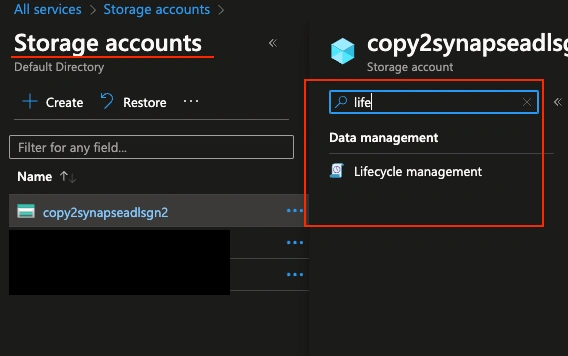
- Configure Lifecycle Management:
- Create a new rule or policy for managing the lifecycle of blobs by clicking on the 'Add a rule' button.
- Specify a rule name. I have set the rule name as testlifecyclerule.
- For this demo, I am selecting the rule scope to filter blobs, you can see a new tab called 'Filter set' added once you have selected it.
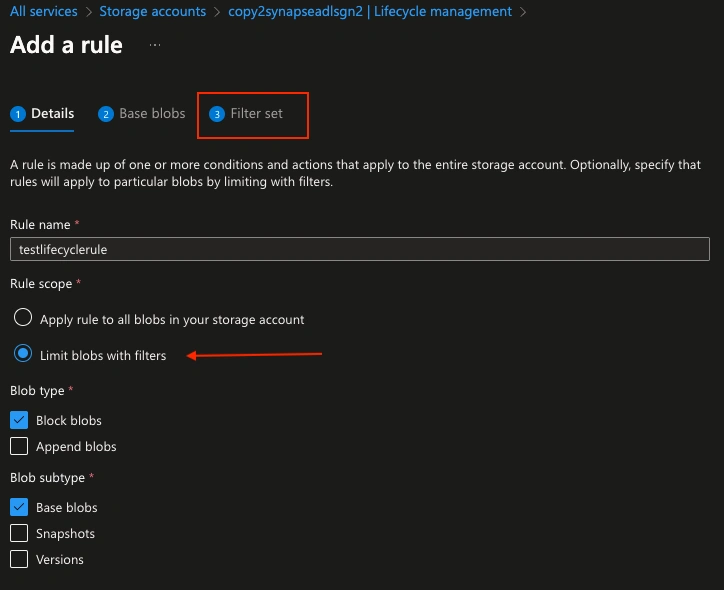
Lifecycle management policy will not delete the current version of a blob until any previous versions or snapshots associated with that blob have been deleted. If blobs in your storage account have previous versions or snapshots, then you should select Base blobs, Snapshots, and Versions in the Blob Subtype section when you are specifying a delete action as part of the policy.
- Define a Rule:
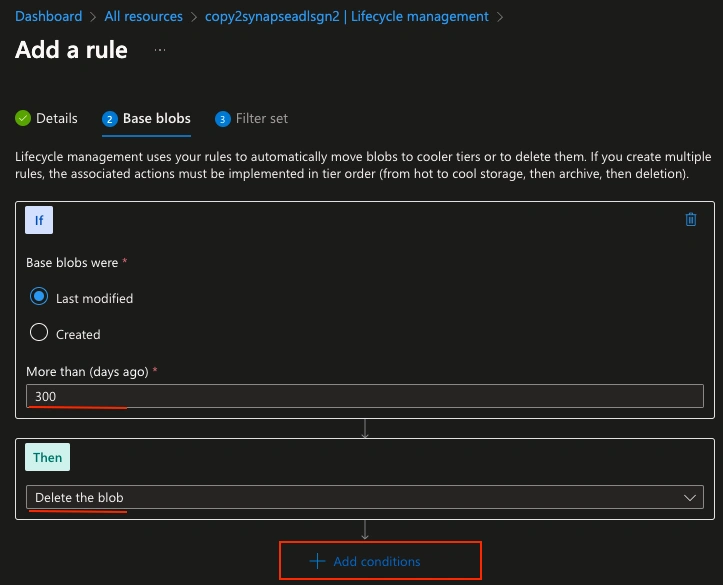
- Choose the type of action you want to perform (e.g., Delete).
- Define the conditions for the rule, such as the age of the blob or a specific prefix.
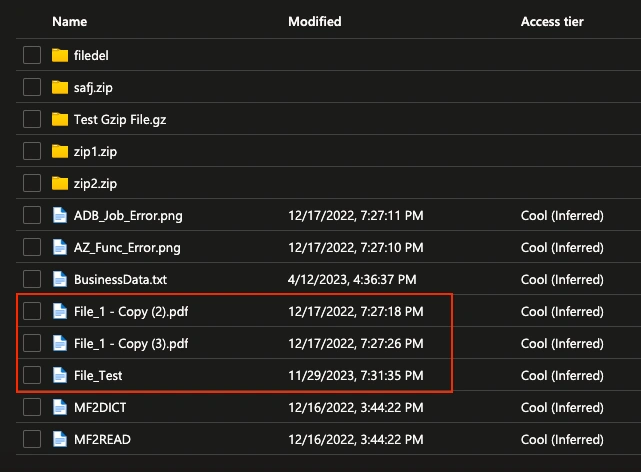
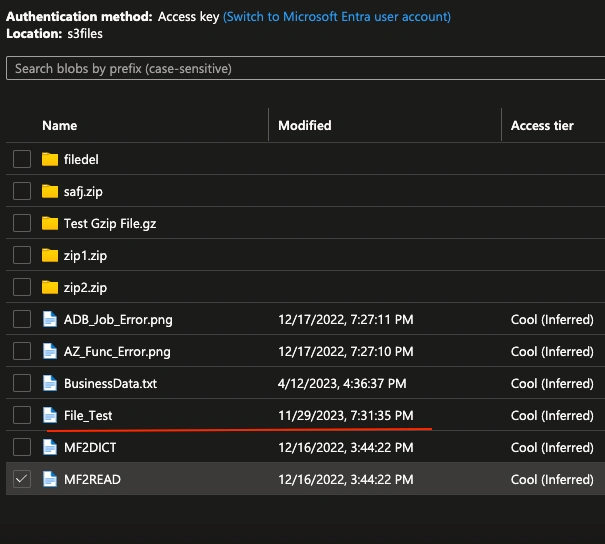
In the filter tab, I have specified to remove only the files that start with the alphabet 'F' present under the folder named 's3files'.
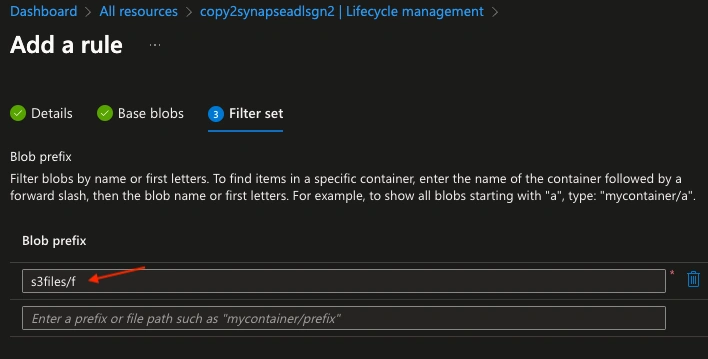
- Save the Policy: Save the policy, and it will take effect based on the conditions you specified.
Here's a general example of what the configuration might look like:
- Rule Name: testlifecyclerule
- Action: Delete
- Filter:
- Rule to delete blobs older than 300 days.
- Optionally, you can specify a prefix or other conditions to target specific blobs.
Once configured, Azure Storage will automatically apply the lifecycle management policy, and blobs that match the specified conditions will be deleted.
Before the rule was executed
The below image is taken once after the lifecycle rule was executed successfully. We could see that as per our filter condition, out of the 3 files starting with the alphabet 'F' which was last modified (2 files) more than 300 days have been deleted.
It's important to note a few things:
- Lifecycle policies may take some time to take effect, as they are processed in the background by Azure Storage, many times it might take up to 48 hours to complete.
- If the blobs are created before the creation of the lifecycle management rule they will not be deleted.
- To apply policy for existing blobs, you can move or copy them to a new container where the policy will be applied.
Using Azure Storage lifecycle policies is often a simpler and more automated way to manage the lifecycle of your blobs compared to custom code solutions.
Conclusion
Lifecycle policies are a powerful feature, and you should carefully review the Azure Storage documentation for detailed information and best practices. Be cautious when setting up policies to ensure you don't inadvertently delete important data.
Join the conversation! Your thoughts help the community grow.